آموزش شبیهسازی جمعیت در Houdini
FXPHD – HOU234 – Crowds in Houdini

آموزش شبیهسازی جمعیت در Houdini
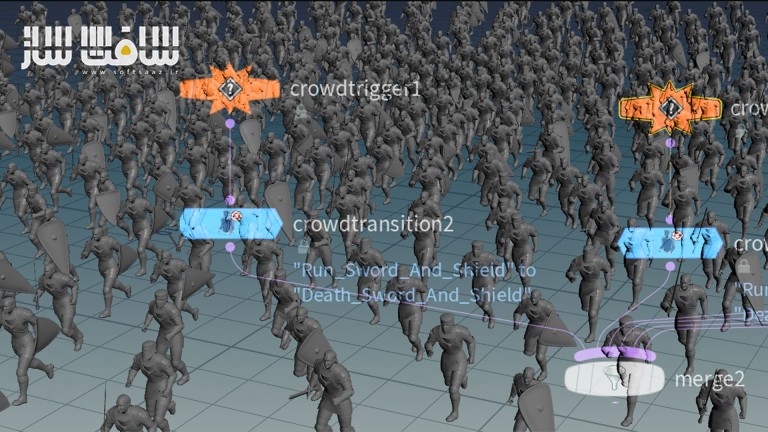
آموزش شبیهسازی جمعیت در Houdini : این دوره از Charles Chorein، سرپرست VFX، یک راهنمای جامع برای ایجاد و انیمیت صحنههای جمعیتی در Houdini با استفاده از دادههای موشن کپچر و داراییهای متنوع است. آموزش با دریافت مدلها و دادههای موشن کپچر از پایگاه Mixamo آغاز میشود، سپس داراییها در Maya ساخته و بهبود داده میشوند و در نهایت وارد Houdini شده و در قالب یک Agent تنظیم و آمادهسازی میگردند.
در این دوره میآموزید چگونه دادههای موشن کپچر را اعمال کنید، ابزارهایی مانند شمشیر و سپر به کاراکترها اضافه کنید و تمامی اجزا را در قالب یک عامل واحد مدیریت نمایید. همچنین یاد میگیرید چگونه زمین را وارد کنید، تغییرات ریگینگ انجام دهید و صحنه را با تعداد زیادی عامل متنوع پر کنید.
این آموزش به شبیهسازی برخورد و تعامل عوامل با استفاده از DOPnet میپردازد و تکنیکهایی برای افزودن تنوع به انیمیشنها بر اساس تریگرهای مختلف معرفی میکند تا صحنهای پویا و واقعگرایانه ایجاد شود.این دوره آموزشی توسط تیم ســافــت ســاز برای شما عزیزان تهیه شده است.
عناوین آموزش شبیهسازی جمعیت در Houdini :
کلاس ۱: راهاندازی اولیه
دریافت مدل و موشن کپچر از پایگاه Mixamo، ساخت دارایی در Maya، انتقال به Houdini و راهاندازی جمعیت اولیه با Agent Node. افزودن سپر و شمشیر به مدل در Maya و انتقال به Houdini.- کلاس ۲: موشن کپچر و چرخه دویدن
اعمال دادههای اولیه موشن کپچر، ایجاد تنوع در چرخه دویدن، اضافه کردن شمشیر و سپر به عامل در حال دویدن و مدیریت همه داراییها در قالب یک عامل. - کلاس ۳: افزودن زمین و تنظیم ریگینگ
وارد کردن زمین از پروژه VFX308 و آزمایش عوامل در شرایط واقعی، همچنین تنظیمات ریگینگ و اصلاحات زمین متناسب با مدل. - کلاس ۴: پر کردن صحنه
شبیهسازی صدها عامل با ایجاد تنوع در انیمیشنها، ابزارها، اندازه و سرعت. - کلاس ۵: شبیهسازی برخورد و تعامل
استفاده از DOPnet برای شبیهسازی برخورد عوامل با یکدیگر و تعامل با زمینهای مختلف همراه با بررسی و اصلاح تنظیمات. کلاس ۶: افزودن تنوع بیشتر
استفاده از دادههای موشن کپچر حرکات مرگ برای ایجاد تنوع بر اساس زمان، VEXpression یا سرعت ذرات. تعریف تریگرها برای فعالسازی انیمیشنهای متفاوت در شرایط خاص.
عنوان دوره : FXPHD – HOU234 – Crowds in Houdini
سطح : متوسط
زمان کل دوره : 2.09 ساعت
تعداد فايل ها : 6
سال آموزش : 2024
فایل تمرینی : دارد
مربی دوره : Charles Chorein
نرم افزار : Houdini
زیرنویس انگلیسی : ندارد
فشردگی اختصاصی سافت ساز : ندارد
FXPHD – HOU234 – Crowds in Houdini
This course, taught by VFX supervisor Charles Chorein, provides a comprehensive guide to creating and animating a crowd scene using motion capture data and various assets from our VFX308 course. Starting with the acquisition of models and motion capture from the Mixamo database, you will create and enhance assets in Maya, then import and set up these assets in Houdini. The course covers the application of motion capture data, adding props like swords and shields, and managing all elements within a single agent.
You will learn to incorporate the terrain, perform rigging adjustments, and populate your scene with varied agents. The course also delves into simulating agent collisions and interactions using DOPnet and introduces techniques to add variation in animations based on different triggers, ensuring a dynamic and realistic crowd scene.
Charles Chorein is a CG supervisor in London with 15 years of experience. He has been working in London since 2009 and has achieved various movies such as The Hobbit, Prometheus, The Hunger Games 2, Superman: Man of Steel, Harry Potter 7, Pirates of the Caribbean 4 and DespicableMe. He has more recently been working on TV shows and recently finished Dark Crystal for Netflix.
Class 1: Initial setup
The Mixamo database assists us in obtaining a model and motion capture library as a starting point. We create our assets in Maya and then use Houdini to initiate our crowd setup using the Agent node to import our assets and apply the motion capture. Finally, we enhance our model in Maya by adding shields and swords before transferring the asset to Houdini.
Class 2: Motion capture and run cycle
We apply our initial motion capture data and introduce additional variations in the run cycle. Next, we incorporate the swords and shields into our running agent. Finally, we explore how to manage all assets within a single agent.
Class 3
Now it’s time to to incorporate the ground from the VFX308 layout to assess our agent under realistic conditions. Additionally, we perform rigging and make terrain adjustments tailored to our specific model.
Class 4: Populating the scene
Next, we populate our asset with hundreds of agents, introducing variation and randomness in animation, props, agent size, and speed.
Class 5: Collision and interaction
We use a DOPnet to simulate and generate collisions among agents, allowing interaction with elements like diverse terrain. The setup necessitates a few adjustments, so we need to evaluate our previous configuration.
Class 6: Adding more variation
Incorporating various “dying” motion capture data to introduce variation based on factors such as Time, VEXpression, or Particle Speed. We adjust properties to enable the triggering of different motion capture animations based on specific action triggers.
حجم کل : 2 گیگابایت
برای نمایش این مطلب و دسترسی به هزاران مطلب آموزشی، نسبت به تهیهی اکانت ویژه از لینک زیر اقدام کنید.
وضعیت فعلی شما
- لینکهای دانلود این مطلب قفل است
- بقیهی مطالب ویژه هم بسته است
- بدون دسترسی به آموزش نصب
با اشتراک ویژه
- دسترسی به همهی مطالب سافتساز
- آپدیت روزانه مطالب سایت از بهترین سایتهای سیجی
- ورود نامحدود کاربران از هر دیوایسی
- دسترسی به آموزش نصب کامل پلاگینها و نرمافزارها
For international users: online support — email info@softsaz.ir or Telegram @SoftSaaz.
امتیاز دهی به این مطلب :
لطفا به این مطلب امتیاز دهید