
آموزش پلاگین Element 3D
Element 3D Essential Training with Chad Perkins

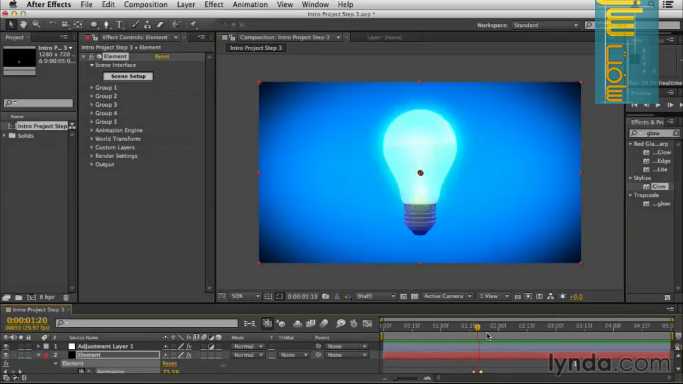
آموزش پلاگین Element 3D
در این دوره 5 ساعته آموزش پلاگین Element 3D از شرکت معتبر Lynda با تمام ویژگی های پلاگین Element 3D وشیوه کار کردن با آن آشنا می شویم.مدرس این دوره آقاای Chad Perkins نخست با یک پروژه عملی مقدماتی ما را با محیط این پلاگین و با ابزارهای اساسی مثل حرکت دادن اشیا ، اضافه کردن متریال ها و نورپردازی کلی آشنا می کند.
سپس یاد می گیریم که چگونه متون و اشیای سه بعدی بسازیم . یاد می گیریم که چگونه translucency و reflection را به متریال های خود اضافه کنیم. سپس یاد می گیریم که چگونه اشیاء خود را انیمه کنیم و با افکت های مثل ambient occlusion و motion blur به صحنه خود جان می دهیم. سپس با انجام یک پروژه عملی و پیشرفته به طور کامل با Element 3D آشنا می شویم. با سافت ساز همراه باشید.
لطفا قبل از دانلود پیش نمایش دوره را مشاهده فرمایید:
عنوان دوره : Lynda – Element 3D Essential Training with Chad Perkins
سطح : متوسط
زمان کل دوره : 4.57 ساعت
تعداد فايل هاي تصويري : 67
سال آموزش : –
فایل تمرینی : دارد
مربی دوره : –
نرم افزار : After Effects – Element 3D
زیرنویس : ندارد
Lynda – Element 3D Essential Training with Chad Perkins
Element 3D is a third-party plugin that allows actual 3D models to be created from scratch or exported to Adobe After Effects, and rendered and composited at a high level of quality and impressive speed. Element 3D Essential Training walks you through the entire workflow and feature set. Author Chad Perkins starts with an introductory project to get you comfortable with the overall workflow in Element 3D, including transforming objects, applying materials, and lighting scenes. The course then details how to create 3D text and shapes, apply translucency and reflections, animate objects, and polish your projects with effects like ambient occlusion and motion blur. The course concludes with an advanced project that leverages each of these techniques.
symple_toggle]- Assigning objects to groups
Adjusting basic object transform properties
Creating 3D objects from text and masks
Working with bevel presets
Creating custom materials
Adding illumination
Creating bumps with normal maps
Using replicator shapes
Animating with the animation engine
Creating a shallow depth of field
حجم کل :
برای نمایش این مطلب و دسترسی به هزاران مطلب آموزشی، نسبت به تهیهی اکانت ویژه از لینک زیر اقدام کنید.
وضعیت فعلی شما
- لینکهای دانلود این مطلب قفل است
- بقیهی مطالب ویژه هم بسته است
- بدون دسترسی به آموزش نصب
با اشتراک ویژه
- دسترسی به همهی مطالب سافتساز
- آپدیت روزانه مطالب سایت از بهترین سایتهای سیجی
- ورود نامحدود کاربران از هر دیوایسی
- دسترسی به آموزش نصب کامل پلاگینها و نرمافزارها
For international users: online support — email info@softsaz.ir or Telegram @SoftSaaz.



ضمن سلام و خسته نباشید
میشه یه آموزش جدید از element 3d بذارید؟!
سلام بررسی میشه اگه موجود بود ، گذاشته خواهد شد