آموزش طراحی دختران مانگا
21 Draw - How to Draw Manga Girls

آموزش طراحی دختران مانگا
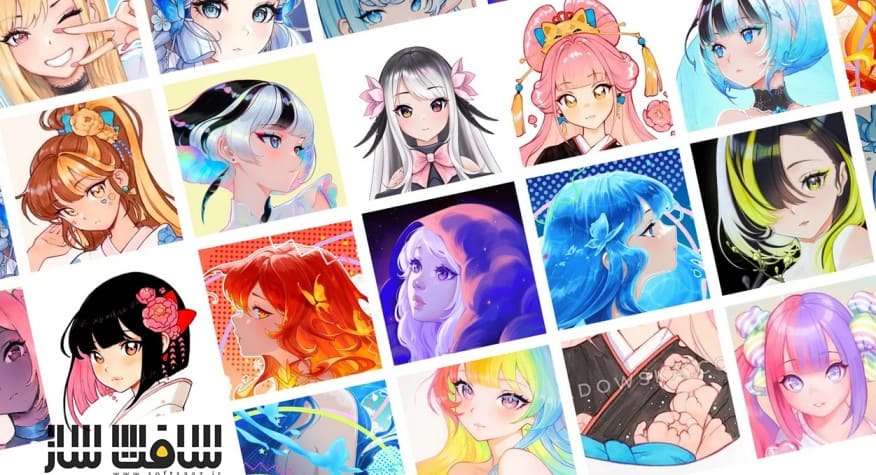
آموزش طراحی دختران مانگا : این دوره از Asia Ladowska ، یک راهنمای ساده و مرحلهبهمرحله برای طراحی شخصیتهای بامزه مانگا ارائه میدهد که بدون سردرگمی، استرس یا تردید، شما را به اعتمادبهنفس در طراحی میرساند.
در این آموزش، از نقطه صفر و بدون فشار شروع میشود؛ ابتدا ساخت صورت با دایرهها و خطوط ساده آموزش داده میشود و سپس با اصول و ابزارهای Clip Studio Paint آشنا میشوید. در ادامه، طراحی مدلهای متنوع مو، پوزهای حرفهای زاویه ۳/۴، تمیز کردن لاینآرت و رنگگذاری اصولی بهصورت کاربردی آموزش داده میشود.
همچنین انتخاب سریع ترکیب رنگ، ایجاد عمق سهبعدی با نور و سایه، افزودن افکتها و حتی تبدیل اثر نهایی به استیکر واقعی نیز پوشش داده میشود. این دوره آموزشی توسط تیم ســافــت ســاز برای شما عزیزان تهیه شده است.
عناوین آموزش طراحی دختران مانگا :
- طراحی دختران مانگا با حالتهای احساسی و استایل بامزه
- تسلط بر ابزارها و امکانات اصلی Clip Studio Paint
- طراحی صورت انیمه با استفاده از اشکال ساده
- طراحی مدلهای متنوع مو (کوتاه، دماسبی، فر و …)
- اجرای صحیح پوز و صورت در زاویه ۳/۴
- ایجاد لاینآرت تمیز و حرفهای
- رنگگذاری ساده با استفاده از رنگهای تخت
- انتخاب سریع ترکیب رنگهای هماهنگ
- ایجاد عمق با نورپردازی و سایهگذاری
- افزودن افکتها و تکسچرهای نهایی
- تبدیل آثار دیجیتال به استیکر فیزیکی
عنوان دوره : 21 Draw – How to Draw Manga Girls
سطح :مبتدی تا متوسط
زمان کل دوره : +2 ساعت
تعداد فايل ها : 22
سال آموزش : 2025
فایل تمرینی : jpg – pdf
مربی دوره : Asia Ladowska
نرم افزار : Clip Studio Paint
زیرنویس انگلیسی : ندارد
فشردگی اختصاصی سافت ساز : ندارد
21 Draw – How to Draw Manga Girls
Asia shares her simple, step-by-step guide to drawing cute manga characters, without the frustration, overwhelm, or self-doubt that often plagues beginners.
Go from feeling lost to becoming confident in your new skills! Even if you have limited art experience, you’ll be amazed that you can master the distinct anime style.
We start right where you are, with zero pressure. You’ll learn to break down face shapes into simple circles and lines. Then, Asia will walk you through the basics of Clip Studio Paint, so you feel right at home. You’ll even build your own vault of inspiration to keep your ideas flowing!
Next, you’ll have a blast designing all kinds of awesome hairstyles and learning the pro secret to cool 3/4 angle poses. After that, you’ll transform your sketches with clean, confident lines and learn how to color your art like a pro.
Asia reveals her method for picking perfect color combos in seconds and creating 3D depth with shadows and light. Then, for the final touch, you’ll add cool special effects and textures to make your art truly stand out. And as a special bonus, Asia shows you how to turn your finished artwork into real, physical stickers you can hold in your hand!
Get ready for an exciting journey of creating beautiful manga art. It starts now!
What you’ll learn
Create expressive, cute manga girls from scratch
Master Clip Studio Paint essentials and tools
Draw anime faces starting with simple shapes
Design a wide range of hairstyles, like ponytails, short, curly, etc.
Nail the 3/4 angle for poses and faces like a pro
Make art a sustainable habit and set realistic goals
Create clean line art using simple, solid techniques
Simplify rendering by using flat colors as the base
Test many color combos quickly to find the best one for your art
Create 3D depth by adding realistic shadows and lighting
Add finishing touches with special effects and textures
Turn your art into actual physical stickers of your own
حجم کل : 0.8 گیگابایت

برای دسترسی به کل محتویات سایت عضو ویژه سایت شوید
برای نمایش این مطلب و دسترسی به هزاران مطالب آموزشی نسبت به تهیه اکانت ویژه از لینک زیر اقدام کنید .
دریافت اشتراک ویژه
مزیت های عضویت ویژه :
- دسترسی به همه مطالب سافت ساز
- آپدیت روزانه مطالب سایت از بهترین سایت های سی جی
- ورود نامحدود کاربران از هر دیوایسی
- دسترسی به آموزش نصب کامل پلاگین ها و نرم افزار ها
اگر در تهیه اشتراک ویژه مشکل دارید میتونید از این لینک راهنمایی تهیه اشتراک ویژه رو مطالعه کنید . لینک راهنما
For International user, You can also stay connected with online support. email : info@softsaaz.ir telegram : @SoftSaaz