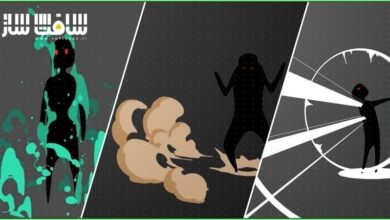
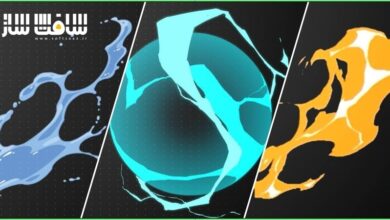
طراحی و انیمیت افکتهای دوبعدی برای لوگو و تایتل
VFXapprentice - 2D FX Animated TitleLogo Masterclass


طراحی و انیمیت افکتهای دوبعدی برای لوگو و تایتل
طراحی و انیمیت افکتهای دوبعدی برای لوگو و تایتل : در این دوره آموزشی سطح بالا، شما بهصورت مرحلهبهمرحله یاد میگیرید که چگونه یک استاد انیمیشن دوبعدی، هیجان و پویایی یک افکت تصویری را برای خلق یک لوگوی متحرک جذاب به حداکثر میرساند. این دوره با بیش از ۳.۵ ساعت آموزش تخصصی، تکنیکهای کلیدی از جمله آنتیسیپیشن (حرکت پیشزمینه)، تغییرات رنگی و افزودن افکتهای آتش و صاعقه را پوشش میدهد. این آموزش برای هنرمندان VFX در سطوح مقدماتی و متوسط طراحی شده است تا بتوانند با استفاده از نرمافزارهای Adobe Animate یا Toon Boom Harmony، آثار خیرهکنندهای خلق کنند. با یادگیری این مباحث، مهارتهای خود را در زمینه طراحی موشنگرافیک و جلوههای ویژه ارتقا دهید. این دوره آموزشی توسط تیم ســافــت ســاز برای شما عزیزان تهیه شده است.
عناوین طراحی و انیمیت افکتهای دوبعدی برای لوگو و تایتل :
- بررسی کلی پروژه انیمیشن لوگو
- آمادهسازی و تفکیک لایههای لوگو
- تکنیکهای آنتیسیپیشن و ضربه اولیه
- اصول تئوری رنگها در انیمیشن
- ایجاد اعوجاج و دیستورشن در حرکت
- طراحی افکتهای درخشش شعاعی
- افزودن جزئیات و انیمیشنهای مکمل
- طراحی و اجرای افکتهای آتش پرسپکتیو
- افزودن شعلهها و جرقههای ثانویه
- پیادهسازی افکتهای صاعقه و نورپردازی
عنوان دوره : VFXapprentice – 2D FX Animated TitleLogo Masterclass
سطح : مبتدی
زمان کل دوره : 3 ساعت و 31 دقیقه
تعداد فايل ها : 13
سال آموزش : 2026
فایل تمرینی : دارد: TXT (1)، ZIP (1)
مربی دوره : Julien Pingault
نرم افزار : Adobe Animate, Toon Boom Harmony
زیرنویس انگلیسی : ندارد
VFXapprentice – 2D FX Animated TitleLogo Masterclass
Included with VFX-A All Access
In this high-octane FX course, you’ll see step-by-step how a 2D FX master maximizes the excitement of an effect for a slick title logo.
3+ Hours
This course includes over three and a half hours of FX animation training.
Skill Level
This is a beginner and intermediate Level Two course for VFX artists.
Software
Adobe Animate or
Toon Boom Harmony
Instant Access
This course is immediately available to All Access members.
Course Breakdown
Lesson overview.
FX Logo Animation
13 Lessons
In this special breakdown lesson series, you’ll see step-by-step how a 2D FX master maximizes the excitement of an effect for a slick logo.
This course is presented French and includes English subtitles.
FX Logo Title Overview
Get started with a quick overview of the project you will work on over the following lessons!
FX Logo Setup
Set up the FX logo and divide the animation into the flashy white and calm dark dimensions.
Anticipation Bump
In this lesson, you will add an anticipation bump to your animation. The quick practice is useful for students of all skill levels!
Color Shift
Color is one of the most difficult parts to get just right, and this animations uses a lot of colors. Learn all about the color theory behind these rapid shifts of awesome colors.
Anticipation Distortion
Push your anticipation even further by adding some distortion to it!
Radial Sparkle
It’s time to add some simple animations to give our logo that extra punch!
More Anticipation Effects
It’s never too late to add or make changes! Let’s circle back to the logo, and add distortion to this as well.
Supporting Animation
Learn how to push the epic moments of your animation to the next level by implementing some small additional animations.
Anticipation Finish
Differentiate between your beginning and end anticipation by changing up timing, motion and color.
Fire FX Animation
It’s time to move on to the big supporting elements of our logo effect. Learn how to add this perspective fire effect to your own animation!
Additional Flames & Sparkles
Learn how to add additional tertiary details for a little extra flare.
Lightning FX
Ease in the calm dark dimension by adding some flickering lightning.
FX Lightning Breakdown
This lighting is the last big supporting animation. Learn how to move lightning around the screen in perspective.
حجم کل : 827.5 مگابایت
برای نمایش این مطلب و دسترسی به هزاران مطلب آموزشی، نسبت به تهیهی اکانت ویژه از لینک زیر اقدام کنید.
وضعیت فعلی شما
- لینکهای دانلود این مطلب قفل است
- بقیهی مطالب ویژه هم بسته است
- بدون دسترسی به آموزش نصب
با اشتراک ویژه
- دسترسی به همهی مطالب سافتساز
- آپدیت روزانه مطالب سایت از بهترین سایتهای سیجی
- ورود نامحدود کاربران از هر دیوایسی
- دسترسی به آموزش نصب کامل پلاگینها و نرمافزارها
For international users: online support — email info@softsaz.ir or Telegram @SoftSaaz.
امتیاز دهی به این مطلب :
لطفا به این مطلب امتیاز دهید