آموزش مدلینگ ربات جنگی در 3ds Max
3DMotive – Dreadnought Modeling Series Volume 1 - 5

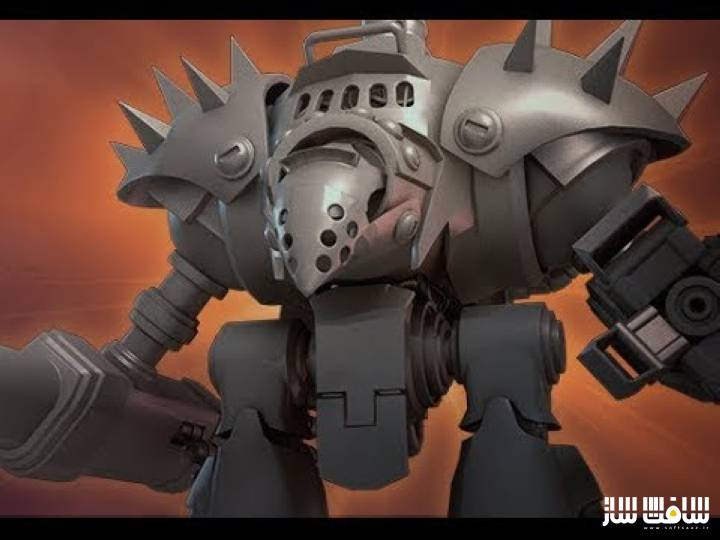
آموزش مدلینگ ربات جنگی در 3ds Max
آموزش مدلینگ ربات جنگی در 3ds Max : اغلب ایجاد یک مدل سطحی سخت میتواند کمی خستهکننده باشد و هم چنین ناآشنا و ترسناک باشد. برای ایجاد یک ورک فلوی بهتر، باید مزایای استفاده از هر کلید های میانبر را بدانید . یک ورک فلوی هوشمند به بهترین دوست و نیز بچیزی تبدیل شود که در طول حرفه خود از آن استفاده میکنید.
شناخت شورت کات ها ، به کار سریع و کارآمد و استفاده بهینه از وقت کمک خواهد کرد. ابزاری پنهان در 3DS Max وجود دارد که کار مدلسازی را بسیار تسریع میکند ، این آموزش از همین ابزارها بهره می برد. همچنین نحوه استفاده از ابزار symmetry و حلقه Swift را برای افزودن edgeloops ها به داخل مش نیز استفاده خواهیم نمود. این دوره آموزشی توسط تیم ســافــت ســاز برای شما عزیزان تهیه شده است.
عنوان دوره : 3DMotive – Dreadnought Modeling Series Volume 1-5
سطح : متوسط
زمان کل دوره : 7 ساعت
تعداد فايل هاي تصويري : 6
سال آموزش : 2019
فایل تمرینی : دارد
مربی دوره : Stephen Wells
نرم افزار : 3ds Max
زیرنویس : ندارد
3DMotive – Dreadnought Modeling Series Volume 1-5
Often, creating a hard surface model can be a bit tedious as well as being unfamiliar and intimidating. To create a better workflow, one needs to know and understand the advantages of using as many shortcuts as possible so that one isn’t spending an overly long amount of time creating meshes. A smart workflow can become your best friend as well as something you’ll use throughout your career. Shortcut hotkeys are an integral component of working smart, not hard. Understanding metholodies helps you to understand when best to use shortcuts and how to use them effeciently. There are tools hidden in 3DS Max that help facilitate the speed at which you can model and the Dreadnought Modeling Series is designed to help you access them. Using such tools as symmetry can help the artist visual how the whole mesh is looking while literally only working on a single half of the model. Swift loop is another extremely handy tool to use to help easily add edgeloops into the meshes. By creating custom shortcut hotkeys that the artist designs for themselves is a boon to the workflow in creating a solid design and, ultimately, a proper mesh.
حجم کل : 9.9 گیگابایت
برای نمایش این مطلب و دسترسی به هزاران مطلب آموزشی، نسبت به تهیهی اکانت ویژه از لینک زیر اقدام کنید.
وضعیت فعلی شما
- لینکهای دانلود این مطلب قفل است
- بقیهی مطالب ویژه هم بسته است
- بدون دسترسی به آموزش نصب
با اشتراک ویژه
- دسترسی به همهی مطالب سافتساز
- آپدیت روزانه مطالب سایت از بهترین سایتهای سیجی
- ورود نامحدود کاربران از هر دیوایسی
- دسترسی به آموزش نصب کامل پلاگینها و نرمافزارها
For international users: online support — email info@softsaz.ir or Telegram @SoftSaaz.
امتیاز دهی به این مطلب :
لطفا به این مطلب امتیاز دهید