
دوره انیمیشن سازی نمای خارجی و داخلی در 3ds Max نسخه 2.0
Archviz Artist – 3ds Max Exterior & Interior Animations 2.0

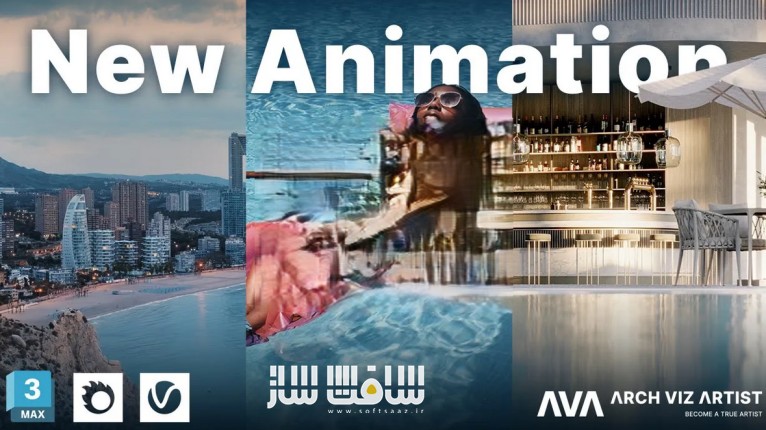
دوره انیمیشن سازی نمای خارجی و داخلی در 3ds Max نسخه 2.0
دوره انیمیشن سازی نمای خارجی و داخلی در 3ds Max نسخه 2.0 : این دوره از هنرمند و یوتیوبر مطرح، Agnieszka Klich، یکی از بنیانگذاران Arch Viz Artist، راهی جامع برای یادگیری فرآیند تولید انیمیشنهای سهبعدی واقعگرایانه با استفاده از 3ds Max است. با سالها تجربه حرفهای و آموزش نکات کلیدی از طریق کانال یوتیوب AVA، او در این دوره، متدی گامبهگام برای خلق انیمیشنهای داخلی و خارجی چشمنواز را به شما آموزش میدهد.
با این آموزش بالهای خود را باز کنید و به رشد ادامه دهید ؛ آثار هنری بیافرینید، نه صرفاً ویدیو ؛ به یکی از بهترین هنرمندان دنیا تبدیل شوید ؛ مشتریان خود را خودتان انتخاب کنید؛ به متخصص انیمیشنسازی تبدیل شوید و به رسمیت شناخته شوید و شهرت حرفهای بسازید.
اگر میخواهید در بازار رقابتی انیمیشنهای معماری بدرخشید و خدماتی جامع و حرفهای ارائه دهید، این دوره از Archviz Artist یک نقطه شروع یا ارتقای عالی برای شماست. این دوره آموزشی توسط تیم ســافــت ســاز برای شما عزیزان تهیه شده است.
این دوره مناسب چه کسانی است؟
- مبتدیها در انیمیشنسازی
اگر بهتازگی وارد دنیای انیمیشن شدهاید، این دوره با آموزشهای پایهای و راهنمایی گامبهگام، شما را بهسرعت وارد مسیر حرفهای میکند. - معماران و طراحان داخلی
به کمک انیمیشن، بهتر میتوانید ایدهها را به نمایش بگذارید و فضای پروژهها را برای مخاطب ملموستر کنید. - فعالان با تجربه در Archviz
با تکنیکهای سینمایی و ابزارهای حرفهای، سطح کاری خود را ارتقا دهید و انیمیشنهایی چشمگیر خلق کنید.
عناوین دوره انیمیشن سازی نمای خارجی و داخلی در 3ds Max نسخه 2.0 :
مبانی انیمیشن
آشنایی با اصول پایه انیمیشن، مفاهیم کلی، کار با ابزارهای نرمافزار 3ds Max مثل Path Constraint و ساخت پیشنمایش سریع.- تنظیمات و حرکت دوربین
یادگیری اصول حرکت دوربین برای خلق فضای سینمایی، به همراه تکنیکهایی مانند سرعت متغیر (speed ramping)، تغییر عمق میدان و ماسکینگ. - انیمیشن نورپردازی
خلق نورپردازی پویا از جمله نور خورشید، HDRI و ساخت تایملپس. حتی انیمیشنسازی با استفاده از دنباله JPG نیز آموزش داده میشود. - ویرایش ویدیو و اصلاح رنگ
آشنایی با نرمافزار DaVinci Resolve (نسخه رایگان) برای ویرایش کلیپ، اصلاح رنگ، ماسکگذاری و مهارتهای پایه تدوین ویدیو. - ایدهپردازی و استوریبورد
آموزش نحوه شروع یک پروژه انیمیشن از مرحله ایدهپردازی و تمرکز بر جزئیات صحنهها تا تدوین نسخه اولیه ویدیو. - انیمیشن هوایی (Aerial)
آموزش ترکیب مدل سهبعدی با ویدیوهای هوایی واقعی برای نمایش بهتر پروژهها از زاویه بالا. - فرآیند رندرینگ
نکاتی در مورد آمادهسازی فایلها برای تست رندر و رندر نهایی با بهترین تنظیمات در نرمافزارهای سهبعدی. - انیمیشن اشیاء
آموزش متحرکسازی عناصر مانند خودرو، پرده، افراد و استفاده از ابزارهایی برای افزودن حرکت به اجزای صحنه. - تکنیکهای هوش مصنوعی
یادگیری روشهایی که با کمک AI سرعت تولید انیمیشن را بالا میبرند بدون افت کیفیت نهایی. - انیمیشن درخت و گیاهان
استفاده از پلاگین GrowFX برای ایجاد حرکت طبیعی در گیاهان و درختان در اثر باد و افزودن زندگی به محیط. - مفهوم شاتهای انیمیشنی
بررسی تمامی شاتهای موجود در یک پروژه، از فضای بیرونی و مناظر گرفته تا فضای داخلی و جزئیات بصری. - انیمیشن مایعات
کار با پلاگین Phoenix FD برای شبیهسازی آب در فضاهایی مانند حمام، و TyFlow برای ایجاد جزئیاتی مثل حباب داخل لیوان شامپاین. بُعد کسبوکار در انیمیشن
آشنایی با نحوه قیمتگذاری پروژهها، مدیریت مشتریان، زمانبندی و نکاتی برای موفقیت حرفهای در بازار کاری
عنوان دوره : Archviz Artist – 3ds Max Exterior & Interior Animations 2.0
سطح : تمامی سطوح
زمان کل دوره : 80 ویدیو
تعداد فايل ها : 10 ماژل
سال آموزش : 2025
فایل تمرینی : دارد
مربی دوره : Agnieszka Klich
نرم افزار : 3dsmax – corona – vray
زیرنویس انگلیسی : ندارد
فشردگی اختصاصی سافت ساز : ندارد
Archviz Artist – 3ds Max Exterior & Interior Animations 2.0
Do you feel the same?
A desire for tremendous progress
Do you have an undying passion to be the best version of yourself? To push your limits and create works that draw admiration from your peers? Do you want to constantly expand your offer to provide better service to your clients and earn more? Of course, you do! Let your ambition soar and create stunning, hyper-realistic videos that will be admired! With the right motivation, anything is possible!
Spread your wings
Are you willing to spread your wings and continue to develop your progress?
Create artwork
Do you want to make your 3D animations something more than just videos?
Aim to be the best
Do you want to beat your competition and be in a group of the top artists in the world?
Select your clients
Do you want to reach the point when you choose your clients, not vice versa?
Expand your offer
Become an expert in animation production and offer comprehensive animation services!
Get recognition
Do you want to be recognized for your expertise and build a strong reputation with your clients?
Spread your wings
Are you willing to spread your wings and continue to develop your progress?
Create artwork
Do you want to make your 3D animations something more
The team of highly skilled 3D artists behind the courses has dedicated years to perfecting the art of creating animations in 3D software. These results are presented by Agnieszka Klich – co-founder of Arch Viz Artist and YouTuber. With years of experience and the Arch Viz Artist YouTube channel, she presents this comprehensive know-how training on the AVA workflow, tricks, and tips to create stunning and engaging 3D animations.
The power of AI in your hands
DON’T be afraid
of Artifical Intelligence
Considering the increasing use of Artifical Intelligence in various industries, it is understandable to have concerns about the potential impact on job security. However, it is important to view AI as a tool that can enhance productivity and efficiency, rather than a threat. By acquiring new skills and knowledge, you can position yourself to take advantage of the opportunities presented by AI and remain competitive in the job market. Therefore, by continuously improving your skills, you can not only stay relevant in the market but also improve your chances of securing a better position.
Who should attend?
Beginner in animations
If you’re just starting out in animation, our comprehensive training will help you understand the fundamentals and guide you through the entire production process step-by-step so you can quickly start to produce your own work.
Architect / Interior designer
Let us help you uncover the power of animations to fully illustrate your ideas and create the perfect atmosphere for your project. You will be able to captivate your audience using videos to effectively communicate your message.
In the arch-viz for a while
With our training, you will learn how to master the art of creating animations. You will gain the skills to craft stunning, professional 3D animations with the use of cinematographic techniques so you can create captivating videos.
What will you learn?
Animation Basics
This is the fundamental cornerstone of the course, giving an essential introduction to the world of animation. We’ll explain the key basics of animation – its general concept and what it entails. An integral part of that is teaching you the idea of animating within the 3D software environment, how to work with Path Constraint and create a quick preview for testing purposes, which will help you save time.
Camera Setup & Movement
We believe that camera movement, in conjunction with lighting, is crucial for creating exceptional 3D animations. By understanding the principles of camera settings and movements and applying them in practice, we can help you master the art of 3D animation. Additionally, we will teach you how to enhance your animations by using techniques such as speed ramping, changing depth of field or masking.
Light Animation
One of the methods you canuse to bring your animations to life is adding animated lighting! We’ll show you how to create the perfect lighting animation, from sun and HDRI animations to time-lapse sequences. We’ll also discuss how to create stunning animation with just a JPG flat sequence.
Video Editing & Color Grading
Video editing is an essential aspect of creating animation. In this course, we’ll cover the basics of working with Davinci Resolve – the video editing software (free version available) and we’ll explain how to edit clips there. We’ll also go through topics like color correction, and masking, which are fundamental skills that every 3D animator should possess.
Creating Storyboard
The first step in creating an animation is to come up with an idea, which involves deciding on how to portray a particular space, what elements to focus on, and what the desired outcome for the viewer supposed to be. Once you have a clear concept, you can start working on the video draft, and in this course we will explain the process of starting an animation from scratch.
Aerial Animations
If you want to showcase a location and give the viewer a feel of the space, an aerial animation is a great way to do it. However, creating a high-quality aerial animation usually involves combining video footage with 3D models, which is a complex process. In this course, we will guide you through the entire process step-by-step.
Rendering Process
Rendering is always one of the most challanging stages of the animation creation process. We will discuss how to approach rendering animation, how to prepare files for testing and final renderings, like what settings to use in the 3D software.
Object Animation
Movement is a vital aspect of video production, allowing you to convey emotions, actions, and ideas in a more dynamic and compelling way. In the training, we will delve into the techniques of animating objects like vehicle, curtain, people, and tools you can use to add movement to your shots.
Artificial Intelligence Techniques
Artificial intelligence is a topic of ongoing discussion nowadays. Regardless of your opinion, the fact remains that it can significantly speed up the animation process. In the course, we will demonstrate the techniques we use to save time while still maintaining quality.
Tree & Plant Animations
You can add realism and life to your exterior animations with wind-driven movement! This will give your scenes a more natural look, as in real life, vegetation is always in motion due to the wind. With the use of the GrowFX plugin, we’ll teach you how to add animations to any plant or tree.
Concept of Animation Shots
We’ll walk you through the entire animation. We will present all the shots including the exteriors of the buildings and the landscaping areas, to the interior shots. We aim to provide you with an in-depth understanding of the various components that make up the animation, as well as the creative and technical processes involved in bringing them to life.
Liquid Animation
Learn water simulation basics using Phoenix FD by Chaos Group. Perfect for bathrooms, but applicable for a variety of scenes. Also, we teach you how to use Tyflow to create things like bubbles in the champane glass. Explore this workflow with us.
Business Side of Animation
In the course, we will help you understand the business side of animations. You’ll have the opportunity to learn how to accurately quote an animation project, as well as how to effectively manage your client throughout the entire process, ensuring that everything runs smoothly and according to a timeline.
حجم کل : 34.5 گیگابایت
برای نمایش این مطلب و دسترسی به هزاران مطلب آموزشی، نسبت به تهیهی اکانت ویژه از لینک زیر اقدام کنید.
وضعیت فعلی شما
- لینکهای دانلود این مطلب قفل است
- بقیهی مطالب ویژه هم بسته است
- بدون دسترسی به آموزش نصب
با اشتراک ویژه
- دسترسی به همهی مطالب سافتساز
- آپدیت روزانه مطالب سایت از بهترین سایتهای سیجی
- ورود نامحدود کاربران از هر دیوایسی
- دسترسی به آموزش نصب کامل پلاگینها و نرمافزارها
For international users: online support — email info@softsaz.ir or Telegram @SoftSaaz.
امتیاز دهی به این مطلب :
لطفا به این مطلب امتیاز دهید


ممنون از سایت خوبتون