انیمیشنسازی سهبعدی در بلندر با هوش مصنوعی GPT-6 Astra و GPT-6.1 Sol
Udemy - AI Animation in Blender with GPT 6 Astra & GPT 6.1 Sol

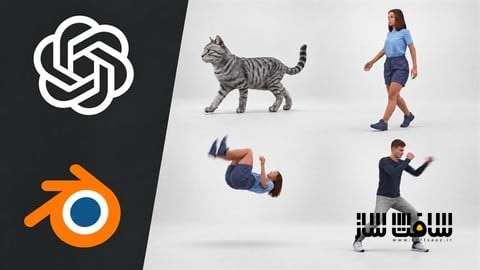
انیمیشنسازی سهبعدی در بلندر با هوش مصنوعی
انیمیشنسازی سهبعدی در بلندر با هوش مصنوعی GPT-6 Astra و GPT-6.1 Sol : در این دوره آموزشی، نحوه استفاده از قدرت مدلهای هوش مصنوعی GPT-6 Astra و GPT-6.1 Sol را برای تولید و اصلاح انیمیشنهای سهبعدی در نرمافزار Blender فرا میگیرید. شما با دنبال کردن ۵ پروژه عملی، یاد میگیرید که چگونه با ارائه بازخورد و اصلاح پرامپتها، خروجیهای هوش مصنوعی را به سطح استانداردهای حرفهای برسانید. این دوره بر مهارت بازبینی و ویرایش تمرکز دارد تا بدون نیاز به کیفریمگذاری دستی، پیچیدهترین حرکات مانند پشتک زدن یا ضربات بوکس را خلق کنید. این یک راهنمای کاربردی برای هنرمندانی است که میخواهند با ترکیب تکنولوژیهای نوین، سرعت و کیفیت گردش کاری خود را در صنعت انیمیشن متحول کنند. این دوره آموزشی توسط تیم ســافــت ســاز برای شما عزیزان تهیه شده است.
عناوین انیمیشنسازی سهبعدی در بلندر با هوش مصنوعی GPT-6 Astra و GPT-6.1 Sol :
- مقدمهای بر هوش مصنوعی در انیمیشنسازی
- اصول کار با GPT-6 Astra در محیط بلندر
- طراحی و اصلاح چرخه راه رفتن کاراکتر
- حرکت دادن کاراکتر در محیط و تعامل با اشیا
- پیادهسازی حرکات پیچیده آکروباتیک
- شبیهسازی ضربات رزمی با کمک ویدیوهای مرجع
- ساخت و ریگبندی خودکار کاراکترهای سهبعدی
- تکنیکهای حرفهای ویرایش و صیقلدهی خروجی هوش مصنوعی
- مدیریت گردش کاری و بهینهسازی پرامپتها
- جمعبندی و پیادهسازی پروژههای شخصی
عنوان دوره : Udemy – AI Animation in Blender with GPT 6 Astra & GPT 6.1 Sol
سطح : متوسط
زمان کل دوره : 1 ساعت و 24 دقیقه
تعداد فايل ها : 6 (1080p)
سال آموزش : 2026
فایل تمرینی : ندارد
مربی دوره : Venny 3D
نرم افزار : Blender – Unity
زیرنویس انگلیسی : ندارد
Udemy – AI Animation in Blender with GPT 6 Astra & GPT 6.1 Sol
Learn how to create and refine 3D character animations in Blender using GPT 6 Astra and GPT 6.1 Sol.
In this practical course, you’ll follow five animation projects and see how I guide AI through the creative process. You’ll watch initial attempts, identify problems in the results, and follow the revisions that help improve the animation.
The 3D animation industry is changing, and adapting to new tools is becoming an important part of a creator’s development. This course gives you hands-on examples of how AI can fit into an animation workflow while keeping your observation, feedback, and creative judgment central to the process.
Across five lessons and approximately 83 minutes, we’ll cover:
• A looping walk cycle: Create a repeating character animation and refine the movement.
• Walking around a tree: Build on the walk cycle to move a character through a scene.
• A backflip: Guide AI through creating and revising a more complex movement.
• A boxing combination: Use a reference video to guide the animation and work through corrections.
• An animated 3D cat: Generate a cat model with TripoAI, then use GPT to help with references, rigging, and animation in Blender.
Much of the course focuses on revision. You’ll see how I communicate changes, respond when an attempt misses the goal, and continue refining the result. These examples show why reviewing the animation is just as important as writing the initial prompt.
This course is for beginners exploring 3D animation and experienced 3D artists looking to bring AI into their workflow. Beginners can follow practical examples of creating and revising animations, while experienced artists can focus on directing AI, working with references, and applying their existing creative judgment to the results. Basic familiarity with Blender is helpful, but no previous experience with AI-assisted animation is required.
To reproduce the projects, you’ll need Blender and access to the AI tools demonstrated. Depending on your access, those tools may require separate subscriptions or credits.
Bring a willingness to experiment, review your results, and try again. By the end, you’ll have a practical starting point for exploring your own AI-assisted animation projects.
What you’ll learn:
– Learn when to use GPT 6 Astra or 6.1 Sol for 3D Animation
– Write proper promts to GPT 6 Astra to let it understand your animating needs
– Create a complex 3D Animation entirely with GPT 6 models
– Learn how to revise AI 3D Animation output to achieve a smooth animation
– Complete a 3D Animation without animating by hand even a single keyframe
Requirements:
– No serious 3D animating skills needed
– Access to GPT 6 models
– BlenderMCP
– TripoAI Subscription is optional
Who this course is for:
– 3D Animators looking for how to ease their workflow
– 3D Artists who want to stay relevant in the industry
– 3D Artists who want to learn more about their job’s future
حجم کل : 1.12 گیگابایت
برای نمایش این مطلب و دسترسی به هزاران مطلب آموزشی، نسبت به تهیهی اکانت ویژه از لینک زیر اقدام کنید.
وضعیت فعلی شما
- لینکهای دانلود این مطلب قفل است
- بقیهی مطالب ویژه هم بسته است
- بدون دسترسی به آموزش نصب
با اشتراک ویژه
- دسترسی به همهی مطالب سافتساز
- آپدیت روزانه مطالب سایت از بهترین سایتهای سیجی
- ورود نامحدود کاربران از هر دیوایسی
- دسترسی به آموزش نصب کامل پلاگینها و نرمافزارها
For international users: online support — email info@softsaz.ir or Telegram @SoftSaaz.
امتیاز دهی به این مطلب :
لطفا به این مطلب امتیاز دهید