مدلسازی سهبعدی «آلیتا: فرشته جنگ» از روی تصویرسازی
Alita Battle Angel - 3D Modeling From An Illustration


مدلسازی سهبعدی «آلیتا: فرشته جنگ» از روی تصویرسازی
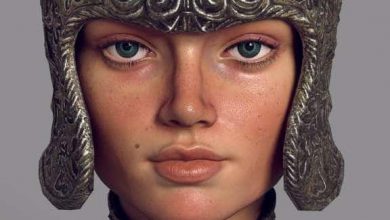
مدلسازی سهبعدی «آلیتا: فرشته جنگ» از روی تصویرسازی : آیا میخواهید یک طرح دوبعدی را به یک مدل سهبعدی بینقص تبدیل کنید؟ در این دوره آموزشی، فرآیند کامل ساخت مدل «آلیتا» از صفر تا صد با استفاده از نرمافزارهای ZBrush، Marvelous Designer و Blender آموزش داده میشود. شما یاد میگیرید چگونه تناسبات یک نقاشی را به فرم سهبعدی تبدیل کنید، لباسها را با شبیهسازی پارچه به صورت واقعی طراحی کنید و با استفاده از تکنیکهای هارد-سرفیس، جزئیات پیچیده مانند سلاحها و تجهیزات را مدلسازی کنید. این دوره روی یک جریان کاری سریع و حرفهای متمرکز است که برای تولید اکشنفیگورها و چاپ سهبعدی بسیار کاربردی خواهد بود. این دوره آموزشی توسط تیم ســافــت ســاز برای شما عزیزان تهیه شده است.
عناوین مدلسازی سهبعدی «آلیتا: فرشته جنگ» از روی تصویرسازی :
- تحلیل تناسبات و تبدیل تصویر دوبعدی به مدل سهبعدی
- مجسمهسازی پایه آناتومی زنانه در زیبراش
- مدیریت مدل با استفاده از پلیگروپها و ابزارهای کنترل
- طراحی و دوخت لباسهای واقعگرایانه در مارولوس دیزاینر
- مدلسازی مو با استفاده از قلمموهای فیبر
- ساخت تجهیزات سخت و سلاحها با زیمدلر
- بهینهسازی توپولوژی و اصلاح جزئیات نهایی
- دستهبندی سابتولها بر اساس متریال
- نورپردازی و رندرینگ حرفهای در بلندر سایکلز
- آمادهسازی نهایی مدل برای خروجی و چاپ
عنوان دوره : Alita Battle Angel – 3D Modeling From An Illustration
سطح : تمامی سطوح
زمان کل دوره : 12 ساعت و 42 دقیقه
تعداد فايل ها : 29 (720p: 27، 1080p: 1، 384p: 1)
سال آموزش : 2020
فایل تمرینی : دارد: JPG (23)، PNG (3)، PUR (1)، TXT (2)، ZBP (11)، ZMT (4)، ZTL (1)
مربی دوره : Nicolás González Salas
نرم افزار : ZBrush, Marvelous Designer, Blender
زیرنویس انگلیسی : ندارد
Alita Battle Angel – 3D Modeling From An Illustration
Want to take a 2D drawing and actually make it work in 3D? This course walks you through the full build of Alita Battle Angel from illustration to finished model using ZBrush, Marvelous Designer, and Blender. No fluff, just a fast production workflow you can reuse for collectibles and 3D printing.
🎯 What you’ll learn
Translate a 2D illustration into accurate 3D proportions
Sculpt a stylized female anatomy base in ZBrush
Use polygroups, guides, and ZModeler for clean control
Create and tailor a realistic coat in Marvelous Designer
Sculpt hair with fiber brushes and refine shapes
Model hard-surface props like swords, straps, buckles, and holster
Prep Subtools by material and render in Blender Cycles
✅ Requirements
Skills: Basic familiarity with ZBrush navigation and human anatomy fundamentals
Tools: ZBrush 2020, Marvelous Designer 2019, Blender 2.90, drawing tablet
Hardware: Quad-core CPU, 16GB+ RAM, SSD storage, dedicated GPU with 6GB VRAM
📝 Description
Look, translating 2D to 3D is tricky. Drawings cheat. Proportions lie. This course shows you how to read an illustration and rebuild it so it still looks right when you orbit around it. Nicolas builds Alita from scratch in ZBrush, starting with a simple anatomical base, then locking in likeness with guides, polygroups, and smart blocking.
Clothes kill a lot of sculpts. Instead of faking folds, you’ll build the coat properly in Marvelous Designer. You make the patterns, cut and tailor them, run the fabric simulation, then bring it back into ZBrush for polish and fit. Result looks natural because it actually drapes like cloth.
Then it’s all about finishing. Hair with fiber brushes, straps and buckles, swords with ZModeler and Topology brush, blade polish, detail pass. At the end you split everything by material, throw base colors from the illustration palette, and render fast in Blender Cycles with his lighting setup. You also get project files, base mesh, brushes, materials, and references to follow along.
حجم کل : 884.3 مگابایت
برای نمایش این مطلب و دسترسی به هزاران مطلب آموزشی، نسبت به تهیهی اکانت ویژه از لینک زیر اقدام کنید.
وضعیت فعلی شما
- لینکهای دانلود این مطلب قفل است
- بقیهی مطالب ویژه هم بسته است
- بدون دسترسی به آموزش نصب
با اشتراک ویژه
- دسترسی به همهی مطالب سافتساز
- آپدیت روزانه مطالب سایت از بهترین سایتهای سیجی
- ورود نامحدود کاربران از هر دیوایسی
- دسترسی به آموزش نصب کامل پلاگینها و نرمافزارها
For international users: online support — email info@softsaz.ir or Telegram @SoftSaaz.
امتیاز دهی به این مطلب :
لطفا به این مطلب امتیاز دهید