آموزش مدلینگ پاستیل خرسی در Blender برای مبتدیان
Skillshare - Blender 3D for Beginners: Learn to Model a Gummy Bear

آموزش مدلینگ پاستیل خرسی در Blender برای مبتدیان
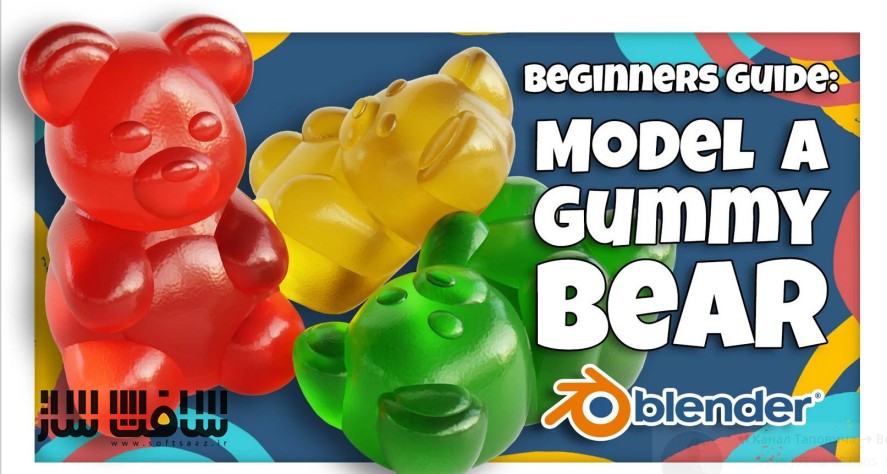
آموزش مدلینگ پاستیل خرسی در Blender برای مبتدیان : در این دوره از هنرمند Harry Helps ، در یک فرآیند سرگرم کننده و دوستانه نحوه ساخت یک پاستیل خرسی را در بلندر نشان می دهد. با این پروژه عجیب ، میتوانید مدل سازی با بلندر را شروع کنید. این دوره آموزشی توسط تیم ســافــت ســاز برای شما عزیزان تهیه شده است.
عناوین آموزش مدلینگ پاستیل خرسی در Blender برای مبتدیان :
- اینترفیس بلندر : استفاده از ابزارهای اساسی و عناصر اینترفیس در حین ساخت خرس
- مدلینگ پاستیل خرسی
- استفاده از مادیفایر ها برای صاف کردن و آینه سازی mirroring مدل
- نورپردازی در بلندر
- شیدینگ : ایجاد یک متریال آب نبات چسبناک رنگارنگ و شفاف
- رندرینگ تصویر نهایی خرس صمغی
عنوان دوره : Skillshare – Blender 3D for Beginners: Learn to Model a Gummy Bear
سطح : متوسط
زمان کل دوره : 3.05 ساعت
تعداد فايل ها : 11
سال آموزش : 2024
فایل تمرینی : jpg
مربی دوره : Harry Helps
نرم افزار : Blender
زیرنویس انگلیسی : دارد
Skillshare – Blender 3D for Beginners: Learn to Model a Gummy Bear
Hi, my name is Harry and I’m a professional 3d artist with over a decade of experience. I’ve worked most recently as the Studio Director of an award winning architectural visualization studio.
On Skillshare, I specialize in clear, easy to follow beginner’s classes. We’ll go through each process, step-by-step, to prevent as much confusion as possible.
In this course, I’ll walk you through the fun and beginner friendly process of creating a gummy bear in Blender.
We’re using Blender for this tutorial, which is an amazing and totally free 3d software. The only barrier to entry is having a computer to run the software on.
A gummy bear might seem like an odd project for a beginner to start with, but it really is a perfect place to start!
In this class, you’ll learn:
- Blender Interface and Tools: We’ll learn about many basic tools and interface elements within Blender while building our gummy bear.
- Modeling: Which is how we’ll create the body of our gummy bear.
- Modifiers: That add effects to our models such as smoothing or mirroring.
- Lighting: Which we will use to illuminate our little gummy bear.
- Shading: We’ll create a colorful and transparent gummy candy material.
- Rendering: Lastly, we’ll render a final image of our gummy bear to share with our friends online.
When we’re done we’ll have a cute little gummy bear to render to our heart’s content! The process you learn in this class can easily be applied to make another gummy animal of your own choice.
For our class project, you’ll be doing just that! Using all the knowledge you gained during this class, model another gummy animal and share your render with the class!
حجم کل : 3.2 گیگابایت
برای نمایش این مطلب و دسترسی به هزاران مطلب آموزشی، نسبت به تهیهی اکانت ویژه از لینک زیر اقدام کنید.
وضعیت فعلی شما
- لینکهای دانلود این مطلب قفل است
- بقیهی مطالب ویژه هم بسته است
- بدون دسترسی به آموزش نصب
با اشتراک ویژه
- دسترسی به همهی مطالب سافتساز
- آپدیت روزانه مطالب سایت از بهترین سایتهای سیجی
- ورود نامحدود کاربران از هر دیوایسی
- دسترسی به آموزش نصب کامل پلاگینها و نرمافزارها
For international users: online support — email info@softsaz.ir or Telegram @SoftSaaz.