آموزش جامع تسلط بر محیط و ناوبری در بلندر
Udemy - Blender Essentials for Beginners: Viewport

آموزش جامع تسلط بر محیط و ناوبری در بلندر
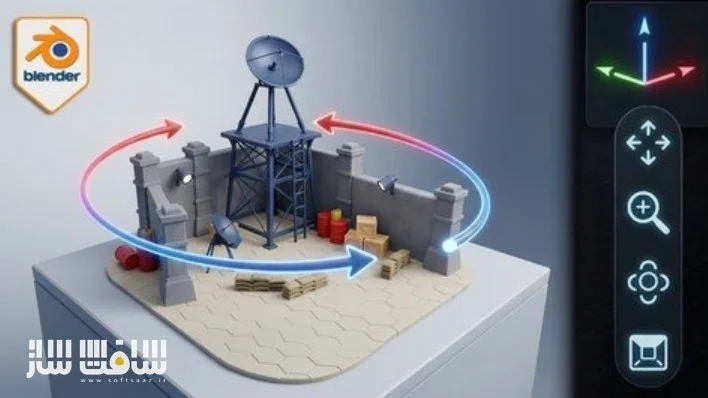
آموزش جامع تسلط بر محیط و ناوبری در بلندر : اگر در محیط نرمافزار بلندر سردرگم هستید و نمیتوانید به درستی در فضای سهبعدی حرکت کنید، این دوره آموزشی نقطه شروع شماست. در این دوره، تمامی تکنیکهای ناوبری در ویوپورت را از پایه میآموزید تا بتوانید با سرعت و دقت بالا در صحنههای خود جابهجا شوید. ما به شما یاد میدهیم چگونه با استفاده از میانبرهای کیبورد، حالتهای نمایشی پرسپکتیو و ارتوگرافیک و ابزارهای حرفهای نظیر حالت پرواز، کنترل کامل محیط کار را در دست بگیرید. با یادگیری تنظیمات بهینه برای موسهای سهبعدی و لپتاپ، دیگر هرگز در فضای پروژه خود گم نخواهید شد و مسیر یادگیری مدلسازی و انیمیشن را با اعتمادبهنفس آغاز میکنید. این دوره آموزشی توسط تیم ســافــت ســاز برای شما عزیزان تهیه شده است.
عناوین آموزش جامع تسلط بر محیط و ناوبری در بلندر :
- تسلط بر ناوبری در محیط سهبعدی و استفاده از گیزمو
- یادگیری میانبرهای کاربردی موس برای جابهجایی سریع
- کار با نماهای استاندارد و ایزومتریک با کلیدهای عددی
- تفاوتهای کلیدی بین پرسپکتیو و ارتوگرافیک
- مدیریت پیشرفته ویوپورت با حالتهای پرواز و قدم زدن
- جداسازی و فوکوس بر روی آبجکتهای خاص در صحنه
- شخصیسازی تنظیمات نرمافزار برای بهرهوری بهتر
- تنظیمات بهینه جهت استفاده در لپتاپ و تبلتهای گرافیکی
- مدیریت صحنههای بزرگ و استفاده از قابلیتهای نمایشی
- ترفندهای حرفهای برای کنترل دوربین و دیدگاهها
عنوان دوره : Udemy – Blender Essentials for Beginners: Viewport
سطح : مبتدی
زمان کل دوره : 1 ساعت و 2 دقیقه
تعداد فايل ها : 10
سال آموزش : 2026
فایل تمرینی : ندارد
مربی دوره : 3D Tudor
نرم افزار : Blender
زیرنویس انگلیسی : ندارد
Udemy – Blender Essentials for Beginners: Viewport
The complete beginner’s guide to moving around the Blender viewport with speed, precision and total confidence
What you’ll learn
⚡ Navigate the Blender viewport confidently using the orientation gizmo, on-screen controls, and Middle Mouse Button shortcuts
⚡ Snap to precise orthographic views (Front, Side, Top) and build clean isometric angles with the Numpad
⚡ Understand and toggle between Perspective and Orthographic projection for distortion-free previews
⚡ Explore scenes in first person with Fly and Walk modes, including gravity, jumping, and teleporting
⚡ Frame, isolate, and reset your view instantly with Frame Selected, Frame All, Local View, and Zoom Region
⚡ Customize orbit, zoom, and input behaviour in Blender Preferences to match your hardware and workflow
⚡ Set up navigation for laptops, tablets, and 3D (NDOF) mice using Emulate Numpad and input options
Requirements
❗ A computer running Blender (Blender 4.x recommended)
❗ No prior Blender or 3D experience needed — this course starts from the very beginning
❗ A three-button mouse with a scroll wheel is recommended (the course also covers laptop / trackpad and tablet alternatives)
Description
Tired of fighting the Blender viewport instead of building in it?
Almost every beginner hits the same wall: you open Blender, try to move around your scene, and within seconds you’re upside down, zoomed into nothing, or staring at a black void with no idea how you got there. Before you can model, sculpt, or texture anything, you have to be able tomove — confidently and precisely.
This course fixes that, completely.
Blender Essentials: Stop Getting Lost in the Viewport is a focused, beginner-friendly course that turns viewport navigation from your biggest frustration into second nature. Across 11 hands-on lessons, you’ll master every way Blender lets you move through 3D space — from the on-screen gizmo and mouse shortcuts, to first-person Fly and Walk modes, to the precise Numpad views professionals use every day.
Here’s what makes this different: we don’t just show you the buttons — we explainwhy each control exists andwhen to reach for it. You’ll understand the difference between Perspective and Orthographic projection, learn to snap to exact axis views, frame and isolate objects instantly, and even customize Blender’s navigation Preferences so the viewport behaves exactly howyou want it to.
By the end of this course you will be able to
✨ Orbit, pan, and zoom smoothly using both on-screen controls and mouse shortcuts
✨ Snap to precise Front, Side, Top, and isometric views on demand
✨ Explore large scenes in first-person using Fly and Walk modes with gravity
✨ Frame, isolate, and reset your view with essential viewport shortcuts
✨ Tailor Blender’s navigation settings to your hardware and workflow — laptop, tablet, or 3D mouse
This is the foundationevery Blender artist needs, whether you’re heading into modeling, sculpting, environment art, or animation. Get the navigation right first, and everything after it gets easier.
No prior Blender experience required — just install it (it’s free) and press play.
Ready to stop getting lost? Enroll now and take control of the Blender viewport.
حجم کل : 2.4 گیگابایت
برای نمایش این مطلب و دسترسی به هزاران مطلب آموزشی، نسبت به تهیهی اکانت ویژه از لینک زیر اقدام کنید.
وضعیت فعلی شما
- لینکهای دانلود این مطلب قفل است
- بقیهی مطالب ویژه هم بسته است
- بدون دسترسی به آموزش نصب
با اشتراک ویژه
- دسترسی به همهی مطالب سافتساز
- آپدیت روزانه مطالب سایت از بهترین سایتهای سیجی
- ورود نامحدود کاربران از هر دیوایسی
- دسترسی به آموزش نصب کامل پلاگینها و نرمافزارها
For international users: online support — email info@softsaz.ir or Telegram @SoftSaaz.