ساخت دنیاهای بیگانه، شاخکها و زمین با Geometry Nodes در Blender
Udemy - Blender Geometry Nodes - Alien Worlds, Tentacles & Terrain

ساخت دنیاهای بیگانه، شاخکها و زمین با Geometry Nodes در Blender
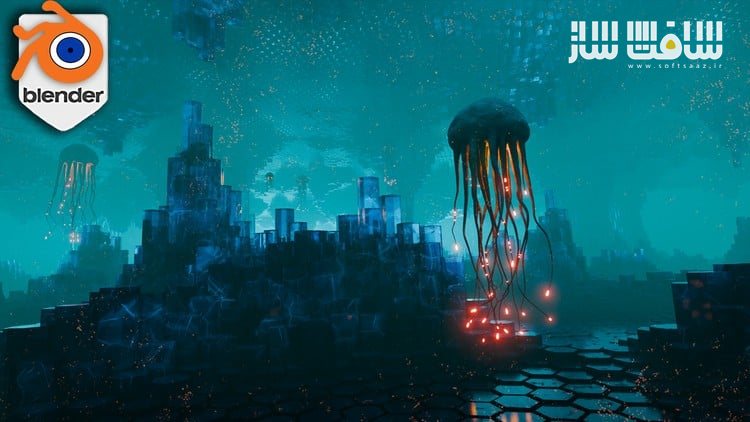
ساخت دنیاهای بیگانه، شاخکها و زمین با Geometry Nodes در Blender : این دوره از هنرمندان خلاق 3D Tudor و Josh، فرصتی منحصربهفرد برای خلق مناظر بیگانه، موجودات شاخکدار انیمیتشده، و نورپردازی سینمایی بهصورت کاملاً پروسجورال در Blender است. اگر تا امروز با Geometry Nodes پروژههای کامل و سینمایی نساختهاید، این دوره نقطهی جهش شما خواهد بود.
Josh، هنرمندی پرشور در حوزه Blender، طی سالهای اخیر با ساخت مناظر علمیتخیلی، انیمیشنهای حلقهای، و رندرهای خیرهکنندهای که عملاً نفس میکشند، به استادی در استفاده از Geometry Nodes تبدیل شده است. او اکنون تمام فرآیند خلاقانهاش را در قالب این مسترکلاس آموزشی تبدیل به یک پروژه کامل کرده است.
در این دورهی جامع پروژهمحور، ساخت یک صحنه کامل از دنیایی بیگانه در Blender 4.4 را از ابتدا تا انتها یاد میگیرید. هیچگونه اسکالپت یا براش در کار نیست – فقط نودها، شیدرها، انیمیشنهای پروسجورال و جادوی نورپردازی که به صحنههای شما عمق و احساس میبخشد. این دوره آموزشی توسط تیم ســافــت ســاز برای شما عزیزان تهیه شده است.
عناوین ساخت دنیاهای بیگانه، شاخکها و زمین با Geometry Nodes در Blender :
ساخت زمینهای بیگانه با Geometry Nodes:
ایجاد کوهها، غارها، و لایههای پیچیدهی زمین با استفاده از جابهجایی مشها (mesh displacement) و میدانهای نویز- مدلسازی و انیمیشن شاخکها بهصورت پروسجورال:
ساخت شاخکهایی متحرک با حرکت تکرارشونده، فرمهای ارگانیک، و افکتهای ضربانی و موجدار - طراحی شیدرهای درخشان و بیولومینسانس:
استفاده از نودهای Emission، بافتگذاری، گرادینتهای رنگی و ترکیب آنها برای ایجاد متریالهایی با جلوه بصری چشمگیر - نورپردازی سینمایی با مه، گلو و تضاد رنگی:
افزودن جوّ و فضای دراماتیک به کمک volume fog، درخشش emission، و عمق بصری حاصل از افت نور و رنگ - آموزش رندرینگ با Cycles و Eevee:
یادگیری رندرگیری در هر دو موتور رندر Blender به همراه نکاتی برای خروجی نهایی تمیز، سینمایی و حرفهای - انیمیشن دوربین و حرکتهای حلقهای:
طراحی حرکتهای subtle برای دوربین جهت ایجاد ریتم، زندگی و جذابیت در صحنه فایلهای پروژه، نودها و پریستهای آماده:
دسترسی به فایلهای تمرینی، سیستمهای نودی آماده و پریستهای نورپردازی برای شروع سریع پروژههای شخصی
عنوان دوره : Udemy – Blender Geometry Nodes – Alien Worlds, Tentacles & Terrain
سطح : متوسط
زمان کل دوره : 2.58 ساعت
تعداد فايل ها : 20
سال آموزش : 2025
فایل تمرینی : ندارد
مربی دوره : Josh/ DragonLaser – 3D Tudor
نرم افزار : Blender
زیرنویس انگلیسی : ندارد
فشردگی اختصاصی سافت ساز : ندارد
Udemy – Blender Geometry Nodes – Alien Worlds, Tentacles & Terrain
Struggling to turn Geometry Nodes into full cinematic scenes? What if you could build alien terrain, animate creatures, and master lighting—all procedurally, inside Blender?
Let me introduce you to Josh—a fellow Blender nerd who has spent the last few years crafting surreal sci-fi landscapes, looping animations, and some of the most hypnotic renders I have seen come out of Geometry Nodes. He pushes aesthetics as much as technique. His stuff moves, glows, and breathes like it is alive—and now he has turned that entire creative process into one beast of a course.
In this Blender tutorial and full project-based course, Josh walks you through creating an alien world with Geometry Nodes. You will build an entire alien cave scene inside Blender 4.4, start to finish. No sculpting, no brushes—just nodes, shaders, procedural animation, and lighting wizardry that gives your scenes depth and emotion.
Whether you are building for games, animation, Instagram reels, or just want to deepen your procedural workflow, this course is designed to walk you through each step while keeping things weird, stylized, and cinematic.
What You Will Learn
Procedural Terrain Generation – Use Geometry Nodes to carve alien ridges, caves, and layered landscapes using mesh displacements and noise fields.
Animated Tentacle Creation – Build fully procedural tentacles with looping motion, organic shape variation, and pulsing animation effects.
Stylized Shader Design – Create glowing, bioluminescent materials using emission, texture mapping, and layered colour gradients.
Lighting & Fog Effects – Add cinematic atmosphere with volume fog, emission-based glow, and clever use of colour contrast and depth falloff.
Rendering Workflows – Learn how to render your scenes in Cycles or Eevee, with clean, stylized results and tips for post-processing.
Camera Animation & Motion – Set up subtle looping camera movement to give your scenes rhythm, life, and visual interest.
• Procedural Terrain Design for Stylized Environments: Learn to generate alien landscapes from scratch using noise-based displacement, mesh manipulation, and la
• Fully Procedural Tentacle Generation & Animation: Create animated, looping tentacles that move like living creatures. Add variation, pulse, twist, and flow us
• Bioluminescent Shader Creation for Visual Impact: Design glowing, alien materials using layered emission, gradient textures, and colour ramps to build depth,
• Atmospheric Lighting with Fog, Emission & Colour: Master cinematic lighting setups using fog volumes, contrast zones, and glowing elements to add drama, mood,
• Camera Animation & Procedural Looping: Animate your scene with subtle camera movement and timing loops that bring life and purpose to your final renders—great
• Cycles & Eevee Rendering + Post FX: Render with both Blender engines, then apply final polish through post-processing workflows including colour grading, bloo
• Reusable Project Files, Nodes & Lighting Presets: Use included project files, node systems, and preset packs to kickstart your own creations—each tool designe
حجم کل : 2.5 گیگابایت
برای نمایش این مطلب و دسترسی به هزاران مطلب آموزشی، نسبت به تهیهی اکانت ویژه از لینک زیر اقدام کنید.
وضعیت فعلی شما
- لینکهای دانلود این مطلب قفل است
- بقیهی مطالب ویژه هم بسته است
- بدون دسترسی به آموزش نصب
با اشتراک ویژه
- دسترسی به همهی مطالب سافتساز
- آپدیت روزانه مطالب سایت از بهترین سایتهای سیجی
- ورود نامحدود کاربران از هر دیوایسی
- دسترسی به آموزش نصب کامل پلاگینها و نرمافزارها
For international users: online support — email info@softsaz.ir or Telegram @SoftSaaz.