ورکفلوهای تولید با Grease Pencil در بلندر برای انیمیشنهای سبک
Class Creatives – Blender Grease Pencil Production Workflows for Beginners

ورکفلوهای تولید با Grease Pencil در بلندر برای انیمیشنهای سبک
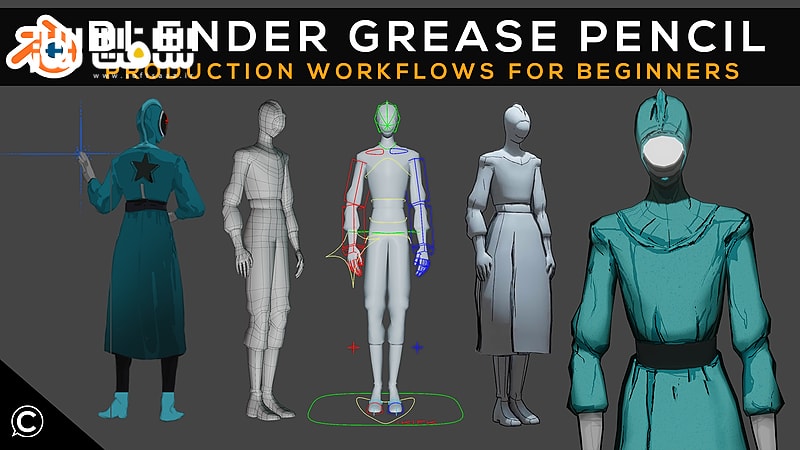
ورکفلوهای تولید با Grease Pencil در بلندر برای انیمیشنهای سبک : در این دوره آموزشی، شما با تمام مراحل تخصصی برای خلق یک پروژه انیمیشن سینمایی در سطح حرفهای آشنا خواهید شد. یاد میگیرید که چگونه از کانسپتسازی و طراحی استوریبورد شروع کرده و با استفاده از ابزار Grease Pencil در بلندر و نرمافزار مایا، کاراکترهای سهبعدی با استایل دوبعدی خلق کنید. این دوره شامل بیش از ۲۰ ساعت آموزش تخصصی، از مدلسازی و ریگبندی گرفته تا تکنیکهای رندرینگ کارتونی و شبیهسازی افکتهای بصری مشابه انیمیشنهای برنده جایزه است. با این متدها، ورکفلوهای استاندارد استودیوهای بزرگ دنیا را برای تولید انیمیشنهای خیرهکننده به کار خواهید بست. این دوره آموزشی توسط تیم ســافــت ســاز برای شما عزیزان تهیه شده است.
عناوین ورکفلوهای تولید با Grease Pencil در بلندر برای انیمیشنهای سبک :
- برنامهریزی و طراحی کانسپت برای سکانسهای انیمیشنی
- اصول ساخت استوریبورد و انیماتیک دوبعدی
- مدلسازی و اسکالپت کاراکتر سهبعدی بر اساس طراحی دوبعدی
- استفاده از شیدرها و ابزارهای نقاشی بافت در بلندر
- تنظیمات حرفهای و کار با ابزار Grease Pencil
- کار با گرههای هندسی (Geometry Nodes) برای تولیدات پیچیده
- ریگبندی پیشرفته کاراکتر و استفاده از کتابخانههای موشنکپچر
- انیمیت در نرمافزار مایا و انتقال دوربینهای مجازی
- خلق افکتهای بصری دوبعدی برای ارتقای رندرهای سهبعدی
- تدوین نهایی و هماهنگسازی موسیقی و جلوههای صوتی
عنوان دوره : Class Creatives – Blender Grease Pencil Production Workflows for Beginners
سطح : مبتدی
زمان کل دوره : 33 ساعت و 54 دقیقه
تعداد فايل ها : 148 (1080p: 145، 720p: 3)
سال آموزش : 2026
فایل تمرینی : ندارد
مربی دوره : Class Creatives
نرم افزار : Adobe Photoshop, Blender, Maya
زیرنویس انگلیسی : ندارد
Class Creatives – Blender Grease Pencil Production Workflows for Beginners
Discover the Complete Blender Grease Pencil Production Workflow: Comprehensive steps necessary to design, concept, sculpt, rig, animate, & render a top tier elite-level project from scratch, enhanced by 2D Grease Pencil rendering.
Are you looking for a course that breaks down the top-secret methods used by studios to use Blender’s Grease Pencil step-by-step?
150 lectures and over 20 hours of content. Bonus: Over 14 hours of unedited video workflows.
Learn the award winning pro-workflows used to produce stylized renders and 3D assets for films such as Across the Spider-Verse & TMNT Mutant Mayhem.
Design and create from start to finish utilizing Blender’s Grease Pencil and Autodesk Maya taught by two industry veterans with accredited university instruction experience.
This comprehensive course will cover all the steps necessary to create a top tier elite level animated cinematic utilizing Blender Grease Pencil and Autodesk Maya.
We will cover the following core skill sets:
How to plan for creating an animated cinematic sequence from scratch
How to establish your conceptual ideation with preliminary concept art
Storyboard creation and best practices
How to create and work with a 2D animatic
How to sculpt the character in 3D from the created 2D concept art in Blender
How to use Blender Toon Shader to create stylized 3D character assets
How to use Blender’s Texture Paint
How to setup and utilize Blender Grease Pencil
How to work with Blender Geometry Nodes
How to create impact frames in Photoshop & Blender similar to The Spider-Verse
Rigging the character in 3D to take advantage of motion capture and online 3D animation libraries
Rigging a vehicle with a motion path and automated moving engine parts
How to animate the character in Autodesk Maya using both keyframe and motion capture animation
How to use Virtual Cameras with iPhone motion capture plug-ins
How to export cameras and animation from Maya to Blender for Grease Pencil rendering
Alembic procedural animation creation for 3D environment assets
How to use Blender’s Grease Pencil to create incredibly stylized 3D renders with 2D line work details
How to create 2D animation FX in Blender to enhance 3D animated character renders
Best practices for music and sfx timing and creation for your cinematic project
We’ll go in-depth on how to plan the project to how to design and concept everything from scratch.
You will learn all of our professional insights on how to go from initial planning to quickly and efficiently creating a fully animated final character with stylized Grease Pencil rendered sketch textures.
Utilizing the reference and concept art we will then model the character in Blender and animate the character in Autodesk Maya covering professional workflows one step at a time.
We’ll be utilizing the latest software packages that top tier studios of today use to create all of your favorite titles! The software packages that we’ll be covering are:
Blender Grease Pencil
Autodesk Maya
Adobe Photoshop
You’ll be armed with the knowledge and powerful tools that are utilized in the industry by some of the top professionals in the world.
Learn how to conceptualize, design, and develop a cinematic stylized sequence using Blender’s Grease Pencil today!
حجم کل : 7.72 گیگابایت
برای نمایش این مطلب و دسترسی به هزاران مطلب آموزشی، نسبت به تهیهی اکانت ویژه از لینک زیر اقدام کنید.
وضعیت فعلی شما
- لینکهای دانلود این مطلب قفل است
- بقیهی مطالب ویژه هم بسته است
- بدون دسترسی به آموزش نصب
با اشتراک ویژه
- دسترسی به همهی مطالب سافتساز
- آپدیت روزانه مطالب سایت از بهترین سایتهای سیجی
- ورود نامحدود کاربران از هر دیوایسی
- دسترسی به آموزش نصب کامل پلاگینها و نرمافزارها
For international users: online support — email info@softsaz.ir or Telegram @SoftSaaz.
امتیاز دهی به این مطلب :
لطفا به این مطلب امتیاز دهید