
آموزش جامع بلندر برای مبتدیان از آکادمی Blender Guru
Blender Guru Beginners Academy

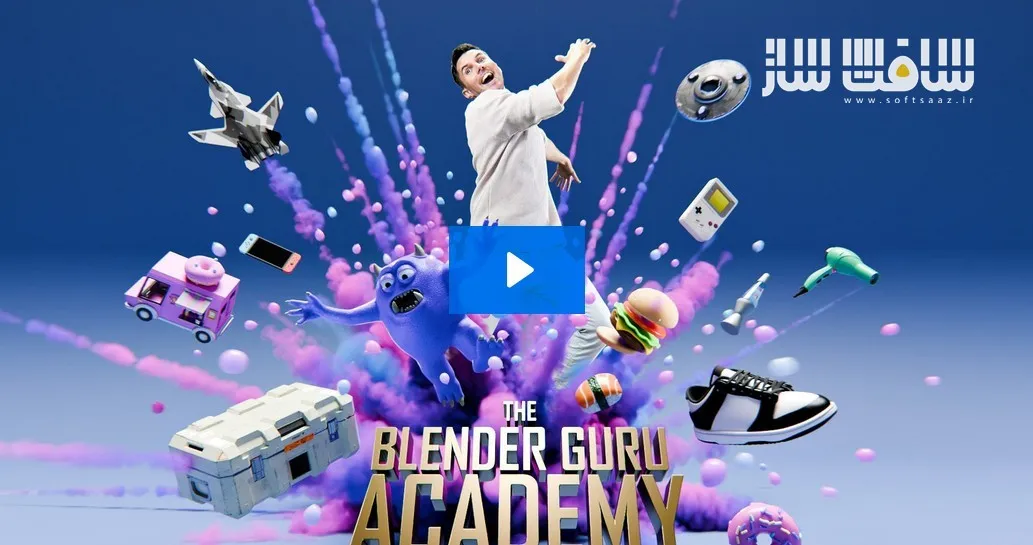
آموزش جامع بلندر برای مبتدیان از آکادمی Blender Guru
آموزش جامع بلندر برای مبتدیان از آکادمی Blender Guru : این دوره جامع از Andrew Price، خالق مجموعه مشهور Blender Guru، برای افرادی طراحی شده است که میخواهند یادگیری Blender را بهصورت اصولی و ساختاریافته دنبال کنند. برخلاف بسیاری از آموزشهای پراکنده که تنها نحوه انجام کارها را آموزش میدهند، این دوره روی درک منطق و اصول پشت تکنیکها تمرکز دارد تا بتوانید مانند یک هنرمند سهبعدی فکر کنید و مهارتهای خود را در پروژههای مختلف به کار بگیرید. در طول دوره با مدلسازی، تکسچرینگ، نورپردازی، دوربین، اسکالپت، ریتوپولوژی و مبانی انیمیشن آشنا میشوید و پایهای محکم برای ورود به دنیای سهبعدی ایجاد خواهید کرد. این دوره آموزشی توسط تیم ســافــت ســاز برای شما عزیزان تهیه شده است.
عناوین آموزش جامع بلندر برای مبتدیان از آکادمی Blender Guru :
- آموزش کامل Blender 5.0 از پایه
- یادگیری اصولی و ساختاریافته بلندر
- درک منطق و چرایی استفاده از ابزارها
- آموزش مدلسازی Hard Surface
- ساخت جعبه علمی تخیلی با جزئیات بالا
- یادگیری ابزارهای اصلی مدلسازی سهبعدی
- طراحی اشیاء صنعتی و محصولات واقعی
- آموزش مدلسازی Subdivision Surface (SubD)
- ساخت کفش ورزشی با سطوح نرم و منحنی
- یادگیری کنترل Edge Loop و Topology
- رفع مشکلات Shading و Geometry
- آموزش مدلسازی ارگانیک
- کار با ابزارهای Sculpting در Blender
- طراحی و ساخت کاراکتر هیولا
- آموزش Retopology برای مدلهای اسکالپت
- ساخت کاراکترها و موجودات پیچیده
- آموزش Procedural Texturing
- ساخت متریالهای واقعگرایانه
- ایجاد بافتهای پوستی و فلسدار
- آموزش UV Unwrapping
- تکسچرینگ مدلهای Hard Surface و Organic
- نقاشی تکسچر بهصورت مستقیم در Blender
- ساخت براشهای اختصاصی برای تکسچرینگ
- ایجاد خط و خش و جزئیات سطح
- آموزش Trim Sheet Workflow
- استفاده از Image Texture در پروژههای حرفهای
- آموزش نورپردازی سینمایی
- آشنایی با اصول ترکیببندی تصویر
- کار با دوربین در Blender
- روایت داستان از طریق نور و کادربندی
- ساخت صحنههای سهبعدی حرفهای
- آموزش Camera Animation
- بهینهسازی فرآیند رندرگیری
- آموزش Rigging مقدماتی
- ژستدهی به کاراکترها
- آشنایی با Keyframe Animation
- مناسب برای هنرجویان مبتدی تا متوسط
- بدون نیاز به افزونههای پولی
- ارائه تمرین، چالش و پروژه عملی
- مناسب برای مدلسازی، انیمیشن و VFX
عنوان دوره : Blender Guru Beginners Academy
سطح : مبتدی
زمان کل دوره : 21.26 ساعت
تعداد فايل ها : 7 فصل
سال آموزش : 2026
فایل تمرینی : دارد
مربی دوره : andrew price
نرم افزار : Blender
زیرنویس انگلیسی : ندارد
Blender Guru Beginners Academy
t’s true. You don’t need to buy a course to learn Blender, because there are already thousands of free tutorials online.
But the reason you’re probably here, is because despite this, you’re still struggling. And I think I know why.
You’re struggling because Youtube tutorials often teach you HOW to make something, but rarely WHY it was made that way. So, you could watch 10 videos on how to make a house but struggle to make a city, because the techniques are different.
That’s why you so many beginners feel like they’re treading water. They hop from tutorial to tutorial, frustrated at their lack of progress. But it’s not their fault. They’re just starving for a real education.
Break the Tutorial Habit: Learn Why, not just How
The Blender Guru Academy is different. Instead of teaching you what to click, I’ll teach you why it’s clicked. Through practical lessons, theory, homework and challenges, you’ll learn the foundational skills to think like an artist.
This course is for you if…
You finished the donut tutorial and want the next step.
You want a structured curriculum, not a random assortment of tutorials.
You want to learn on your own schedule from pre-recorded content.
You want to pay once, NOT have another subscription.
You want to learn the latest version of Blender (5.0), with free updates for the whole 5.x series.
You want a substantial course that you can sink your teeth into for 2-3 months.
Learn Core Modelling Techniques
You’ll start by learning basic hard surface modelling, transforming a cube into a detailed sci-fi crate. Along the way learning core modelling tools that you can use to make most man-made objects from the real world, like electronics, buildings or props.
Next, you’ll learn how to create Smooth Surface objects. You’ll model a sneaker with rounded curves, using the most common modelling technique in animation and VFX “SubD”. Along the way discovering how to tighten edges and connect geometry without creating shading artifacts. When you finish, you’ll have the basic skills to make 90% of objects. Like furniture, plants, gadgets, vehicles, and most objects found in movies.
Next, you’ll learn Organic objects. You’ll learn how to use Blender’s sculpting tools to create a fast and loose monster character, which you’ll then convert into a polished model using a technique called “retopo”. By the end of this module you’ll be able to sculpt characters, creatures and practically anything intricate.
Learn Core Texturing Techniques
Texturing and Shading are the most important skills to making something look realistic.
The first thing you’ll learn is how to texture your shoe and monster character, using procedural texturing, to create reptilian scales and
Next, you’ll learn how to paint textures. First UV unwrapping both an organic form (your character) and a hard form (your sci-fi box). After unwrapping you’ll then paint color onto the character but underneath the skin texture. Then you’ll get more detailed, as you learn how to create custom brushes to paint scratches and scrapes onto our sci-fi box.
And then finally you’ll learn how to take an image texture, and make it repeat all over, as well as along one specific section using a technique called “Trim Sheets”. And best of all, there’s no paid addons. Just vanilla Blender with free extensions.
Learn Core Lighting & Camera Techniques
After the hard work of modelling and texturing, you now get to make it look good!
In this module you’ll learn how to use lighting and camera framing to effectively tell a story.
You’ll be provided with some ready-made environments for your scifi box and your monster, so that you can see a finished scene and how to explore it. Then we’ll explore how different lighting setups and camera setups can completely change the focus, story and mood of your scene. You’ll then add camera movements and learn how to render it efficiently so that it doesn’t take hours on your machine.
And finally, you’ll learn how to add a quick rig to your character so it can be posed. And although this isn’t a character animation course, you’ll also learn the basics of keyframe animation.
Course Outline
Below is a sneak peek inside the course, and what videos you’ll see.
As the course teaches the newly released Blender 5.0, much of the course has not yet recorded. You can see the estimated release date of each module below.
I estimate that the full course would take the average learner 2-3 months to complete everything, if watching 1-2 hours per night.
حجم کل : 25 گیگابایت
برای نمایش این مطلب و دسترسی به هزاران مطلب آموزشی، نسبت به تهیهی اکانت ویژه از لینک زیر اقدام کنید.
وضعیت فعلی شما
- لینکهای دانلود این مطلب قفل است
- بقیهی مطالب ویژه هم بسته است
- بدون دسترسی به آموزش نصب
با اشتراک ویژه
- دسترسی به همهی مطالب سافتساز
- آپدیت روزانه مطالب سایت از بهترین سایتهای سیجی
- ورود نامحدود کاربران از هر دیوایسی
- دسترسی به آموزش نصب کامل پلاگینها و نرمافزارها
For international users: online support — email info@softsaz.ir or Telegram @SoftSaaz.
امتیاز دهی به این مطلب :
لطفا به این مطلب امتیاز دهید


همه مطالب دوره اصلی رو داره یا به مرور آپدیت میشه ؟
سلام آپدیت جدید بیاد میزاریم فعلا همین فایلهاست