آموزش پیشرفته ریگبندی صورت در Blender
Blender Studio - Advanced Facial Rigging

آموزش پیشرفته ریگبندی صورت در Blender : خلق شخصیتهای حرفهای
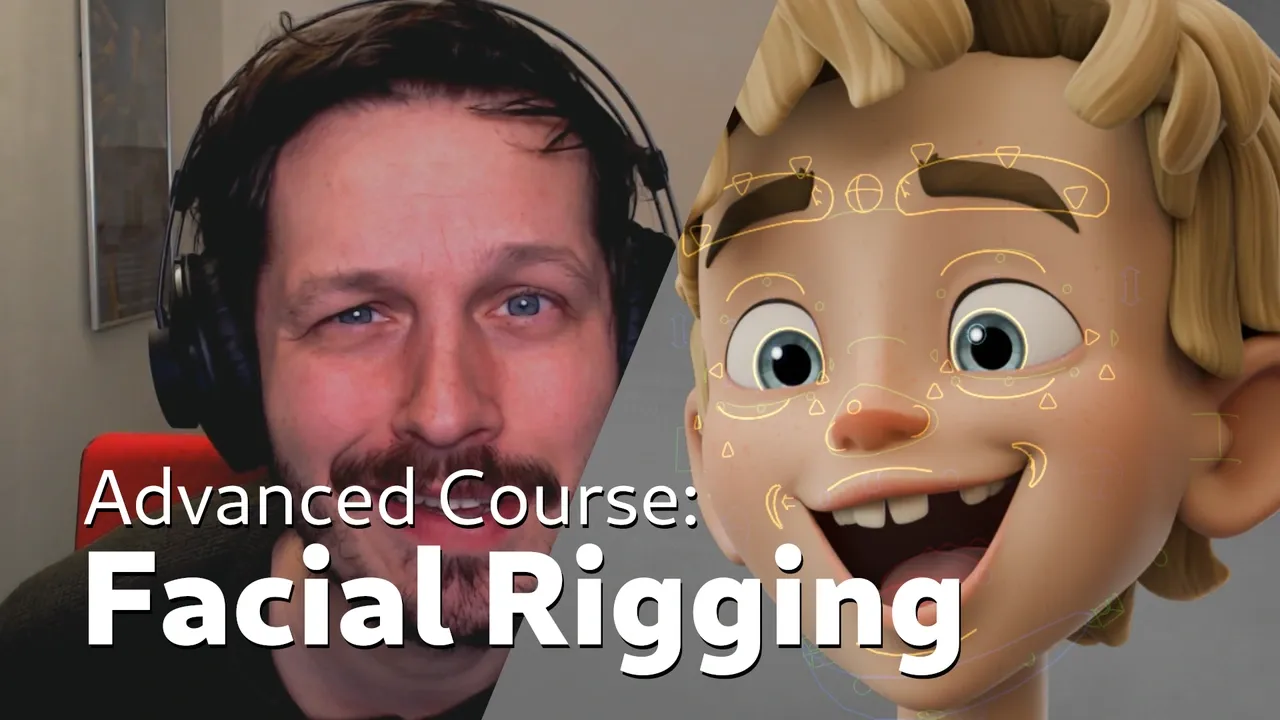
آموزش پیشرفته ریگبندی صورت در Blender : خلق شخصیتهای حرفهای : در این دوره آموزشی جامع، شما با تمامی روشها و گردشکارهای تخصصی برای ساخت یک سیستم ریگبندی صورت (Facial Rigging) منعطف و رسا آشنا خواهید شد. این دوره بر اساس فرآیند ساخت شخصیت محبوب «استورم» (Storm) توسط استودیو بلندر طراحی شده است تا شما را با تکنیکهای پیشرفته تغییر شکل چهره، استفاده از Ribbon Guide و Shape Keys آشنا کند. این آموزش برای کسانی که به دنبال یادگیری استانداردهای صنعت انیمیشن هستند و میخواهند ریگهایی با قابلیتهای بالا و حرکتهای واقعگرایانه بسازند، ایدهآل است. با دنبال کردن این مسیر، شما یاد میگیرید که چگونه فرآیندهای پیچیده ریگبندی را به شکلی نظاممند و حرفهای پیادهسازی کنید. این دوره آموزشی توسط تیم ســافــت ســاز برای شما عزیزان تهیه شده است.
عناوین آموزش پیشرفته ریگبندی صورت در Blender : خلق شخصیتهای حرفهای :
- مقدمات و آمادهسازی برای ریگبندی پیشرفته
- پیادهسازی تکنیک Ribbon Guide برای تغییر شکل نرم
- استفاده حرفهای از Shape Keys برای ابروها و گونهها
- اصول طراحی ریگ با تکیه بر متد سه منحنی (Three Curve Principle)
- بهینهسازی ساختار استخوانبندی صورت برای انیماتورها
- پیادهسازی ابزارهای اختصاصی و اسکریپتنویسی در بلندر
- مدیریت جریان کاری (Workflow) برای شخصیتهای پیچیده
- اصلاح و بهبود نامگذاری و چیدمان استخوانها
- تکنیکهای تغییر شکل پویا برای حالات چهره متنوع
- بررسی دیدگاه انیماتور در طراحی ریگهای سینمایی
عنوان دوره : Blender Studio – Advanced Facial Rigging
سطح : پیشرفته
زمان کل دوره : 6 ساعت و 53 دقیقه
تعداد فايل ها : 54
سال آموزش : 2026
فایل تمرینی : دارد
مربی دوره : Rik Schutte
نرم افزار : Blender
زیرنویس انگلیسی : دارد
Blender Studio – Advanced Facial Rigging
Video: MPEG4 Video (H264) 1920×1080 30fps 1585kbps | Audio: AAC 48000Hz stereo 234kbps | Duration: 6h 53m | Language: English | Subtitle: English | Level: Intermediate | File size: 5.6 GB
In this course, we are going to cover every method and workflow used to create the fexlible and expressive facial rigging system for Storm, the latest character by Blender Studio.
Screenshot
Blender Studio – Advanced Facial Rigging
Are you ready to learn facial rigging? Then you’re in the right place! Rik Schutte has been working on this advanced course, spending months preparing, writing, and recording every step of the process.
In order to use the latest functionality, Blender 5.0 or later is required to complete the course successfully.
Here is a showcase of the Storm character, which was rigged using the same techniques shared in this course.
What is the course about?
This is a video course that goes over the step-by-step process of how to create a high-quality facial rig in Blender. We’ll be using different techniques for facial deformation as well as Blender’s native tools and free add-ons to accommodate this particular workflow. The course contains over 40 videos and additional files, scripts, and add-ons to provide you with everything you need to follow along.
Note that this is an advanced rigging course that assumes you already have a solid understanding of facial rigging and Blender in general.
Facial rigging can be a daunting and tedious task. With this course, I hope to make it a straightforward process that is standardized and can serve as a base for a variety of characters and styles.
This course is not about rigging automation, as we make almost everything from scratch. In order to thoroughly understand the workflow, we need to follow each step and grasp the underlying concepts.
Advanced training
This course assumes you know how to navigate Blender and are familiar with constraints, bone assignments, and rigging in general.
If you are familiar with rigging and want to expand your knowledge of facial rigging, this course is right up your alley. Even if you are an animator who wants to peek under the hood, this course offers an interesting look at the decisions made to accommodate certain features for animators.
References
The workflows and techniques used for Storm are inspired by facial rigs commonly seen in the animation industry. I wanted to create a facial rigging workflow that allows us to produce dynamic and appealing animations with characters capable of a wide range of expressions. The knowledge I have gained over the years comes from my experience as an animator working with high-end, film-quality character rigs, as well as from following facial rigging courses.
I have also spoken with several riggers and animators in the animation industry to learn about their thoughts and principles for creating and using effective facial rigs. Many of the facial rigging principles and deformation concepts are explained thoroughly in the book The Art of Moving Points by Brian Tindall.
Ribbon Guides and Shape Keys
One method I used is the creation of Ribbon Guide Meshes to achieve smooth and predictable interpolation between neighboring bones while following the “three curve principle” as explained in the book.
Another method involves creating a series of shape keys to accommodate the deformation of the brows and cheeks. This method applies the same “three curve principle” but in a more traditional way.
Even though I implemented the brows this way on Storm, I would likely introduce the Ribbon Guide Mesh workflow for the brows as well in future versions to give the animator more flexibility. Either way, I think it’s useful to explain and demonstrate both workflows in the course, since they are universally applicable and conceptually equally strong.
An animator’s perspective
As Storm was the first facial rig I shipped, I learned a great deal during the creation of its initial version. While writing this course and dissecting Storm’s facial rig, I updated some of the naming conventions and made small adjustments to the bones, among other improvements.
This means the course reflects a slightly updated version of the facial rig setup compared to the original Storm release. The naming is cleaner and certain aspects of the rig have been optimized. That said, there are no noticeable changes for the animator.
If you are following the course, please let me know if anything is unclear by leaving a comment. We will read all comments and suggestions and update the course if necessary. I wish you the best of luck on your rigging journey, and I hope this course provides you with the tools and knowledge to create fantastic character rigs in Blender.
حجم کل : 5.6 گیگابایت

برای دسترسی به کل محتویات سایت عضو ویژه سایت شوید
برای نمایش این مطلب و دسترسی به هزاران مطالب آموزشی نسبت به تهیه اکانت ویژه از لینک زیر اقدام کنید .
دریافت اشتراک ویژه
مزیت های عضویت ویژه :
- دسترسی به همه مطالب سافت ساز
- آپدیت روزانه مطالب سایت از بهترین سایت های سی جی
- ورود نامحدود کاربران از هر دیوایسی
- دسترسی به آموزش نصب کامل پلاگین ها و نرم افزار ها
اگر در تهیه اشتراک ویژه مشکل دارید میتونید از این لینک راهنمایی تهیه اشتراک ویژه رو مطالعه کنید . لینک راهنما
For International user, You can also stay connected with online support. email : info@softsaaz.ir telegram : @SoftSaaz