آموزش ساخت صحنه رودخانه فانتزی در Blender و Unreal Engine 5
Udemy - Blender to Unreal Engine 5: Fantasy River 3D Diorama Scene

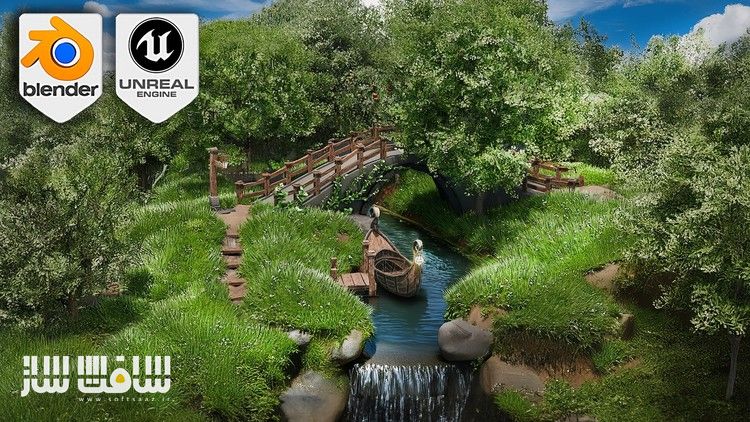
آموزش ساخت صحنه رودخانه فانتزی در Blender و Unreal Engine 5
آموزش ساخت صحنه رودخانه فانتزی در Blender و Unreal Engine 5 : در این آموزش از 3D Tudor ، با نحوه ساخت محیط خیره کننده در بلندر و بردن آن به آنریل انجین برای ارتقا به سطح بهتری آشنا خواهید شد. با این دوره وارد دنیای مدلینگ و توسعه بازی شوید و نحوه استفاده از نودهای هندسی و تکنیک های مختلف مدلینگ و ساخت محیط خیره کننده در بلندر و تبدیل آن به پروژه آنریل انجین رو یاد بگیرید.
این آموزش تسریع ورک فلو ، تسلط بر ایجاد زمین و شاخ و برگ ؛ بیک تکسچرهای پیشرفته ؛ نحوه بازسازی شیدر های بلندر در آنریل ، رفع مشکلات رایج در حین اکسپورت از بلندر به آنریل و تکنیک های بهبود صحنه با نورپردازی پیشرفته و پست پراسسینگ را پوشش می دهد.این دوره آموزشی توسط تیم ســافــت ســاز برای شما عزیزان تهیه شده است.
عناوین آموزش ساخت صحنه رودخانه فانتزی در Blender و Unreal Engine 5 :
- اصول کار با ویوپورت و مهارت های اساسی
- نحوه استفاده از نودهای هندسی برای ایجاد ساختار پیچیده
- حجاری زمین های پیچیده با clay strips, dynamic mesh, and the grab tool
- افزودن جزییات تکسچر با ورتکس پینتینگ و شیدر متریال
- ایجاد پل و نرده با نودهای هندسی
- استفاده از ویرایش منحنی و پارامترهای نودهای هندسی برای طراحی ارگانیک و با جزییات
- قرار دادن چمن و گل واقع بینانه با weight painting adjustments
- تولید شاخ و برگ ، پیچک با نودهای هندسی
- مدلینگ قایق با تخته های دقیق با استفاده از ویرایش متناسب و تکنیک های یووی آنرپینگ
- ایجاد دارایی چون فانوس با مادیفایر ها و نودهای هندسی
- اسکپورت با FBX Batch
- ایمپورت دارایی به آنریل انجین و عیب یابی مشکلات برای برای بهبود پرفورمنس
- باز آفرینی متریال در آنریل انجین
- پیاده سازی تکسچر های seamless ، ماسکینگ پوشاندن لبه ، بهبود نرمال مپ ها
- تکنیک های نورپردازی پیشرفته و تنظیمات پست پراسسینگ
- ایجاد شیدر های آب داینامیک ، ، ایجاد افکت های ذرات نیاگارا
- بهینه سازی صحنه
- تکمیل صحنه با تصحیح رنگ ، مسدود سازی سایه و نور
عنوان دوره : Udemy – Blender to Unreal Engine 5: Fantasy River 3D Diorama Scene
سطح : متوسط تا پیشرفته
زمان کل دوره : 16.50 ساعت
تعداد فايل ها : 85
سال آموزش : 2024
فایل تمرینی : دارد
مربی دوره : 3D Tudor
نرم افزار : Blender – Unreal Engine 5
زیرنویس انگلیسی : ندارد
فشردگی اختصاصی سافت ساز : ندارد
Udemy – Blender to Unreal Engine 5: Fantasy River 3D Diorama Scene
Create a stunning stylized 3D environment in Blender and take it to the next level in Unreal Engine 5!
• Blender Viewport Basics: Master the foundational skills needed to navigate and manipulate the Blender viewport effectively.
• Geometry Nodes Introduction: Discover how to utilize geometry nodes to create complex structures.
• Terrain Sculpting: Sculpt intricate terrains using clay strips, dynamic mesh, and the grab tool.
• Vertex Painting: Add detailed textures to your terrain with vertex painting and material shaders.
• Bridge and Railings Creation: Design a customizable bridge and add detailed railings using geometry nodes.
• Organic Placement: Use curve editing and geometry node parameters for organic and detailed design.
• Grass and Flower Placement: Implement realistic grass and flower placement with weight painting adjustments.
• Foliage Generation: Generate ivy and tree variations with geometry nodes, enhancing natural elements.
• Boat Modeling: Design a stylized boat with detailed planks using proportional editing and UV unwrapping techniques.
• Detailed Asset Creation: Create detailed assets like lanterns and stylized posts using lattice modifiers and geometry nodes.
• FBX Batch Export: Organize and export your Blender creations using FBX batch export.
• Unreal Engine 5 Integration: Import assets into Unreal Engine 5 and troubleshoot common issues for optimized performance.
• Material Recreation: Recreate Blender materials and vertex colours in Unreal Engine for consistent visual fidelity.
• Texture Implementation: Implement seamless textures, edge wear masking, and enhanced normal maps.
• Advanced Lighting Techniques: Enhance your scene with advanced lighting techniques and post-processing adjustments.
• Dynamic Water Shaders: Develop dynamic water shaders and Niagara particle effects for realistic water movement.
• Scene Optimization: Repurpose and reposition assets to create an engaging environment silhouette.
• Final Touches: Perfect your scene with colour correction, shadow blockers, and directional lighting.
Unlock Your Creative Potential with ‘Blender to Unreal Engine 5: Fantasy River 3D Diorama Boat Scene’!
Dive into the world of 3D modeling and game development with our comprehensive course, ‘Blender to Unreal Engine 5: Fantasy River 3D Diorama Boat Scene’. Learn how to create a stunning stylized 3D environment in Blender using geometry nodes and various modeling techniques, then convert it into an Unreal Engine 5 project.
Are you ready to dive into the captivating world of 3D modeling and game development?
Our comprehensive course, ‘Blender to Unreal Engine 5: Fantasy River 3D Diorama Boat Scene’, is designed to take your skills to the next level. Whether you’re a beginner or an experienced artist, this course will empower you to create breathtaking stylized 3D environments with ease.
Top 6 Points about ‘Blender to Unreal Engine 5: Fantasy River 3D Diorama Boat Scene’:
1. Accelerate Your Workflow: Master the art of speeding up your creative modeling process with customized geometry nodes, allowing for rapid and efficient 3D design.
2. Terrain and Foliage Mastery: Gain skills in sculpting intricate miniature terrains, texturing them beautifully, and enriching your scene with lush foliage for a realistic touch.
3. Advanced Texture Baking: Learn to bake asset textures from shaders into high-quality PBR materials, ensuring your models look stunning in any environment.
4. Seamless Shader Recreation: Discover how to perfectly recreate Blender shader materials in Unreal Engine, maintaining visual consistency across platforms.
5. Expert Problem Solving: Equip yourself with the knowledge to troubleshoot and resolve common issues encountered during environment exportation from Blender to UE5, ensuring a smooth workflow.
6. Scene Enhancement Techniques: Enhance your diorama with advanced lighting and post-processing techniques, bringing your 3D environment to life with professional-quality visuals.
حجم کل : 18.1 گیگابایت
برای نمایش این مطلب و دسترسی به هزاران مطلب آموزشی، نسبت به تهیهی اکانت ویژه از لینک زیر اقدام کنید.
وضعیت فعلی شما
- لینکهای دانلود این مطلب قفل است
- بقیهی مطالب ویژه هم بسته است
- بدون دسترسی به آموزش نصب
با اشتراک ویژه
- دسترسی به همهی مطالب سافتساز
- آپدیت روزانه مطالب سایت از بهترین سایتهای سیجی
- ورود نامحدود کاربران از هر دیوایسی
- دسترسی به آموزش نصب کامل پلاگینها و نرمافزارها
For international users: online support — email info@softsaz.ir or Telegram @SoftSaaz.
امتیاز دهی به این مطلب :
لطفا به این مطلب امتیاز دهید