ساخت بازی تیراندازی فضایی به سبک سیارکها در Godot 4
Udemy - Build an Asteroids-Style Space Shooter in Godot 4

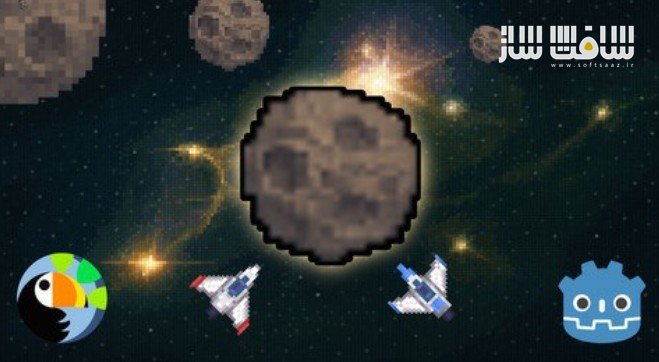
ساخت بازی تیراندازی فضایی به سبک سیارکها در Godot 4
ساخت بازی تیراندازی فضایی به سبک سیارکها در Godot 4 : در این دوره از هنرمند Michael Bridges ، یاد میگیرید چگونه از صفر یک بازی شوتری دوبعدی در سبک کلاسیک Asteroids را در موتور Godot 4 طراحی، کدنویسی و تکمیل کنید.
این آموزش شما را از یک پروژه خالی به یک بازی قابل بازی با کنترل روان، سیستم امتیازدهی، برخوردها، منوها، صدا و ذخیره رکوردها میرساند.
تمام مراحل بهصورت قدمبهقدم آموزش داده میشود تا بتوانید پس از پایان دوره، بهتنهایی بازیهای دوبعدی کامل بسازید و به مهارت عملی در Godot و GDScript برسید. این دوره آموزشی توسط تیم ســافــت ســاز برای شما عزیزان تهیه شده است.
عناوین ساخت بازی تیراندازی فضایی به سبک سیارکها در Godot 4 :
- ساخت کامل یک بازی Asteroids از یک پروژه خالی تا خروجی نهایی
- استفاده از سیستم Node و Scene برای ساختاردهی بازی دوبعدی
- نوشتن منطق گیمپلی با GDScript (حرکت، تیراندازی، برخورد، امتیاز)
- کار با سیستم فیزیک دوبعدی برای اسپاون و برخورد سیارکها و مرگ بازیکن
- ساخت رابط کاربری ساده و خوانا (امتیاز، جانها، صفحه ریاستارت)
- سازماندهی صحیح پروژه و فایلها برای یک ورکفلو حرفهای
- استفاده از Signals برای جدا کردن سیستمهای بازی
- خروجی گرفتن از بازی برای اشتراکگذاری خارج از ادیتور
عنوان دوره : Udemy – Build an Asteroids-Style Space Shooter in Godot 4
سطح : متوسط
زمان کل دوره : 9.44 ساعت
تعداد فايل ها : 68
سال آموزش : 2025
فایل تمرینی : دارد
مربی دوره : Michael Bridges
نرم افزار : Godot 4
زیرنویس انگلیسی : دارد
فشردگی اختصاصی سافت ساز : ندارد
Udemy – Build an Asteroids-Style Space Shooter in Godot 4
Create your own Asteroids-style space shooter from the ground up.
What you’ll learn
Build a complete Asteroids style game in Godot from a blank project to a playable export
Use Godot’s scene and node system to structure a small but real 2D game
Write core gameplay logic in GDScript, including movement, shooting, collisions, and scoring
Work with 2D physics nodes and areas to handle asteroid spawning, hits, and player death
Create simple, readable game UI elements such as score, lives, and restart screens
Organise a Godot project so assets, scripts, and scenes stay tidy and easy to maintain
Use signals to decouple game systems so player, asteroids, and UI communicate cleanly
Export the finished game so it can be shared and played outside the editor
Requirements
A computer that can run the current stable version of Godot 4 and a text editor
Basic computer skills such as installing software and managing folders
No previous Godot experience required, the project is built step by step
Some very basic programming or logic understanding is helpful but not essential
An interest in learning how 2D games work under the hood, not just following along blindly
Around a few hours of focused time to follow the lessons and experiment between them
A willingness to tinker, break things, and fix them as part of the learning process
Description
A Complete 2D Game in Godot 4
Create your own Asteroids-style space shooter from the ground up
Learn how to design, code, and polish a full 2D arcade game using Godot 4.
Turn a blank project into a fast-paced Asteroids-style space shooter in Godot 4.
This course guides you step by step through every stage of development. Start with an empty project and finish with a playable, professional-quality game featuring smooth controls, score tracking, menus, sound, and high-score saving. From importing assets and coding player movement to adding menus, sound effects, and saving high scores, this course will enable you to create full games, not just a tech demo!
Whether you are new to Godot or looking to strengthen your 2D development workflow, you will finish this course with a fully playable, polished game and the confidence to create your own projects.
Perfect for: new and intermediate developers who want to master practical game creation, build confidence with GDScript, and establish a solid workflow for future projects.
You’ll Learn How To:
Implement player movement, physics, and shooting.
Build responsive UI and in-game menus.
Use signals and singletons to manage gameplay systems.
Add music, sound effects, and save player settings.
Polish your project for a professional finish.
Outcome:
A fully functional Asteroids-style game and the knowledge to create your next one faster and better.
What You’ll Learn
Build a complete 2D game from start to finish in Godot 4.
Write efficient, well-structured GDScript code.
Implement player movement, physics, and shooting systems.
Use signals and enums to connect and manage gameplay logic.
Design professional interfaces, menus, and in-game UI.
Save and load player data such as settings and high scores.
Integrate sound effects, music, and user-controlled volume.
Refine your project with polish and visual feedback.
Course Breakdown
Section 1: Introduction and Setup
In this section, you’ll establish the foundation for your game project. You’ll create a new Godot workspace, link it with a Git repository for version control, and plan your design using a Game Design Document. You’ll also import your game assets, including sprite sheets, and learn how to slice them into usable frames for animation. By the end, your workspace will be fully organised and ready for development.
Create and organise your Godot workspace.
Use Git for version control and project safety.
Plan your game with a Game Design Document (GDD).
Import and prepare sprite sheets for use in the engine.
Section 2: Core Gameplay
Here you’ll bring your player ship to life. You’ll build the core scenes that define your level and player setup, then map keyboard inputs for thrust and rotation. Through hands-on coding, you’ll apply real physics forces to create responsive movement and introduce screen wrapping so your ship loops seamlessly around the edges of play. You’ll finish this section by creating your first asteroid setting the stage for gameplay interaction.
Set up the main level and player ship scenes.
Map player inputs for thrust and rotation.
Apply physics-based movement using vector maths.
Add screen wrapping for continuous play.
Challenge: create a basic asteroid scene.
Section 3: Projectiles and Collisions
Now you’ll make your ship fight back. You’ll design and script a bullet scene, attach it to your ship, and control its firing rate using timers. You’ll learn how to detect impacts between bullets and asteroids using Godot’s collision layers and masks, then handle destruction events cleanly with object-oriented techniques. By the end, you’ll have a fully functional shooting system with satisfying visual feedback.
Build and fire bullets using timers and spawn points.
Detect and handle collisions between objects.
Manage object destruction with clean, modular logic.
Configure physics layers and masks for accuracy.
Section 4: Game Logic and Spawning
With the fundamentals in place, you’ll introduce gameplay depth and challenge. You’ll code an asteroid spawner that randomly places new asteroids on the screen, add movement and rotation variety, and make large asteroids split into smaller ones when destroyed. You’ll also connect game systems together using signals a key feature of Godot for managing complex events. Finally, you’ll handle player damage, invulnerability timers, and refactor your scripts to keep your codebase clean and scalable.
Spawn asteroids with randomised positions and behaviour.
Split large asteroids into smaller ones dynamically.
Use signals to connect different parts of the game.
Implement player damage and cooldown logic.
Refactor your code with enums and consistent style.
Section 5: UI and Menus
In this section, you’ll shift focus to user experience. You’ll create a complete user interface including score and health displays, a main menu, a game-over screen, and a ship-selection screen. You’ll use a singleton (autoload) to store and update global data such as player scores and settings, then implement file saving so scores persist between sessions. By the end, your game will feel cohesive and player-friendly, with smooth menu transitions and reusable UI scenes.
Display score, health, and game-over information.
Build a main menu with Start, Settings, and Quit options.
Create a ship-selection menu with multiple playable ships.
Save and load data for high scores and preferences.
Section 6: Audio and Polish
This final section brings your game to life with sound and visual refinement. You’ll add background music, sound effects, and explosion feedback, using Godot’s Audio Buses to balance music and effects. You’ll connect volume sliders in your Settings menu to control sound in real time, and save player preferences to disk. Once complete, you’ll tweak the visuals, timing, and transitions for a polished, ready-to-release project that feels as good as it plays.
Add background music and sound effects.
Use Audio Buses to balance and group sounds.
Create in-game sliders to control volume.
Save and restore audio preferences.
Add explosion and feedback effects for polish
حجم کل : 7 گیگابایت
برای نمایش این مطلب و دسترسی به هزاران مطلب آموزشی، نسبت به تهیهی اکانت ویژه از لینک زیر اقدام کنید.
وضعیت فعلی شما
- لینکهای دانلود این مطلب قفل است
- بقیهی مطالب ویژه هم بسته است
- بدون دسترسی به آموزش نصب
با اشتراک ویژه
- دسترسی به همهی مطالب سافتساز
- آپدیت روزانه مطالب سایت از بهترین سایتهای سیجی
- ورود نامحدود کاربران از هر دیوایسی
- دسترسی به آموزش نصب کامل پلاگینها و نرمافزارها
For international users: online support — email info@softsaz.ir or Telegram @SoftSaaz.
امتیاز دهی به این مطلب :
لطفا به این مطلب امتیاز دهید