آموزش برنامه نویسی بازی Connect 4 در انجین Unity
Udemy - Connect 4 Game Programming Course for Unity 3D

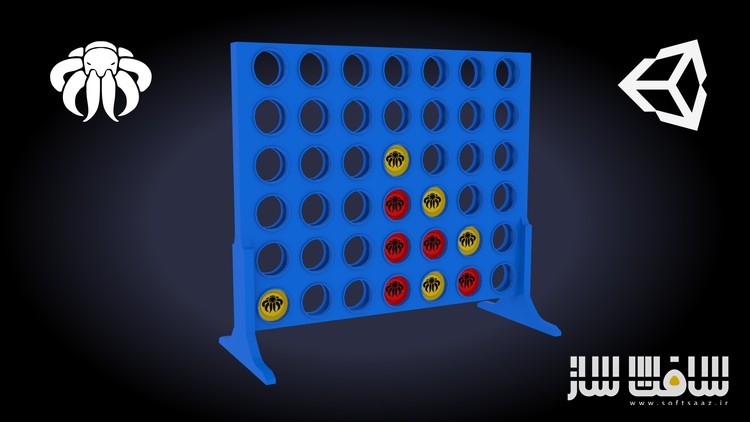
آموزش برنامه نویسی بازی Connect 4 در انجین Unity
آموزش برنامه نویسی بازی Connect 4 در انجین Unity : در این دوره از هنرمند Octo Man ، با نحوه توسعه و برنامه نویسی بازی 3D Connect 4 در انجین یونتی آشنا خواهید شد. این دوره نحوه ساخت یک بازی استراتژیکی و شانسی ، استفاده از هوش مصنوعی برای بازیکنان ، ایجاد پروژه در یونیتی و تنظیم همه چیز ، ایجاد مکانیک و زمین بازی ، ایجاد بورد بازی تعاملی ، ساخت منوی زیبا ، برنامه نویسی سی شارپ و … را پوشش می دهد.این دوره آموزشی توسط تیم ســافــت ســاز برای شما عزیزان تهیه شده است.
عناوین آموزش برنامه نویسی بازی Connect 4 در انجین Unity :
- نحوه ایجاد بازی Connect 4 در یونیتی
- آموزش ساخت بازی های نوبتی در یونیتی
- آموزش اصول زبان سی شارپ : for loops, foreach loops, int, string, float, functions, classes
- آموزش ساخت هوش مصنوعی در یونیتی با استفاده از الگوریتم Minimax
عنوان دوره : Udemy – Connect 4 Game Programming Course for Unity 3D
سطح : متوسط
زمان کل دوره : 8 ساعت
تعداد فايل ها : 54
سال آموزش : 2024
فایل تمرینی : دارد
مربی دوره : Octo Man
نرم افزار : Unity
زیرنویس انگلیسی : دارد
Udemy – Connect 4 Game Programming Course for Unity 3D
Connect 4 Game Programming Course for Unity 3D
Learn how to create Connect 4 Game in Unity 3D
Learn to create turn based games.
Learn basic C#: for loops, foreach loops, int, string, float, functions, classes …
Learn how to build AI in Unity using Minimax algorythm.
Connect 4 is a fun game that can be played with friends, family, and classmates. It’s a game of strategy and luck. In this course, we’ll learn how to create Connect 4 in Unity. We’ll also go a little deeper and create an AI for the player to play against. Come join me on this journey to learn Connect 4!
This course is a Beginner/Intermediate course, so if you have trouble in any case, write me a message or Q&A, and i’ll help as best as i can.
If you are beginner, you might have some trouble to follow, but the videos will guide you through the complete course. Don’t forget: You only become better if you repeat things and keep on learning!
Unity (2021) Course Content:
You will learn to create a new 3D Project in Unity and set up everything needed
I will show you how you to setup the playfield and create the game mechanics.
I will show you to interact with the game board and drop coins into it
We create a beautiful game menu
C#
We take a look into coding basics like: int, float, string, bool, for-loops, foreach-loops, 2D Array, List …
We will put in functionality with scripts using Visual Studio Code and C# (you can use any other IDE)
Also we implement create a 1 vs 1 Player game first, so the main game is working
We create an AI using Minimax Algorythm with Heuristic board evaluations (Intermediate)
Course Material:
3D Model Connect 4 Board
2x 3D Model Coins
Some Checker Texture
Buttons and a Background 2D Sprite to create a beautiful Connect 4 Menu.
You have to write the code on your own, i do not provide the final scripts!
All other graphics for Menu’s, Icons, Images or Buttons need to be created on your own.
All Materials i provide are for education only and should not be in your final release!
Conclusion
In the end of this course you will have a fully functional Connect 4 3D Game.
Challenge:
After you have created nice Menus, Buttons, and maybe additional content, upload the Game to any Gaming Website like: itch io, Google Playstore, Apple Store or even Windows Store or Steam.
So what are you waiting for?
Let’s make your dream game a reality!!
Who this course is for:
Unity and C# beginners.
C# intermediates to learn Minimax algorythm.
حجم کل : 4.3 گیگابایت
برای نمایش این مطلب و دسترسی به هزاران مطلب آموزشی، نسبت به تهیهی اکانت ویژه از لینک زیر اقدام کنید.
وضعیت فعلی شما
- لینکهای دانلود این مطلب قفل است
- بقیهی مطالب ویژه هم بسته است
- بدون دسترسی به آموزش نصب
با اشتراک ویژه
- دسترسی به همهی مطالب سافتساز
- آپدیت روزانه مطالب سایت از بهترین سایتهای سیجی
- ورود نامحدود کاربران از هر دیوایسی
- دسترسی به آموزش نصب کامل پلاگینها و نرمافزارها
For international users: online support — email info@softsaz.ir or Telegram @SoftSaaz.