آموزش طراحی و مدلسازی کفش واقعگرایانه با Nomad Sculpt
Udemy - Create a realistic shoe with Nomad Sculpt

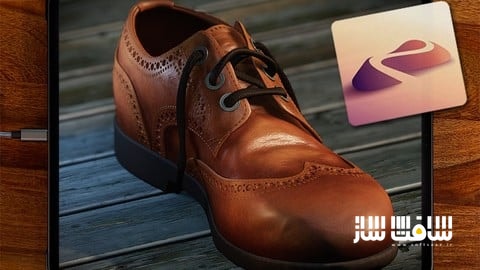
آموزش طراحی و مدلسازی کفش واقعگرایانه با Nomad Sculpt
آموزش طراحی و مدلسازی کفش واقعگرایانه با Nomad Sculpt : طراحی یک کفش چرمی با جزئیات دقیق، چالشی عالی برای سنجش مهارتهای شما در Nomad Sculpt است. در این دوره آموزشی، از تحلیل تصاویر مرجع تا مرحله نهایی رندر، فرآیند ساخت یک کفش مردانه کلاسیک را فرا میگیرید. شما یاد میگیرید که چگونه با استفاده از ابزارهای جدید نسخه ۲.۹، خطوطی نرم و ساختاری بینقص ایجاد کنید. همچنین با تکنیکهای حرفهای رنگآمیزی لایهای، اعمال متریالهای واقعگرایانه و تنظیمات پیشرفته نورپردازی آشنا خواهید شد تا خروجی نهایی شما از یک مدل دیجیتالی ساده به اثری هنری و زنده تبدیل شود. این دوره آموزشی توسط تیم ســافــت ســاز برای شما عزیزان تهیه شده است.
عناوین آموزش طراحی و مدلسازی کفش واقعگرایانه با Nomad Sculpt :
- تحلیل تصاویر مرجع و اصول طراحی ساختار کفش
- مدیریت دقیق تناسبات در مدلسازی سهبعدی
- تکنیکهای استخراج پنلهای چرمی با رزولوشن بالا
- کار با ابزارهای جدید اسنپینگ در نسخه ۲.۹
- استفاده از براشهای تخصصی برای ایجاد جزئیات دقیق
- رنگآمیزی حرفهای و تفکیک لایههای متریال و زبری
- ایجاد بندهای کفش با دقت بالا
- کار با کتابخانه متریالهای جدید و باکیفیت
- نورپردازی استودیویی برای نمایش فرم و بافت
- استفاده از پردازشهای نهایی برای خروجی واقعگرایانه
عنوان دوره : Udemy – Create a realistic shoe with Nomad Sculpt
سطح : تمامی سطوح
زمان کل دوره : 4 ساعت و 33 دقیقه
تعداد فايل ها : 25
سال آموزش : 2026
فایل تمرینی : دارد: JPG (1)، ZIP (9)
مربی دوره : Simon Foster
نرم افزار : Nomad Sculpt
زیرنویس انگلیسی : ندارد
Udemy – Create a realistic shoe with Nomad Sculpt
A realistic leather shoe is a surprisingly good test of your Nomad skills. It needs convincing proportions, smooth curves, crisp construction and surface detail that suggests leather rather than a lump of brown plastic. In this course, we’ll create, paint and light a realistic brogue shoe in Nomad Sculpt, working from reference images through to a finished render. Along the way, you’ll learn techniques you can use on plenty of other projects, even if footwear isn’t your lifelong artistic obsession.
We’ll start by using reference images to understand the shoe’s shape and construction, then build up the basic form. We’ll pay attention to the proportions and the way the different parts fit together. But I’ll aslo point out the pitfalls of using multiple reference images – it’s not your fault, it’s the photos. That took me years to figure out.
From there, we’ll extract high-resolution leather panels, giving us the detail we need while keeping the construction manageable. The aim is to make deliberate choices and understand why they work, rather than just follow a series of button presses.
Partway through recording, Nomad Sculpt 2.9 arrived with some very useful new features. Naturally, I put them to work. You’ll see the course move into 2.9 and learn how its new snapping tools help us create precise, smooth shapes with a level of control that would previously have been almost impossible to achieve. For a subject like this, where clean curves and carefully placed details matter, these tools are indispensable.
Once the shoe is built, we’ll develop its leather finish by applying colour and roughness separately. That distinction gives us much more control over how the surface looks and reacts to light. We’ll also use layer blend modes to build subtle variations and enhance the realism. Leather needs a little character, but there’s a fine line between a beautifully worn shoe and something you’ve just retrieved from a swamp.
We’ll create the laces, then give the finished shoe a simple setting using the incredible new 2.9 material library, with materials courtesy of Poly Haven. Next comes lighting: choosing how to show the form, bring out the surface detail and make all that careful work visible. We’ll finish by using Post Processing to enhance the image and bring the presentation together.
The course also includes 15 tools from my Nomad Sculpt Art Studio, a collection of over 400 tools. You’ll use the included tools as part of the project, so you can see what they do and how they fit into a practical workflow.
By the end, you’ll have a finished brogue shoe and a clearer understanding of how modelling, painting, materials and lighting work together. More importantly, you’ll have a set of techniques to take into your own projects, where convincing surfaces and controlled detail make your work leap out of the screen.
What you’ll learn:
– Create a realistic shoe in Nomad Sculpt
– Work with Hirez meshes
– Explore new ways of working with Nomad Sculpt 2.9
– Paint ultra realistic effects using layers
Requirements:
– A working copy of Nomad Sculpt 2.9 or above – desktop or mobile
Who this course is for:
– Intermediate students of Nomad Sculpt, although I explain all the tools as I use them
حجم کل : 6.71 گیگابایت
برای نمایش این مطلب و دسترسی به هزاران مطلب آموزشی، نسبت به تهیهی اکانت ویژه از لینک زیر اقدام کنید.
وضعیت فعلی شما
- لینکهای دانلود این مطلب قفل است
- بقیهی مطالب ویژه هم بسته است
- بدون دسترسی به آموزش نصب
با اشتراک ویژه
- دسترسی به همهی مطالب سافتساز
- آپدیت روزانه مطالب سایت از بهترین سایتهای سیجی
- ورود نامحدود کاربران از هر دیوایسی
- دسترسی به آموزش نصب کامل پلاگینها و نرمافزارها
For international users: online support — email info@softsaz.ir or Telegram @SoftSaaz.
امتیاز دهی به این مطلب :
لطفا به این مطلب امتیاز دهید