آموزش ساخت یک اتاق انیمه استایل در Blender
Udemy - Create a Stylized Anime Room in Blender

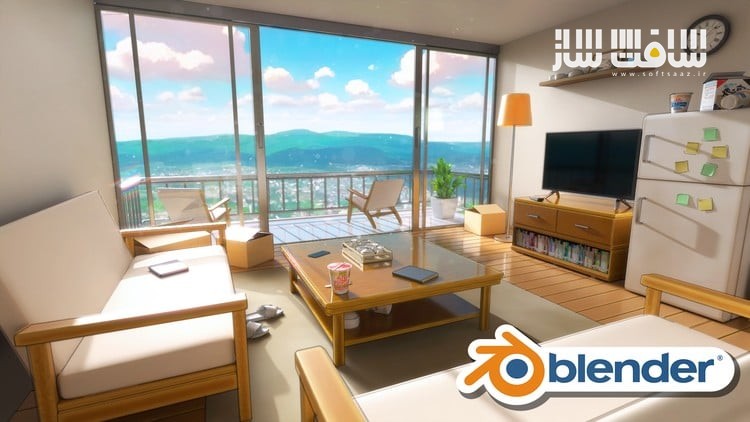
آموزش ساخت یک اتاق انیمه استایل در Blender
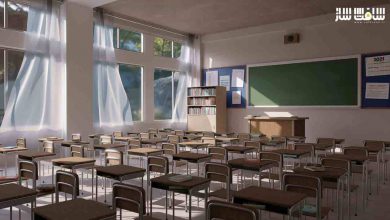
آموزش ساخت یک اتاق انیمه استایل در Blender : در این دوره از هنرمند Aniket Rawat ، میآموزید چگونه با استفاده از بلندر، یک اتاق داخلی با سبک انیمهای را از صفر تا صد طراحی کنید. مراحل مدلسازی اجزای اصلی مانند دیوارها، مبلمان و پنجرهها، تا ساخت جزئیاتی مثل قفسهها، کتابها و وسایل کوچک انجام میشود تا صحنهای زنده و واقعی خلق شود.
در ادامه، با اعمال نورپردازی، تنظیم رنگها و ایجاد افکتهایی مثل خطوط بیرونی، جلوهای دستکشیده و انیمهای به صحنه میدهید. سپس با تکسچرینگ حرفهای و استفاده از متریالهای متنوع، ظاهر نهایی آبجکتها را کامل میکنید و در پایان با انجام کامپوزیت و رندر از زوایای مختلف، خروجیهایی مناسب برای پورتفولیو خواهید داشت. این دوره آموزشی توسط تیم ســافــت ســاز برای شما عزیزان تهیه شده است.
عناوین آموزش ساخت یک اتاق انیمه استایل در Blender :
- آموزش طراحی محیطهای استایلایز و با الهام از انیمه
- مدلسازی سهبعدی انواع آبجکتها در بلندر
- ساخت و اعمال متریالهای مختلف مانند شیشه، چوب و دیوار
- تسلط بر نورپردازی انیمهای در بلندر
- استفاده از HDRI و منابع نوری برای ایجاد حس و فضای مناسب
- اضافهکردن خطوط بیرونی و افکتهای خاص استایلایز
- ارتقاء رندرها با استفاده از بخش کامپوزیت بلندر
- بهبود ترکیببندی صحنه و تنظیم حرفهای دوربین
- کار با مدیفایرهایی مانند Solidify، Bevel و Mirror
- استفاده از تصاویر مرجع برای تبدیل تصاویر دوبعدی به مدلهای سهبعدی
عنوان دوره : Udemy – Create a Stylized Anime Room in Blender
سطح : مبتدی
زمان کل دوره : 5.44 ساعت
تعداد فايل ها : 20
سال آموزش : 2025
فایل تمرینی : دارد
مربی دوره : Aniket Rawat
نرم افزار : Blender
زیرنویس انگلیسی : ندارد
فشردگی اختصاصی سافت ساز : ندارد
Udemy – Create a Stylized Anime Room in Blender
Master the Process of Creating a Stylized Anime Room in Blender – From 3d Modeling and Texturing to Lighting & Rendering
Welcome to this new course Stylized Anime Room in Blender, where you’ll learn to create a beautiful, detailed anime-inspired room environment from start to finish—just using Blender.
You will get:
1. 20 Full HD video lectures with over 5.5+ hours of content and AUDIO commentary
2. All the files related to the course including .blend files, HDRIs, textures etc
We’ll cover every step of the process—from modelling and layout, to texturing, lighting, and final rendering — learning how to achieve that signature anime look with materials, lighting techniques, and outline effects for the hand-drawn look.
We’ll start by modeling the core elements of the room, including walls, furniture, windows, cabinets etc. On top of that, we’ll also create a wide variety of small props—like balcony chairs, wall shelves, books, cup noodles, magazines, and many more details that really bring the scene to life and make it feel lived-in.
After modelling our assets, we’ll focus on the final stylization phase—adding lighting, adjusting color settings like the color space and exposure to match the anime look, and setting up outline effects for that signature hand-drawn style. These elements work together to give the scene its final polished, 2D-inspired aesthetic.
Then we’ll dive into texturing, creating a variety of materials like glass, wood, and walls, all designed to match the style. We’ll also texture a wide range of small props like clocks, books, cup noodles, lamp, chairs and more—adding those subtle details that bring the room to life and give it character.
Finally, we’ll do a bit of compositing and post-processing, using Blender’s compositor and some Photoshop tweaks to polish the final render using effects like Glare, the Kuwahara Node, and adding Overlays to give finishing touches to our scenes. We will finish the course by setting up various camera angles and taking portfolio ready renders of our scene.
Whether you’re a beginner or an experienced Blender user, this course will give you the skills to create eye-catching, stylized anime scenes from scratch.
What you’ll learn
Learn to Create Stylized and Anime-Inspired Environments
Learn 3D Modelling in Blender by creating various 3D Props
Create and Apply Various Materials in Blender like Glass, Wood, Walls etc
Master Anime-Style Lighting in Blender
Learn to use HDRIs and Lights to add Mood and Atmosphere to your Blender Scene
Add Outlines & Stylized Effects
Enhance Renders with Compositing in Blender
Improve Composition & Camera Work
Learn Different Modifiers in Blender like Solidify, Bevel, Mirror etc
Learn to work with Reference Images and use them to create 3D models from 2D images
حجم کل : 5.3 گیگابایت
برای نمایش این مطلب و دسترسی به هزاران مطلب آموزشی، نسبت به تهیهی اکانت ویژه از لینک زیر اقدام کنید.
وضعیت فعلی شما
- لینکهای دانلود این مطلب قفل است
- بقیهی مطالب ویژه هم بسته است
- بدون دسترسی به آموزش نصب
با اشتراک ویژه
- دسترسی به همهی مطالب سافتساز
- آپدیت روزانه مطالب سایت از بهترین سایتهای سیجی
- ورود نامحدود کاربران از هر دیوایسی
- دسترسی به آموزش نصب کامل پلاگینها و نرمافزارها
For international users: online support — email info@softsaz.ir or Telegram @SoftSaaz.