آموزش ساخت صحنه انیمهای چراغ راهنمایی در بلندر
Udemy - Create Anime Traffic Light Scene in Blender

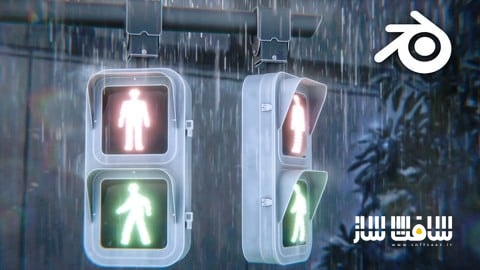
آموزش ساخت صحنه انیمهای چراغ راهنمایی در بلندر
آموزش ساخت صحنه انیمهای چراغ راهنمایی در بلندر : در این دوره آموزشی، صفر تا صد خلق یک انیمیشن سینمایی با حال و هوای انیمههای ژاپنی را در نرمافزار بلندر میآموزید. شما یاد میگیرید چگونه با استفاده از تکنیکهای مدلسازی، فضاسازی جوی و نورپردازی استایلیز، یک صحنه بارانی و چشمنواز طراحی کنید. این دوره شامل بیش از ۲ ساعت آموزش ویدیویی با کیفیت، به همراه تمامی فایلهای پروژه است. در نهایت، با بهرهگیری از کامپوزیتور بلندر و تکنیکهای پسپردازش، خروجیهای حرفهای و مناسب برای پورتفولیو هنری خود دریافت خواهید کرد. این دوره آموزشی توسط تیم ســافــت ســاز برای شما عزیزان تهیه شده است.
عناوین آموزش ساخت صحنه انیمهای چراغ راهنمایی در بلندر :
- مقدمه و آشنایی با محیط پروژه
- مدلسازی چراغ راهنمایی و اجزای صحنه
- تنظیم دوربین و ترکیببندی هنری
- طراحی متریالهای استایلیز و کارتونی
- نورپردازی و ایجاد اتمسفر بارانی
- شبیهسازی افکتهای درخشش و بازتاب
- انیمیشنسازی چراغها و حرکت باران
- کار با کامپوزیتور برای اصلاح رنگ و نور
- تکنیکهای پسپردازش در فتوشاپ
- خروجی نهایی و رندرینگ حرفهای
عنوان دوره : Udemy – Create Anime Traffic Light Scene in Blender
سطح : تمامی سطوح
زمان کل دوره : 2 ساعت و 8 دقیقه
تعداد فايل ها : 1440p:12, 1080p:1
سال آموزش : 2026
فایل تمرینی : دارد: RAR (1)
مربی دوره : Aniket Rawat
نرم افزار : Adobe Photoshop, Blender
زیرنویس انگلیسی : ندارد
Udemy – Create Anime Traffic Light Scene in Blender
Welcome to this new course, where you’ll learn to create a beautiful anime-inspired traffic light animation from start to finish using just Blender.
You will get:
12+ Full HD video lectures with over 2+ hours of content and audio commentary.
All the project files, including the .blend files, textures, HDRIs, and reference resources used throughout the course.
We’ll cover the complete workflow from modelling and texturing to lighting, animation, rendering, and post-processing learning the techniques used to create a cinematic anime-style scene.
We’ll begin by modeling the traffic light from scratch, building every part of the scene step by step. We’ll then set up the camera and composition to establish the overall look and framing of the scene.
Once the modeling is complete, we’ll create stylized materials for the entire scene, including painted metal, glass, traffic signals, and other surfaces that give the project its distinctive look.
Next, we’ll set up the lighting and rainy atmosphere, creating rain, reflections, glow, and adjusting the color settings to achieve a soft anime-inspired aesthetic.
After that, we’ll polish everything using Blender’s compositor along with a few Photoshop enhancements to produce a portfolio-ready render and finished animation.
Finally, we’ll animate the traffic light signals and create a realistic rain animation, adding subtle motion that transforms the scene into a cinematic anime-inspired shot.
Whether you’re a beginner or an experienced Blender user, this course will teach you practical techniques that you can apply to your own stylized projects.
So, if you’re ready to create this beautiful rainy anime traffic light in Blender, join me in this course, and let’s get started.
What you’ll learn:
– Create a Rainy Anime Traffic Light Animation in Blender.
– Learn to Create Stylized and Anime-Inspired Environments
– Learn 3D Modelling in Blender by creating various 3D Props
– Master Anime-Style Lighting in Blender
– Learn to use HDRIs and Lights to add Mood and Atmosphere to your Blender Scene
– Enhance Renders with Compositing in Blender
– Improve Composition & Camera Work
– Learn to work with Reference Images and use them to create 3D models from 2D images
Requirements:
– Blender
– Photoshop – Optional
Who this course is for:
– Whether you’re a beginner or an experienced Blender user looking to explore anime aesthetics, this course will give you the skills to create eye-catching, stylized 3D scenes.
حجم کل : 3.41 گیگابایت
برای نمایش این مطلب و دسترسی به هزاران مطلب آموزشی، نسبت به تهیهی اکانت ویژه از لینک زیر اقدام کنید.
وضعیت فعلی شما
- لینکهای دانلود این مطلب قفل است
- بقیهی مطالب ویژه هم بسته است
- بدون دسترسی به آموزش نصب
با اشتراک ویژه
- دسترسی به همهی مطالب سافتساز
- آپدیت روزانه مطالب سایت از بهترین سایتهای سیجی
- ورود نامحدود کاربران از هر دیوایسی
- دسترسی به آموزش نصب کامل پلاگینها و نرمافزارها
For international users: online support — email info@softsaz.ir or Telegram @SoftSaaz.
امتیاز دهی به این مطلب :
لطفا به این مطلب امتیاز دهید