ایجاد کاراکتر ۳۶۰ درجه در Moho 14 : ریگینگ پیشرفته
Udemy - Creating a 360° Character in Moho 14 — Advanced Rigging

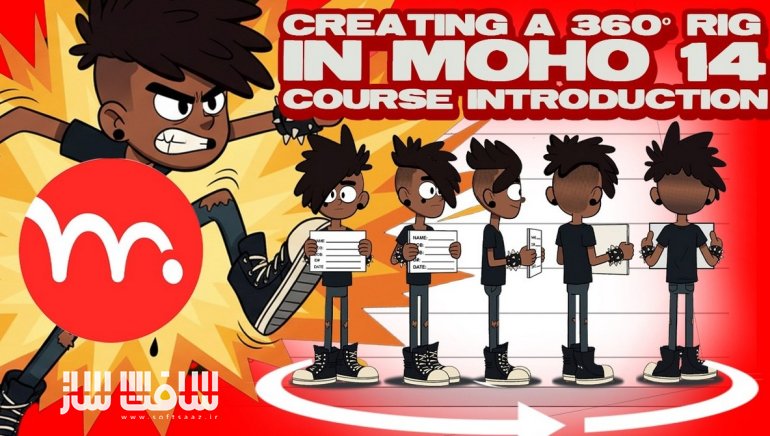
ایجاد کاراکتر ۳۶۰ درجه در Moho 14 : ریگینگ پیشرفته
ایجاد کاراکتر ۳۶۰ درجه در Moho 14 : ریگینگ پیشرفته : در این دوره از Ricky Ruff ، شما روش کامل و حرفهای ساخت یک ریگ کاراکتر ۳۶۰ درجه در نرمافزار Moho Pro 14 را یاد میگیرید؛ از Smart Actions و ساخت استخوانها تا کنترلهای صورت و ایجاد چرخش روان و بدون شکستگی.
این آموزش با رویکردی پروژهمحور طراحی شده تا شما را از مرحله آمادهسازی آرتورک در فتوشاپ و موهو، تا ساخت سیستم چرخش کامل، کنترلهای IK، Target Bones و طراحی facial rig حرفهای همراهی کند.
اگر یک انیماتور مستقل، فریلنسر یا هنرمند استودیویی هستید، این دوره به شما کمک میکند بیشترین قدرت را از ابزارهای ریگینگ Moho استخراج کرده و کاراکترهایی تمیز، انعطافپذیر و مناسب تولید بسازید. این دوره آموزشی توسط تیم ســافــت ســاز برای شما عزیزان تهیه شده است.
عناوین ایجاد کاراکتر ۳۶۰ درجه در Moho 14 : ریگینگ پیشرفته :
- آمادهسازی و سازماندهی آرتورک کاراکتر برای ریگینگ (با فتوشاپ یا مستقیماً در Moho)
- ایجاد استخوانها، محدودیتها و Binding برای حرکات طبیعی و خمشدن تمیز
- ساخت Target Bones و کنترلهای IK با زاویههای مستقل برای تثبیت و کنترل بهتر
- طراحی سیستم کامل چرخش ۳۶۰ درجه: کپی Point Coordinates، ساخت Smart Actions و تست ترنزیشنها
- طراحی و یکپارچهسازی کنترلهای صورت، لایههای سوئیچ و پوزیشنهای دهان برای انیمیشنهای ۳۶۰
- رفع خطاهای خمشدن استخوان، اصلاح جهتها با Alt-drag و آمادهسازی نهایی ریگ
- یادگیری سیستمهای چرخش، Smart Actions، IK و روشهای حرفهای در Moho 14
- ایجاد ریگ قابلاستفاده مجدد، مناسب پروژههای تولیدی و استانداردهای استودیو
- تست ریگ، رفع ایرادات و پولیش نهایی برای انیمیشن روان و کنترل آسان
عنوان دوره : Udemy – Creating a 360° Character in Moho 14 — Advanced Rigging
سطح : متوسط
زمان کل دوره : 2.08 ساعت
تعداد فايل ها : 8
سال آموزش : 2025
فایل تمرینی : دارد
مربی دوره : Ricky Ruff
نرم افزار : Moho 14
زیرنویس انگلیسی : ندارد
فشردگی اختصاصی سافت ساز : ندارد
Udemy – Creating a 360° Character in Moho 14 — Advanced Rigging
Master 360° character rigging in Moho 14 — from Smart Actions and target bones to facial controls and smooth rotation.
What you’ll learn
How to prepare and organize your character artwork for rigging — including optional prep work in Photoshop, part separation, and importing assets into Moho 14.
Build bones and Smart Actions for natural bending, clean joint motion, and flexible character movement.
Create target bones and IK controls with independent angles to ground and stabilize your rig.
How to build a complete 360° rotation system, copying point coordinates, setting up Smart Actions for rotation, and testing directional flips for smooth transi
How to design and integrate facial controls, switch layers, and mouth positions for expressive 360° head turns and animations.
How to troubleshoot bone bending issues, correct joint direction with Alt-drag, and finalize your rig for test animation.
Requirements
Solid understanding of Moho Pro tools, bone rigging, and Smart Actions.
Prior experience creating or editing character rigs in Moho (basic to intermediate level).
Moho Pro 14 or earlier versions installed on your computer.
Optional: Adobe Photoshop (or similar) for prepping 360 rotation or layered character artwork.
Familiarity with concepts like binding, switch groups, and inverse kinematics (IK).
Description
Create your own fully rotatable 360° character rig in Moho Pro 14.
This course takes you behind the scenes of a complete, production-style rigging workflow — from artwork prep to Smart Actions, IK controls, and full rotation systems.
Whether you’re an independent animator, freelancer, or studio artist, this course will help you push Moho’s rigging tools to their limits and achieve clean, flexible animation ready for any project.
What You’ll Learn
Prepare and organize character artwork in Photoshop or Moho for clean rigging setup
Add bones, constraints, and bindings for natural bending and movement
Create and link target bones with IK systems for grounded, stable control
Build Smart Actions for both bending and rotation to drive smooth 360° turns
Copy point coordinates to maintain alignment across character views
Develop facial controls, mouth switches, and expressions for dynamic performance
Troubleshoot bending errors, fix bone directions, and finalize your rig
Why Take This Course
Follow along with real screen-recorded footage of the full rigging process — no steps skipped
Learn proven techniques for building reusable, production-ready character rigs
Gain a clear understanding of Smart Actions, IK constraints, and rotation systems inside Moho 14
Discover professional rigging methods designed for smooth animation and easy control
Who This Course Is For
Intermediate to advanced Moho users ready to master full 360° character rigging
Animators familiar with Moho bones, Smart Actions, and layer organization
Artists and riggers who want to move beyond static or front-facing rigs
Anyone looking to streamline their Moho workflow and achieve studio-quality results
Course Overview
Prep Work & Importing Artwork
Bone Setup & Smart Actions
Target Bones & IK Controls
Rotation Systems & Point Coordination
Facial Controls & Switch Layers
Testing, Troubleshooting & Final Polish
By the end of this course, you’ll have a fully functional 360° rig — complete with smooth rotation, responsive facial controls, and animation-ready flexibility.
This is your step-by-step guide to mastering advanced rigging in Moho Pro 14
Who this course is for:
Intermediate and advanced Moho users ready to build complete 360° character rigs.
Animators who already understand Moho bones, Smart Actions, and layer organization.
Artists who want to take their rigging beyond basic front-view setups into full rotations.
Moho users looking to refine their workflow, troubleshoot complex rigs, and add pro-level facial controls.
Experienced riggers seeking new methods and techniques for cleaner Smart Actions and rotation systems.
حجم کل : 1 گیگابایت
برای نمایش این مطلب و دسترسی به هزاران مطلب آموزشی، نسبت به تهیهی اکانت ویژه از لینک زیر اقدام کنید.
وضعیت فعلی شما
- لینکهای دانلود این مطلب قفل است
- بقیهی مطالب ویژه هم بسته است
- بدون دسترسی به آموزش نصب
با اشتراک ویژه
- دسترسی به همهی مطالب سافتساز
- آپدیت روزانه مطالب سایت از بهترین سایتهای سیجی
- ورود نامحدود کاربران از هر دیوایسی
- دسترسی به آموزش نصب کامل پلاگینها و نرمافزارها
For international users: online support — email info@softsaz.ir or Telegram @SoftSaaz.