آموزش طراحی و پیادهسازی پرتو انرژی سینمایی در آنریل انجین
The gnomon workshop - Creating a Charged Energy Beam in Unreal Engine

آموزش طراحی و پیادهسازی پرتو انرژی سینمایی در آنریل انجین
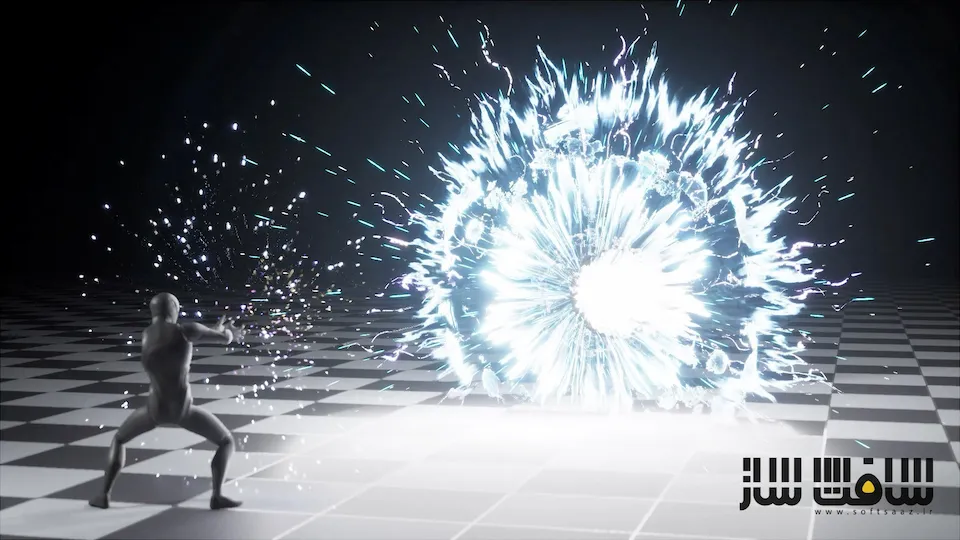
آموزش طراحی و پیادهسازی پرتو انرژی سینمایی در آنریل انجین : در این دوره آموزشی، یاد میگیرید چگونه یک شات سینمایی حرفهای با محوریت پرتو انرژی قدرتمند خلق کنید. تمرکز اصلی مدرس بر فراتر رفتن از ساخت افکتهای پراکنده و آموزش جریان کاری تولیدی است که شامل برنامهریزی، نورپردازی، کامپوزیشن و استفاده از Niagara در کنار Sequencer میشود. شما با استفاده از ابزارهایی نظیر Cascadeur برای انیمیشن و تکنیکهای پیشرفته متریالسازی، یاد میگیرید که چگونه یک صحنه کاملاً هماهنگ و تاثیرگذار را از مرحله ایدهپردازی تا رندر نهایی پیادهسازی کنید تا در نهایت یک خروجی در سطح پروژههای بزرگ صنعت بازیسازی و سینما داشته باشید. این دوره آموزشی توسط تیم ســافــت ســاز برای شما عزیزان تهیه شده است.
عناوین آموزش طراحی و پیادهسازی پرتو انرژی سینمایی در آنریل انجین :
- ایدهپردازی، استوریبرد و برنامهریزی شات
- متحرکسازی کاراکتر در Cascadeur
- چیدمان صحنه، دوربین و نورپردازی در Sequencer
- استفاده از پروکسیهای زمانی برای تنظیم ریتم افکت
- طراحی سیستم ذرات شارژ انرژی در Niagara
- پیادهسازی شلیک پرتو و انفجار نهایی
- تکنیکهای ساخت متریال و تکسچر برای افکت
- ریاضیات حاکم بر ماسکها، نویزها و تغییر شکلها
- رندرینگ نهایی خروجیهای سینمایی
- پولیش و اصلاحات رنگی در افتر افکت
عنوان دوره : The gnomon workshop – Creating a Charged Energy Beam in Unreal Engine
سطح : متوسط
زمان کل دوره : 2 ساعت و 03 دقیقه
تعداد فايل ها : 10
سال آموزش : 2026
فایل تمرینی : دارد
مربی دوره : Raúl Ruiz
نرم افزار : Adobe After Effects, Unreal Engine , Krita
زیرنویس انگلیسی : ندارد
The gnomon workshop – Creating a Charged Energy Beam in Unreal Engine
Learn how to build a production-ready cinematic effects shot centered on a charged energy beam using Niagara and Sequencer in this workshop for intermediate Unreal Engine and real-time VFX artists. Rather than focusing on an isolated effect element, instructor Raúl Ruiz approaches VFX as part of a complete presentation shot, covering the planning, animation support, shot setup, implementation, and final polish needed to make the work read clearly on screen.
This workshop begins with the ideation and shot planning, using references, a quick storyboard, and anchor frames to define timing beats and visual intent. From there, Raúl creates a short support animation in Cascadeur, imports it into Unreal, and establishes the shot context in Sequencer through camera, composition, and lighting decisions. Before building the final systems, he shows how to use simple timing proxies to lock scale, spacing, and rhythm.
The core of this workshop focuses on Niagara. Raúl builds the effect in three practical phases: charge-up, beam launch, and blast/dispersal. Along the way, he shows how to create supporting materials and textures, reveals useful controls, and explains the math behind masks, falloffs, breakup, and noise shaping. The final lesson covers how to render in Unreal Sequencer and apply a subtle After Effects polish pass to enhance the presentation without hiding the real-time work.
Throughout the workshop, he shares production-oriented insights on readability, shot context, iteration control, parameterization, and making VFX decisions that serve both artistic intent and practical workflow. By completing this workshop, artists will have developed an understanding of how to plan and construct a complete Unreal VFX shot from start to finish, rather than just assembling isolated Niagara elements.
Downloadable files include the Unreal Engine project, Niagara systems and materials, animation assets, EmberGen flipbooks, textures, and supporting scene files used during the workshop.
حجم کل : 3.6 گیگابایت
برای نمایش این مطلب و دسترسی به هزاران مطلب آموزشی، نسبت به تهیهی اکانت ویژه از لینک زیر اقدام کنید.
وضعیت فعلی شما
- لینکهای دانلود این مطلب قفل است
- بقیهی مطالب ویژه هم بسته است
- بدون دسترسی به آموزش نصب
با اشتراک ویژه
- دسترسی به همهی مطالب سافتساز
- آپدیت روزانه مطالب سایت از بهترین سایتهای سیجی
- ورود نامحدود کاربران از هر دیوایسی
- دسترسی به آموزش نصب کامل پلاگینها و نرمافزارها
For international users: online support — email info@softsaz.ir or Telegram @SoftSaaz.
امتیاز دهی به این مطلب :
لطفا به این مطلب امتیاز دهید