آموزش کامپوزیشن خلاقانه با Adobe Photoshop
Udemy - Creative Compositing with Adobe Photoshop

آموزش کامپوزیشن خلاقانه با Adobe Photoshop
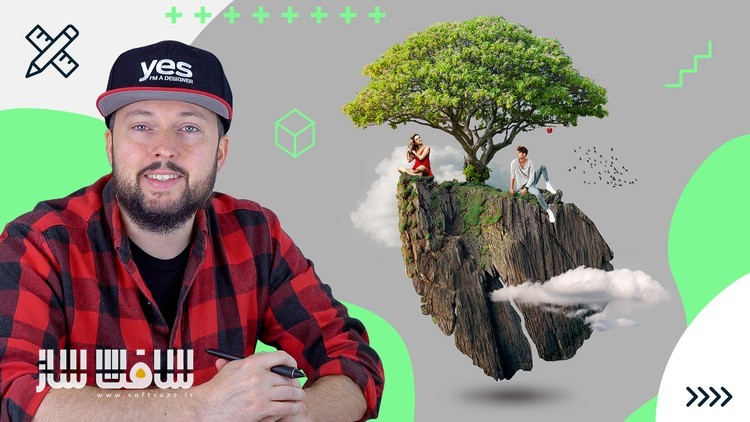
آموزش کامپوزیشن خلاقانه با Adobe Photoshop : در این دوره از هنرمند معروف Martin Perhiniak ، با نحوه ایجاد کامپوزیشن خارق العاده و منحصر به فرد در ادوبی فتوشاپ آشنا خواهید شد. این دوره هنر ترکیب چندین عکس ، ایجاد یکپارچه باورپذیر و زیبای کامپوزشین ، فرآیند تئوری ، تکنیک ها و ساخت 4 ترکیب منحصر به فرد با با فتوشاپ با موضوع طبیعت نشان می دهد. این دوره آموزشی توسط تیم ســافــت ســاز برای شما عزیزان تهیه شده است.
عناوین آموزش کامپوزیشن خلاقانه با Adobe Photoshop :
- استفاده از ورک فلوی کامپوزشین غیرمخرب حرفه ایی با ماسک ها،اسمارت آبجکت ها و لایه ها
- تکنیک های روتوشینگ با ابزارهایی چون Healing Brushes و Clone Stamp Tool
- ویرایش پیشرفته تصویر با ادجانسمنت ها و فیلتر ها و …
- یادگیری کامپوزیشن در هنر ترکیب عکس با هم
عنوان دوره : Udemy – Creative Compositing with Adobe Photoshop
سطح : مبتدی
زمان کل دوره : 1.32 ساعت
تعداد فايل ها : 25
سال آموزش : 2024
فایل تمرینی : دارد
مربی دوره : Martin Perhiniak
نرم افزار : Adobe Photoshop
زیرنویس انگلیسی : ندارد
Udemy – Creative Compositing with Adobe Photoshop
Create a unique fantastical composition
You will learn professional non-destructive compositing workflow utilising Masking, Smart Objects and Layers
Retouching techniques using tools like Healing Brushes and Clone Stamp Tool
Advanced image editing with Adjustments and Filters and so much more.
Learn about compositing is the art of combining multiple photographs together
Compositing is the art of combining multiple photographs together and making them look seamless, believable and beautiful. Learn about the process, theory, techniques and test your skills by working on the class project!
We will create four unique and imaginative compositions using Adobe Photoshop with the theme of nature and exploration. I will be using both the iPad and desktop versions of Photoshop, but you can follow along with whichever version you prefer. For each of these comps we will be using layers, selections, masking, transformations, adjustments, filters and Smart Objects.
I am Martin Perhiniak (Graphic Designer and Adobe Certified Instructor), join me and learn my workflow and best practices I developed over 20 years working as a creative professional for clients like BBC, Mattel, IKEA, Google, Pixar, Adobe.
In this class you’ll learn:
Professional non-destructive compositing workflow utilising Masking, Smart Objects and Layers
Retouching techniques using tools like Healing Brushes and Clone Stamp Tool
Advanced image editing with Adjustments and Filters
and so much more.
Who this class is for?
Anyone planning to become a graphic designer or retoucher
Creatives aiming to improve their technical skills
You don’t need to be a creative professional to take the class
What you will need?
Adobe Creative Cloud
Desire to make something awesome
Even if you’re new to creative compositing or using Adobe applications, you’ll find the simple and effective techniques discussed in this course easy to use and apply to your work!
حجم کل : 2 گیگابایت
برای نمایش این مطلب و دسترسی به هزاران مطلب آموزشی، نسبت به تهیهی اکانت ویژه از لینک زیر اقدام کنید.
وضعیت فعلی شما
- لینکهای دانلود این مطلب قفل است
- بقیهی مطالب ویژه هم بسته است
- بدون دسترسی به آموزش نصب
با اشتراک ویژه
- دسترسی به همهی مطالب سافتساز
- آپدیت روزانه مطالب سایت از بهترین سایتهای سیجی
- ورود نامحدود کاربران از هر دیوایسی
- دسترسی به آموزش نصب کامل پلاگینها و نرمافزارها
For international users: online support — email info@softsaz.ir or Telegram @SoftSaaz.
امتیاز دهی به این مطلب :
لطفا به این مطلب امتیاز دهید