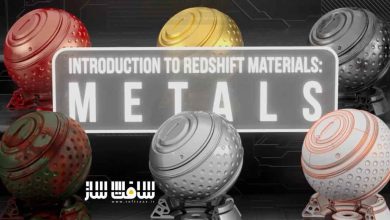
ابهام زدایی از متریال های Redshift در C4D
Skillshare - Demystify Redshift Materials in C4D

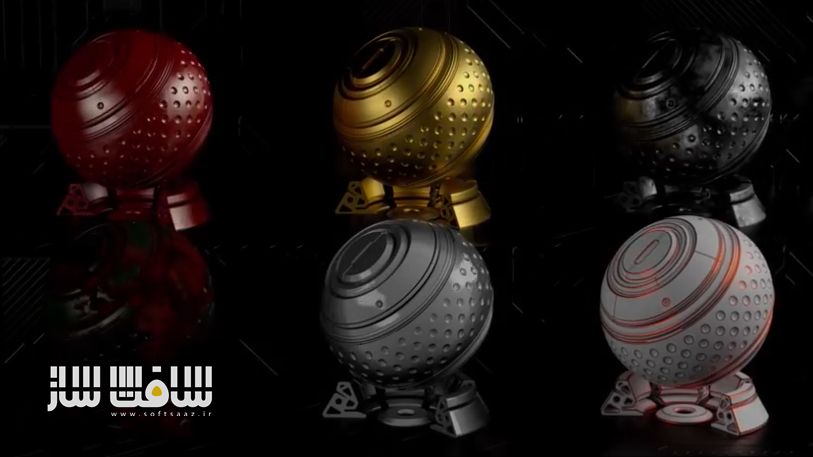
ابهام زدایی از متریال های Redshift در C4D
ابهام زدایی از متریال های Redshift در C4D :این دوره با تدریس Derek Kirkبه شما یاد میدهد چگونه با استفاده از قدرت موتور رندر Redshift بیش از ۵۰ متریال فلزی واقعگرایانه بسازید. در این دوره با Shader Graph کار میکنید و بهصورت گامبهگام گرهها (Nodes) را یاد میگیرید تا بتوانید از پایه متریالهای فوتورئالیستیک ایجاد کنید.
این کلاس هم برای مبتدیان و هم برای کاربران باتجربه طراحی شده است و در طول آموزش با ابزارها و نکات کاربردی در Redshift Shader Graph آشنا خواهید شد. اگر تازهکار هستید، بهتر است ابتدا دوره Introduction to Redshift: The Basics را بگذرانید. این دوره آموزشی توسط تیم ســافــت ســاز برای شما عزیزان تهیه شده است.
عناوین ابهام زدایی از متریال های Redshift در C4D :
- آشنایی با Redshift Shader Graph و ورکفلو ادیتور نودها
- ساخت و استفاده از RS Materials
- طراحی متریالهای فلزی و Car Paints
- استفاده از Noise Maps و Maxon Noise
- کار با Texture Maps و Roughness Maps
- ساخت جزئیات با Bump Maps و Bump Blender Nodes
- استفاده از Curvature Nodes، Ramps، RS Color Layers و Color Control Nodes
- بهکارگیری Displacement برای جزئیات بیشتر
- طراحی افکتهای خاص مثل Cyberpunk Style Greebles
- ترکیب متریالها با Material Blenders
- استفاده از Math Nodes و Simple Expressions
- ذخیرهسازی متریالها و منابع تکسچر و متریال برای تمرین بیشتر
عنوان دوره : Skillshare – Demystify Redshift Materials in C4D
سطح : متوسط
زمان کل دوره : 5.11 ساعت
تعداد فايل ها : 43
سال آموزش : 2025
فایل تمرینی : ندارد
مربی دوره : Derek Kirk
نرم افزار : Redshift – C4D
زیرنویس انگلیسی : ندارد
فشردگی اختصاصی سافت ساز : ندارد
Skillshare – Demystify Redshift Materials in C4D
In this class we will use the awesome power of Redshift to create over 50 metal materials. Using the Shader Graph we will demystify the Node Editor step by step as we create photo realistic materials from scratch. We will cover a ton of content from Noise maps, textures, reflections, bump maps, displacement maps, etc. Learning how and when to use each piece of the puzzle to create some amazing materials.
About This Class
In this class we will learn the process for creating metal materials inside the Shader Graph for the Redshift Render Engine inside of Maxon’s Cinema 4D (C4D). This class is for beginners and experienced users alike looking to learn how to use many of the tools and workflow tips inside the Redshift Shader Graph in order to create amazing materials. If you are brand new to Redshift then you should first take my Introduction to Redshift: The Basics course. Throughout this course we will create over 50 metals and breakdown many of the most common Nodes and how they work. We start off simple and work our way up node by node. By the end you’ll be creating very complex materials with ease.
THIS CLASS:
– We are going to take a look at the Redshift Shader Graph-
-We will go over:
Node Editor Workflow
RS Materials
Car Paints
Creating and using Noise and Maxon Noise Maps
Using Texture Maps
Roughness Maps
Bump Maps
Bump Blender Nodes
Curvature Nodes
Ramps
RS Color layers
Color Control Nodes
Displacement
Cyberpunk Style Greebles
Material Blenders
Math Nodes
Simple Expressions
Saving materials
Resources for textures and materials
We’ll learn all of that while creating over 50 materials step by step!
-The goal of this course is to get you comfortable with the Redshift Shader graph and have a concrete understanding of what nodes to use and how to apply them to create amazing looking materials.
-This is for people who want to demystify both the Shader Graph and the whole process of making materials inside of Redshift.
-I will be using C4D but the information is not limited to Cinema 4D, it applies to all 3D software that Redshift supports: 3ds Max, Maya, etc. GPU rendering like Redshift is an incredible tool for independent users and teams alike. Many of these workflow tips and methods will work for other renderers but there will need to be some interpolation in order to follow along.
I’m excited to breakdown how to make some really cool Metal Materials!!
حجم کل : 1.5 گیگابایت
برای نمایش این مطلب و دسترسی به هزاران مطلب آموزشی، نسبت به تهیهی اکانت ویژه از لینک زیر اقدام کنید.
وضعیت فعلی شما
- لینکهای دانلود این مطلب قفل است
- بقیهی مطالب ویژه هم بسته است
- بدون دسترسی به آموزش نصب
با اشتراک ویژه
- دسترسی به همهی مطالب سافتساز
- آپدیت روزانه مطالب سایت از بهترین سایتهای سیجی
- ورود نامحدود کاربران از هر دیوایسی
- دسترسی به آموزش نصب کامل پلاگینها و نرمافزارها
For international users: online support — email info@softsaz.ir or Telegram @SoftSaaz.
امتیاز دهی به این مطلب :
لطفا به این مطلب امتیاز دهید