آموزش جامع طراحی محیط – بخش دوم: متریالها و شیدرها
ArtsStation - Everything I learnt about Environment Art - Part 2- Materials & Shaders

آموزش جامع طراحی محیط – بخش دوم: متریالها و شیدرها
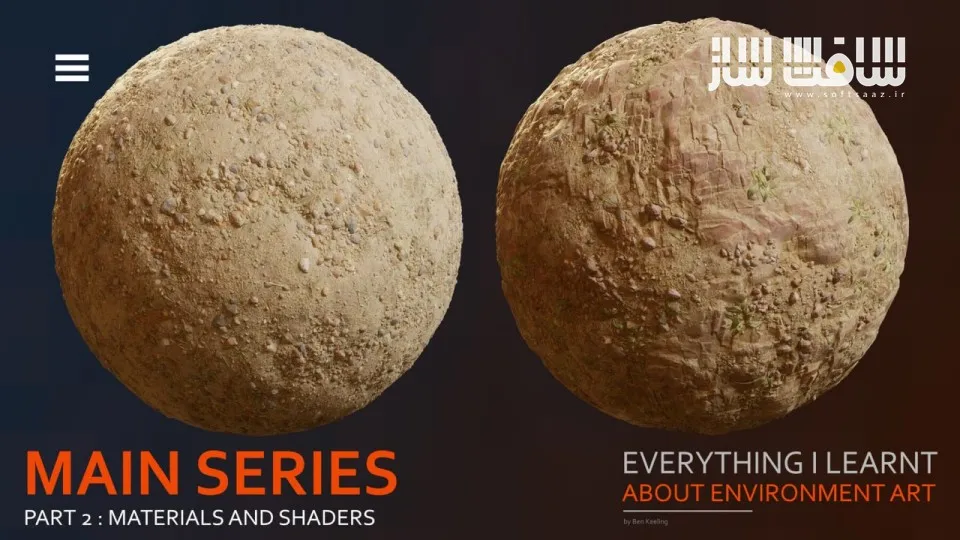
آموزش جامع طراحی محیط – بخش دوم: متریالها و شیدرها : این دوره از Ben Keeling، دومین بخش از مجموعه آموزشی جامع طراحی محیط (Environment Art) است که برای هنرمندان مبتدی و متوسط طراحی شده است. در این دوره، مدرس تجربیات و نکات ارزشمندی را که طی سالها فعالیت حرفهای در زمینه طراحی محیط به دست آورده است، با هنرجویان به اشتراک میگذارد. آموزشها بهصورت فصلبندی شده ارائه میشوند و ترکیبی از مباحث تئوری، اصول فنی و تمرینهای عملی را در بر میگیرند.
این بخش شامل فصلهای سوم و چهارم مجموعه است که به دو موضوع بسیار مهم در طراحی محیط یعنی متریالهای تکرارشونده (Tiling Materials) و شیدرها (Shaders) اختصاص دارند. در طول دوره با فرآیند ساخت متریالهای حرفهای، ایجاد تنوع در سطوح، طراحی شیدرهای پیشرفته و پیادهسازی آنها در Unreal Engine آشنا خواهید شد. همچنین تمامی مفاهیم از طریق مثالهای واقعی و دموهای عملی آموزش داده میشوند تا بتوانید آنها را مستقیماً در پروژههای خود به کار بگیرید. این دوره آموزشی توسط تیم ســافــت ســاز برای شما عزیزان تهیه شده است.
عناوین آموزش جامع طراحی محیط – بخش دوم: متریالها و شیدرها :
- فصل سوم: متریالهای تکرارشونده (Tiling Materials)
آشنایی با مفهوم Tiling Material
درک کاربرد متریالهای تکرارشونده در طراحی محیط
آموزش ساخت متریالهای تکرارشونده از صفر
ایجاد تنوع در متریالهای محیطی
آموزش جمعآوری رفرنسهای حرفهای
تحلیل و بررسی رفرنسها
ساخت Height Map برای سطوح مختلف
ایجاد Base Color حرفهای
تنظیم Roughness برای متریالها
آموزش ساخت متریال خاک در Substance Designer
طراحی متریالهای طبیعی و محیطی
ساخت Leaf Atlas برای پوشش گیاهی
ساخت Rock Atlas برای سنگها
آموزش Sculpting متریالهای سنگی
ایجاد متریال سنگی تکرارشونده
تکمیل و بهینهسازی Variations متریال - فصل چهارم: شیدرها (Shaders)
آشنایی با مفهوم Shader
درک عملکرد شیدرها در موتورهای بازی
آموزش ساخت Shader از پایه
بررسی نمونههای کاربردی شیدر در محیط
آشنایی با Unreal Engine برای توسعه شیدرها
آموزش Material Functions
ساخت Master Shader
طراحی Uber Shader
ایجاد Vertex Blend Shader
آموزش Material Layering
ساخت متریالهای چندلایه
آشنایی با اصول Landscape در Unreal Engine
طراحی شیدرهای Decal
ساخت شیدرهای Foliage
افزودن افکتهای Grunge به متریالها
توسعه ویژگیهای پیشرفته شیدر
بهینهسازی شیدرها برای محیطهای بازی
عنوان دوره : ArtsStation – Everything I learnt about Environment Art – Part 2- Materials & Shaders
سطح : متوسط
زمان کل دوره : 9.17 ساعت
تعداد فايل ها : 2 فصل
سال آموزش : 2026
فایل تمرینی : pur
مربی دوره : Ben Keeling
نرم افزار : zbrush – substance – unreal – blender
زیرنویس انگلیسی : ندارد
فشردگی اختصاصی سافت ساز : ندارد
ArtsStation – Everything I learnt about Environment Art – Part 2- Materials & Shaders
This is the second part of an all-encompassing tutorial for beginners and intermediate-level users. It covers different topics in Environment Art and is intended to share some of my lessons and advice I have learnt along the way. It is split into a chapter-based format. Version 2 includes chapters 3 and 4, available to purchase separately or as part of a reduced bundle.
Chapter 3 – Tiling Materials – Breakdown below – Total run time: 5h 17 mins
What is a tiling material – 5 mins
How to create tiling materials – 22 mins
How to approach tiling materials and variations – 4 mins
Practical examples
Reference gathering – 13 mins
Breaking down the reference – 13 mins
Soil height, base colour and roughness in Substance Designer – 2h 36 mins
Sculpted workflows (Sculpting leaf atlas, sculpting rock atlas, sculpting tiling rock base material – 1h 16 mins
Finishing the variation on the soil – 27 mins
Chapter 4 – Shaders – Breakdown below – Total run time: 4h
What is a Shader – 4 mins
How to create Shaders – 16 mins
Shader examples in an environment – 13 mins
Practical examples
Unreal Intro – 15 mins
Material Functions and Master/Uber Shader – 50 mins
Vertex Blend Shader – 40 mins
Material Layering – 38 mins
Landscape basics – 10 mins
Decal & Foliage Shaders – 27 mins
Adding Grunge and Extra Shader features – 24 mins
The tutorial chapters follow the same format. I start with an explanation and theory on a specific topic. The chapter covers the topic, terminology, why you approach things in a certain way, and the tools and workflows you would use. Each chapter concludes with live demonstrations of applying that theory in practice.
It will be framed around personal art, mainly using examples from my work and professional experience where relevant.
Software used will include, but not be limited to
Blender
Zbrush
Substance Painter/Designer
Unreal 5
You will also gain access to Pure Ref files, which include further tutorial breakdowns, links, and documentation to valuable resources and files. I plan to expand on this as I create more chapters for the tutorial.
حجم کل : 4.2 گیگابایت
برای نمایش این مطلب و دسترسی به هزاران مطلب آموزشی، نسبت به تهیهی اکانت ویژه از لینک زیر اقدام کنید.
وضعیت فعلی شما
- لینکهای دانلود این مطلب قفل است
- بقیهی مطالب ویژه هم بسته است
- بدون دسترسی به آموزش نصب
با اشتراک ویژه
- دسترسی به همهی مطالب سافتساز
- آپدیت روزانه مطالب سایت از بهترین سایتهای سیجی
- ورود نامحدود کاربران از هر دیوایسی
- دسترسی به آموزش نصب کامل پلاگینها و نرمافزارها
For international users: online support — email info@softsaz.ir or Telegram @SoftSaaz.
امتیاز دهی به این مطلب :
لطفا به این مطلب امتیاز دهید