
آموزش Geometry Nodes در Blender 4.4
Udemy - Geometry Nodes For Blender 4.4

آموزش Geometry Nodes در Blender 4.4
آموزش Geometry Nodes در Blender 4.4 : Geometry Nodes یک سیستم فوقالعاده در بلندر است که به شما امکان مدلسازی رویهای، انیمیشن، پراکندگی اشیا و بسیاری کارهای دیگر را میدهد. اما با وجود این همه قابلیت، ممکن است ندانید از کجا باید شروع کنید. در این دوره از هنرمندان Michael Bridges و Erindale Woodford و Canopy Games ،، با دنیای نودهای هندسی در بلندر 4.4 آشنا خواهید شد.
از یک سیستم پراکندگی ساده شروع میکنید و به تدریج مهارتهای خود را از جابجایی و نمونهسازی گرفته تا انیمیشن و بیلبوردهای رویهای توسعه میدهید . در پایان دوره، یک صحنه متحرک کامل را فقط با یک ساختار نودی خواهید ساخت. اگر هنرمندی هستید که میخواهید صحنههای خود را هوشمندانهتر بسازید یا یک مبتدی کنجکاو که به دنیای رویهای علاقه دارد، این دوره به شما پایهای محکم خواهد داد.این دوره آموزشی توسط تیم ســافــت ســاز برای شما عزیزان تهیه شده است.
عناوین آموزش Geometry Nodes در Blender 4.4 :
- اصول اولیه Geometry Nodes در بلندر
- نحوه کار با گراف نودها، ویرایشگر اسپردشیت و میانبرهای مهم
- درک سیستم فیلدها و نحوه جریان دادهها در میان نودها
- مدلسازی رویهای، اعمال متریال و تغییر شکل هندسه
- پراکندگی مجموعهها، استفاده از گروههای ورتکس و نمونهسازی اشیا
- ایجاد انیمیشن با باد، نویز و اسپلاینها
- کار با نودهای مهم مانند Ray Cast، Attribute Statistic و Geometry Proximity
- ساخت بیلبوردهای رویهای و ایجاد انیمیشنهای لوپشده
عنوان دوره : Udemy – Geometry Nodes For Blender 4.4
سطح : متوسط
زمان کل دوره : 4 ساعت
تعداد فايل ها : 25
سال آموزش : 2025
فایل تمرینی : ندارد
مربی دوره : Michael Bridges – Erindale Woodford –Canopy Games
نرم افزار : Blender
زیرنویس انگلیسی : ندارد
فشردگی اختصاصی سافت ساز : ندارد
Udemy – Geometry Nodes For Blender 4.4
Geometry Nodes is one of Blender’s most powerful systems — a visual scripting tool that opens the door to procedural modelling, animation, scattering, and much more. But with all its flexibility, it can be hard to know where to begin.
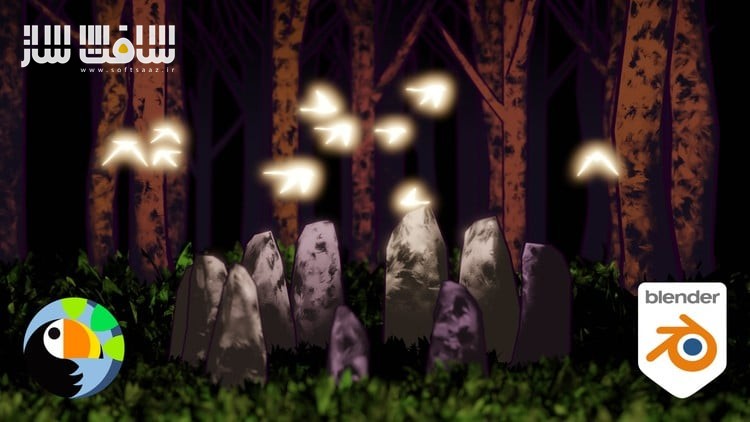
This newly remastered course, written by Erin Woodford and presented by Mike Bridges, introduces you to the world of Geometry Nodes using Blender 4.4. You’ll start with a simple scatter system and build your knowledge step-by-step, covering everything from displacement and instancing to animation and billboards. By the end, you’ll create an entire animated scene — all built within a single node tree.
Whether you’re an artist looking to make smarter scenes or a curious beginner diving into procedural workflows, this course gives you the solid grounding you need.
What You’ll Learn
- The core principles of Blender’s Geometry Nodes system
- How to navigate the node graph, spreadsheet editor, and key shortcuts
- A clear understanding of the fields system and how data flows through nodes
- How to procedurally model, apply materials, and displace geometry
- How to scatter collections, use vertex groups, and instance assets
- Techniques for animating scenes with wind, noise, and splines
- How to use nodes like Ray Cast, Attribute Statistic, and Geometry Proximity
- How to set up procedural billboards and loop animations
Throughout the course, you’ll complete small, focused exercises before working on a full scene — an animated glade complete with trees, wind, and birds — all built procedurally.
What you’ll learn
- Navigate and use the Geometry Nodes system confidently in Blender 4.4
- Build procedural scenes with animation entirely within a node tree
- Use key nodes like Ray Cast, Attribute Statistic, and Geometry Proximity
- Apply instancing, scattering, and animation techniques for dynamic effects
حجم کل : 3.3 گیگابایت
برای نمایش این مطلب و دسترسی به هزاران مطلب آموزشی، نسبت به تهیهی اکانت ویژه از لینک زیر اقدام کنید.
وضعیت فعلی شما
- لینکهای دانلود این مطلب قفل است
- بقیهی مطالب ویژه هم بسته است
- بدون دسترسی به آموزش نصب
با اشتراک ویژه
- دسترسی به همهی مطالب سافتساز
- آپدیت روزانه مطالب سایت از بهترین سایتهای سیجی
- ورود نامحدود کاربران از هر دیوایسی
- دسترسی به آموزش نصب کامل پلاگینها و نرمافزارها
For international users: online support — email info@softsaz.ir or Telegram @SoftSaaz.
امتیاز دهی به این مطلب :
لطفا به این مطلب امتیاز دهید





دمتان گرم