
آموزش Houdini برای هنرمندان سهبعدی از Rebelway
Rebelway - Houdini For 3D Artists

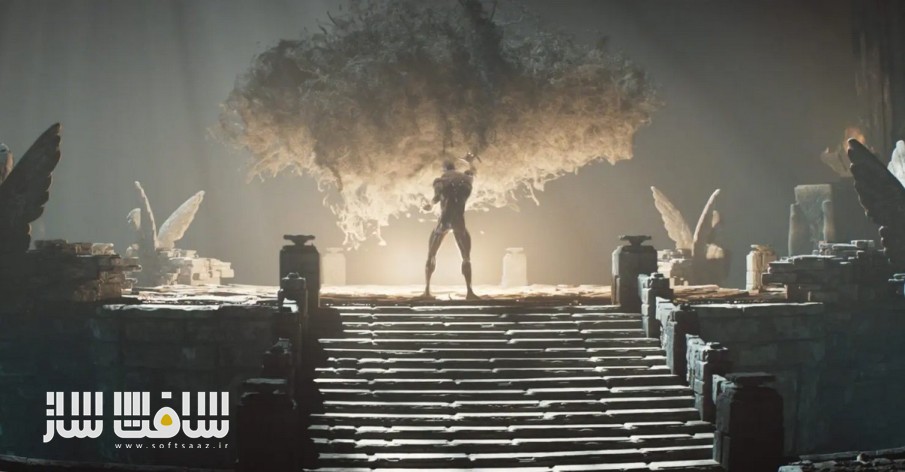
آموزش Houdini برای هنرمندان سهبعدی از Rebelway
آموزش Houdini برای هنرمندان سهبعدی از Rebelway : این دوره از Rebelway راهی برای تسلط بر اصول پایهی تولید رویهای (Procedural Generation) در است Houdini است . در این آموزش جامع، یاد میگیرید چگونه محیطهای سهبعدی را با استفاده از HDAها و ابزارهای Shelf بسازید و ویرایش کنید.
با تمرکز بر Solaris و سیستم رندر قدرتمند Karma، روشهای آمادهسازی مشها برای نمایش، ساخت صحنهها با خروجی مستقیم USD از بستر SOP و صرفهجویی در زمان برای نورپردازی و شیدینگ پیشرفته آموزش داده میشود.
در ادامه، به کار با Copernicus — فریمورک قدرتمند بافتدهی رویهای در Houdini — پرداخته میشود تا یاد بگیرید چگونه جزئیات دقیق و منحصربهفردی خلق کنید و با ترکیب آن با تکسچرهای Megascans کنترل کاملی بر شیدرهای خود بهدست آورید. این دوره آموزشی توسط تیم ســافــت ســاز برای شما عزیزان تهیه شده است.
عناوین آموزش Houdini برای هنرمندان سهبعدی از Rebelway :
هفته ۱: مروری کلی بر پروژه و بررسی جریانهای کاری مختلف. در این بخش، ساختار پروژه تحلیل میشود و رویکردهای فنی برای دستیابی به اهداف مشخص میگردد. سپس، تنظیمات اولیه پروژه برای ایجاد پایهی اصلی ورکفلو انجام میشود.
- هفته ۲: آغاز ساخت مرکز محیط با مدلسازی رویهای. ایجاد پلتفرم اصلی و توسعهی یک ابزار Shelf برای افزودن جزئیات سریع به سایر اجزای صحنه. همچنین، آمادهسازی هندسه برای رندر در Solaris و ساخت HDA برای ایجاد سریع شیدرها با استفاده از تکسچرهای Megascans.
- هفته ۳: ایجاد مسیرهای اصلی محیط. ساخت پایهی walkway از روی منحنیها و توسعهی سیستم خودکار تولید پلهها بر اساس زاویهی منحنیها.
- هفته ۴: ساخت HDA پایه برای walkway و یادگیری نحوهی ساخت نمونههای رندر آماده (Render Instances) برای دیوارههای بالا و کناری. در این هفته با روشهای Instance کردن هندسه روی پرایمیتیوها بهجای نقاط (Points) آشنا میشوید.
- هفته ۵: تولید هندسهی پلهها بر اساس زاویههای مختلف و افزودن قابلیت ساخت پلها و قوسها به HDA. در پایان، walkway آمادهی خروجی گرفتن به USD برای رندر نهایی میشود.
- هفته ۶: ساخت سایر داراییهای محیط با استفاده از تنظیمات قبلی برای ایجاد سریع هندسههای دقیق و آمادهی رندر.
- هفته ۷: کار با ابزار قدرتمند بافتدهی رویهای Copernicus. یادگیری نحوهی ترکیب لایههای بافت، وارد کردن هندسه و صفات (Attributes) برای افزایش جزئیات، و اعمال تکسچرها روی شیدرها با پارامترهای قابل تنظیم برای کنترل کامل جزئیات.
هفته ۸: در هفتهی پایانی، وارد کردن کاراکتر و دوربینهای انیمیتشده، بارگذاری آنها در Solaris، تنظیم نهایی محیط، اختصاص شیدرها، و ایجاد نورپردازی و تنظیمات رندر برای هر شات انجام میشود.
عنوان دوره : Rebelway – Houdini For 3D Artists (Weeks 1-8)
سطح : مبتدی
زمان کل دوره : +35 ساعت
تعداد فايل ها : 128
سال آموزش : 2025
فایل تمرینی : دارد
مربی دوره : JASON SLABBER
نرم افزار : Houdini
زیرنویس انگلیسی : دارد (چسبیده)
فشردگی اختصاصی سافت ساز : ندارد
Rebelway – Houdini For 3D Artists (Weeks 1-8)
Master the Basics of Houdini
In this course, you’ll learn the essentials of procedural generation in Houdini
This course will teach you how to build and modify environments using HDAs and shelf tools.
Explore methods for preparing meshes tailored for display in Solaris and rendering with Karma’s powerful instancing system. Simplify scene creation in Solaris with direct USD export from the SOP context, freeing up time for detailed shader and lighting adjustments.
Taking it a step further, we explore using Copernicus, Houdini’s powerful new procedural texturing framework. This will allow us to craft specific details. Combining this with Megascans textures to give us the ultimate control over our shaders.
WEEK 1
We start off by having a look at an overview of the project and the various workflows covered in the course. Breaking down the components of the project we discuss the technical approaches to be able to achieve our goals. Then we dive into the Project setup to establish the base of our workflow.
WEEK 2
We dive right in, starting with the center of the environment we create and build the main platform using procedural modeling. Here we will build a detailing shelf tool that will allow us to quickly apply the same setup to other components in the environment . Before finalizing the platform geometry we make sure it’s setup correctly for rendering in Solaris. As part of this setup we build a HDA to quickly generate shaders using Megascans textures.
WEEK 3
This week we dive into the main walkway setup for the environment. Starting off we build the base walkway that can be generated from curves. Then we establish the workflow for auto generating stairs based on curve angles.
WEEK 4
Continuing with our walkways, we set up a base HDA that we will build on as we develop the walkways. Building the first components of the walkway we look at generating render ready instances for the top and side walls of the walkways. We then learn how to randomly instance the geometry onto individual primitives rather than copy to points.
WEEK 5
Building on the walkways we look at generating the stairs geometry and how to instance them based on different angles. Adding to our HDA, we build a setup to generate bridges and archways. We finalize the walkways setup for exporting to USD for rendering.
WEEK 6
This week we move onto building the other assets for the environment, we take advantage of some existing setups that we have established to help quickly build highly detailed render ready geometry.
WEEK 7
This week we take a look at using this powerful procedural texturing toolset. Covering the basics, we learn how to layer up texture detail by compositing various operations together. We learn how to import geometry and attributes to enhance texture detail, finally assigning the textures to shaders and setting up parameters to get the most out of the details.
WEEK 8
For the final week, we import our animated character and cameras we learn how to load them into Solaris We finalize the Solaris setup, assigning shaders to our environment and taking a look at how to setup per shot lighting and render settings.
Update: This has been updated to the newer Houdini 20.5 course.
حجم کل : 38 گیگابایت

برای دسترسی به کل محتویات سایت عضو ویژه سایت شوید
برای نمایش این مطلب و دسترسی به هزاران مطالب آموزشی نسبت به تهیه اکانت ویژه از لینک زیر اقدام کنید .
دریافت اشتراک ویژه
مزیت های عضویت ویژه :
- دسترسی به همه مطالب سافت ساز
- آپدیت روزانه مطالب سایت از بهترین سایت های سی جی
- ورود نامحدود کاربران از هر دیوایسی
- دسترسی به آموزش نصب کامل پلاگین ها و نرم افزار ها
اگر در تهیه اشتراک ویژه مشکل دارید میتونید از این لینک راهنمایی تهیه اشتراک ویژه رو مطالعه کنید . لینک راهنما
For International user, You can also stay connected with online support. email : info@softsaaz.ir telegram : @SoftSaaz


