آموزش شبیهسازی گلولای با MPM در هودینی
Udemy - Houdini MPM Mud Simulation

آموزش شبیهسازی گلولای با MPM در هودینی
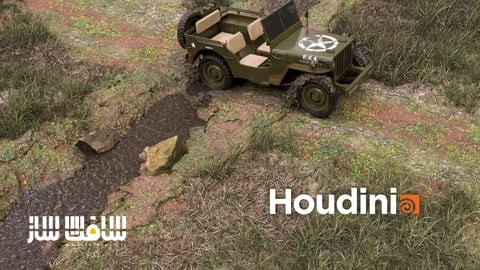
آموزش شبیهسازی گلولای با MPM در هودینی : در این دوره آموزشی، شما با استفاده از شبیهساز پیشرفته MPM در هودینی، ساخت یک شبیهسازی واقعگرایانه از حرکت خودرو در گلولای را به صورت حرفهای میآموزید. این مسیر آموزشی با آمادهسازی زمین و پیکربندی RBD Car Rig برای حرکت داینامیک خودرو آغاز شده و در ادامه به مفاهیم کلیدی شبیهسازی ذرات و کنترل اصطکاک لاستیکها میپردازد. شما یاد میگیرید چگونه با مدیریت توپولوژی برخورد، تولید Wet Maps برای نمایش بهتر گلهای خیس و استفاده از Solaris و Karma XPU، خروجی نهایی را با استانداردهای سینمایی تولید کنید. این دوره یک گردش کاری کامل از ایدهپردازی تا رندر نهایی را در اختیار هنرمندان FX قرار میدهد. این دوره آموزشی توسط تیم ســافــت ســاز برای شما عزیزان تهیه شده است.
عناوین آموزش شبیهسازی گلولای با MPM در هودینی :
- تنظیمات اولیه صحنه و آمادهسازی محیط
- پیکربندی و بهینهسازی خودرو با RBD Bullet
- پیادهسازی انیمیشن داینامیک و کنترل اصطکاک لاستیکها
- مبانی شبیهسازی MPM و تعریف چشمههای ذرات
- بهینهسازی توپولوژی و رفع خطاهای برخورد
- تولید نقشههای رطوبت برای افکتهای واقعگرایانه
- چیدمان محیط و توزیع عناصر طبیعی مانند سنگ و گیاه
- کامپوزیت و مدیریت صحنه در محیط Solaris
- نورپردازی و رندرینگ نهایی با Karma XPU
- جمعبندی و بررسی فایلهای پروژه
عنوان دوره : Udemy – Houdini MPM Mud Simulation
سطح : مبتدی
زمان کل دوره : 4 ساعت و 29 دقیقه
تعداد فايل ها : 23 (1080p)
سال آموزش : 2026
فایل تمرینی : دارد: HTML (1)، ZIP (1)
مربی دوره : Shahzad Ahmad
نرم افزار : Houdini
زیرنویس انگلیسی : ندارد
Udemy – Houdini MPM Mud Simulation
In this course, you will learn how to create a realistic off-road mud simulation in Houdini using modern production workflows. We will begin by building the terrain and preparing a jeep model for RBD Bullet simulation. Using Houdini’s RBD Car Rig, you will learn how to dynamically animate a vehicle and create realistic wheel-slipping effects by controlling tire friction over time. Next, we will explore the fundamentals of Houdini’s MPM Solver before diving into the creation of a detailed mud simulation, including source setup and initial state preparation. Along the way, you will learn techniques for fixing collider topology issues, generating realistic wet maps for wet mud effects, and enhancing the environment with scattered grass and rocks. Finally, we will bring everything together in Solaris and render the complete scene using Karma XPU, following a professional end-to-end workflow from simulation to final render.
What You’ll Learn
Create realistic off-road mud simulations using Houdini’s MPM Solver
Build and prepare terrain for large-scale simulation environments
Configure and optimize vehicles for RBD Bullet simulations
Use Houdini RBD Car Rig to create dynamic vehicle animations
Animate tire friction to achieve realistic wheel-slipping effects
Set up proper MPM sources and initial simulation states
Fix collider mesh topology issues for reliable simulation results
Generate wet maps to create convincing wet mud effects
Explore multiple techniques for creating and refining wet maps
Scatter environmental assets such as grass and rocks to enhance realism
Assemble and render complete scenes using Solaris and Karma XPU
Follow a production-oriented workflow from simulation setup to final rendering
What you’ll learn:
– Create realistic mud simulations using Houdini’s MPM Solver
– Build and prepare terrains for large-scale simulation environments
– Set up and optimize vehicles for RBD Bullet simulations
– Create proper MPM sources and initial states for stable simulations
– Fix collider topology issues that can negatively affect simulations
– Generate realistic wet maps for mud and surface interaction effects
– Assemble simulation, environment, lighting, and rendering workflows in Solaris
– Render high-quality final shots using Karma XPU
Requirements:
– A Basic Understanding Of Houdini is Required
Who this course is for:
– Houdini artists who want to learn advanced MPM simulation workflows
– FX artists interested in creating realistic mud, dirt, and ground interaction effects
– Intermediate Houdini users looking to expand their simulation skillset
– Technical artists interested in combining RBD and MPM simulations
– Students aiming to understand a complete production workflow from simulation to rendering
– Anyone looking to create high-quality cinematic off-road effects in Houdini
حجم کل : 8.13 گیگابایت
برای نمایش این مطلب و دسترسی به هزاران مطلب آموزشی، نسبت به تهیهی اکانت ویژه از لینک زیر اقدام کنید.
وضعیت فعلی شما
- لینکهای دانلود این مطلب قفل است
- بقیهی مطالب ویژه هم بسته است
- بدون دسترسی به آموزش نصب
با اشتراک ویژه
- دسترسی به همهی مطالب سافتساز
- آپدیت روزانه مطالب سایت از بهترین سایتهای سیجی
- ورود نامحدود کاربران از هر دیوایسی
- دسترسی به آموزش نصب کامل پلاگینها و نرمافزارها
For international users: online support — email info@softsaz.ir or Telegram @SoftSaaz.