
مقدمهای بر Nuke بخش اول
FxPhd – NUK151 – Introduction to Nuke Part 1

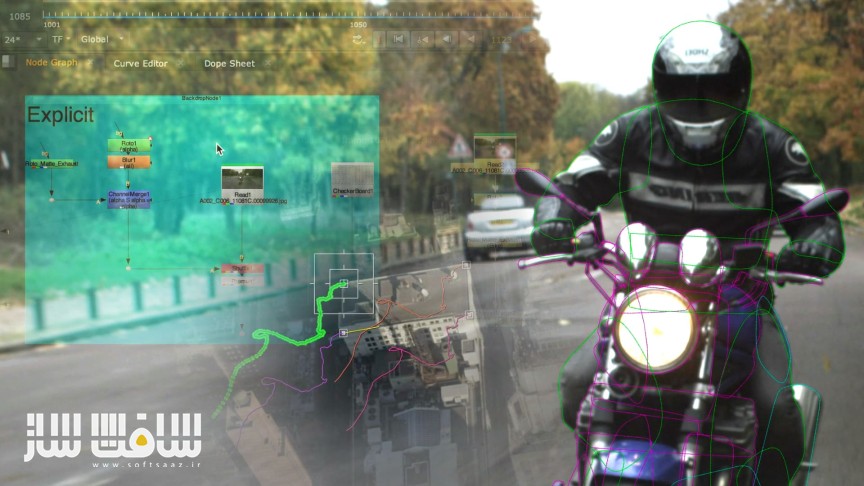
مقدمهای بر Nuke بخش اول
مقدمهای بر Nuke بخش اول : Nuke نرمافزار استاندارد صنعت برای کامپوزیت نودبیس است. چه تازهوارد این حوزه باشید یا از نرمافزارهای دیگر به Nuke آمده باشید، این دوره چندبخشی پایهای محکم برای شروع اولین شاتهای شما فراهم میکند.
با ایجاد تعادل بین توضیح اصول پایه و مثالهای عملی، Nuke در هر کلاس برای شما قابلفهمتر خواهد شد. این بخش اول تکنیکهایی را به شما نشان میدهد که بهعنوان یک هنرمند کامپوزیت روزانه با آنها سر و کار خواهید داشت.
مدرس دوره، کریستف زاپلتال (Christoph Zapletal)، هنرمند مستقل Flame و Nuke است که نزدیک به ۲۵ سال سابقه در پروژههای تبلیغاتی و سینمایی دارد. او از نویسندگان ثابت مجله Digital Production و مدرس دانشگاه HFF در مونیخ آلمان است. این دوره آموزشی توسط تیم ســافــت ســاز برای شما عزیزان تهیه شده است.
عناوین مقدمهای بر Nuke بخش اول :
- کلاس 1: مقدمه، مرور کلی و اولین قدمها
مروری بر تاریخچه Nuke، نقش آن در خط تولید VFX و آشنایی با رابط کاربری از طریق ساخت یک کامپ ساده. - کلاس 2: رابط کاربری
آشنایی با پنجرهها و پانلها و نحوه شخصیسازی آنها، انواع نودها و قوانین نظمدهی به اسکریپت برای کار حرفهای. - کلاس 3: فضاهای رنگی، نود Read و Write
بحث درباره Cache و Localisation، بررسی نود Read، فریم شروع ثابت، سیاست رنگ Nuke، premultiply و اصول صحیح نوشتن فایل خروجی. - کلاس 4: ترنسفورمها، زنجیرهسازی و باکس محدودکننده (Bounding Box)
استفاده از یک توپ فوتبال برای آموزش مفاهیم مهمی که پایه ورود به انیمیشن را تشکیل میدهند. - کلاس 5: انیمیشن
آشنایی با ساخت انیمیشن توپ و کار با curve editor و dope sheet. - کلاس 6: ترکینگ – بخش اول
آشنایی با ترکینگ یک و دو نقطهای، روشهای بررسی کیفیت ترک، جلوگیری از انسداد ترکها و میانگینگیری ترکها. - کلاس 7: ترکینگ – بخش دوم
ترک چهار نقطهای و Corner Pin برای ورود به ترکینگ تحت نظارت (Supervised Tracking) و اصلاح دستی ترکها. - کلاس 8: روتو – بخش اول
معرفی نود Roto و نحوه اتصال ترکینگ به آن، همراه با بررسی استراتژیهای مختلف روتو. - کلاس 9: روتو – بخش دوم
بررسی دقیق lifetime، ripple offset و motion blur و انتخاب درست حالتهای ترکیب (Blend Mode) برای ساخت Matte. - کلاس 10: رتوش
معرفی نود RotoPaint و بررسی روش Invert-Stabilize برای حذف لرزش و تثبیت تصویر.
عنوان دوره : FxPhd – NUK151 – Introduction to Nuke Part 1
سطح : متوسط
زمان کل دوره : 5.32 ساعت
تعداد فايل ها : 10
سال آموزش : 2023
فایل تمرینی : دارد
مربی دوره : Christoph Zapletal
نرم افزار : Nuke
زیرنویس انگلیسی : ندارد
فشردگی اختصاصی سافت ساز : ندارد
FxPhd – NUK151 – Introduction to Nuke Part 1
Nuke is the industry standard for node-based compositing. Whether you are just starting out in the industry or coming to Nuke from another Application, this multi-part course aims to give you a solid foundation for setting up your first shots.
Striking a balance between explaining core principles and hands-on examples, Nuke will become more and more accessible to you with each class. This first part will show you many techniques you will use on a day-to-day basis as a compositing artist.
The course is taught by Christoph Zapletal, a freelance Flame and Nuke artist who has been in the industry for close to 25 years, working on both commercial and feature projects. Beyond that, he is a frequent contributor to Digital Production Magazine as well as an instructor at the HFF in Munich, Germany.
Class 1: Introduction, Overview and First Steps
We discuss Nuke’s history, its place in the vfx pipeline, and take a tour of the interface by building our first very basic comp.
Class 2: User Interface
The workspaces with their panes and windows offer great flexibility and customisation. We also learn about different types of notes and good housekeeping rules for keeping your script organised.
Class 3: Color Spaces, Read and Write Node
Starting off with a discussion on caching vs. localisation, we dive deep into the Read Node, discussing the virtues of a consistent start frame and Nuke’s color policy. We also discuss premultiplication and good working practices when writing files to disk.
Class 4: Transforms, Concatenation, and the Bounding Box
A simple football/soccer ball will help us exploring three important concepts of Nuke, laying the groundwork to head of into animation.
Class 5: Animation
The football wants to bounce, so we explore animation while also taking a close look at the curve editor and the dope sheet.
Class 6: Tracking, Part 1
We discuss the basic functionality of a point tracker, both with one and two points. Another topic is how to verify your track. Later, we also discuss offsetting tracks to avoid obstructions and averaging your tracks.
Class 7: Tracking, Part 2
4-Point-tracking and corner pinning serve as a jumping off point for our discussion on supervised tracking as well as manually refining your track.
Class 8: Roto, Part 1
A detailed introduction into the roto node and a guide on how to apply tracking data to your roto. Also a discussion on roto strategies.
Class 9: Roto, Part 2
Continuation of the roto class, with a closer look at lifetime, ripple offset and motion blur. The class concludes with a discussion on proper blend modes for mattes.
Class 10: Retouch
Meet the roto nodes bigger, beefier brother, the RotoPaint Node. Also, an introduction to the Invert-Stabilize Workflow.
حجم کل : 2.5 گیگابایت
برای نمایش این مطلب و دسترسی به هزاران مطلب آموزشی، نسبت به تهیهی اکانت ویژه از لینک زیر اقدام کنید.
وضعیت فعلی شما
- لینکهای دانلود این مطلب قفل است
- بقیهی مطالب ویژه هم بسته است
- بدون دسترسی به آموزش نصب
با اشتراک ویژه
- دسترسی به همهی مطالب سافتساز
- آپدیت روزانه مطالب سایت از بهترین سایتهای سیجی
- ورود نامحدود کاربران از هر دیوایسی
- دسترسی به آموزش نصب کامل پلاگینها و نرمافزارها
For international users: online support — email info@softsaz.ir or Telegram @SoftSaaz.
امتیاز دهی به این مطلب :
لطفا به این مطلب امتیاز دهید




با سرچی که کردم فایل اصلی حجمش 2.9 است که از لینک زیر میشه دید ممنون میشم فایل اصلی رو برای دانلود قرار بدید.
با سلام
عنوان دوره و توضیحات دوره با فایلی که برای دانلود قرار داده اید متقاوت است. توضیحات مربوط به دوره Introduction to Nuke است ولی فایلی که برای دانلود قرار داده اید مربوطه به دوره FXPHD Secrets of Paint and Roto است لطفا اصلاح کنید و فایلهای دوره Nuke رو بذارید. تشکر
سلام بله حق با شماست ولی از همون منبع گرفته شده و اشتباه گذاشته شده