آموزش مدلسازی و تکسچرینگ دکوراسیون در Blender
Udemy- Modeling and Texturing Decoration in Blender, step-by-step

آموزش مدلسازی و تکسچرینگ دکوراسیون در Blender
آموزش مدلسازی و تکسچرینگ دکوراسیون در Blender : با این آموزش از هنرمند Sime Bugarija ، مهارتهای خود را در مدلسازی و تکسچرینگ ارتقا دهید و یاد بگیرید چگونه داراییهای سهبعدی حرفهای خلق کنید و حتی بفروشید! این آموزش مناسب مبتدیان – هر درس حدود ۳۰ دقیقه است و تمامی مراحل را پوشش میدهد.این دوره آموزشی توسط تیم ســافــت ســاز برای شما عزیزان تهیه شده است.
عناوین آموزش مدلسازی و تکسچرینگ دکوراسیون در Blender :
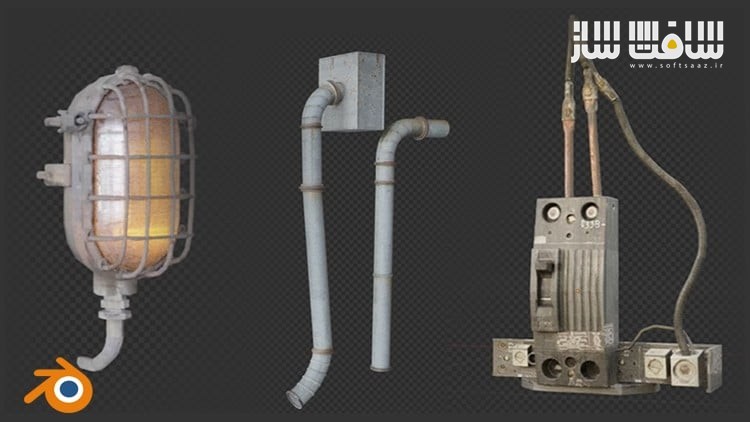
- ایجاد داراییهای دکوراتیو صنعتی – شامل سیستمهای نوری، لولهها، کابلها، جعبههای الکتریکی، سازههای فلزی، نردهها، قطعات مکانیکی و …
- مدلسازی و تکسچرینگ از روی تصاویر واقعی – برای دستیابی به بالاترین سطح واقعگرایی
- آموزش گامبهگام ساخت ۶ مدل از ابتدا تا انتها – با فرآیند کامل مدلسازی، تکسچرینگ و UV Unwrapping
- استفاده از شورتکاتها و مدیفایرها – برای سرعت بخشیدن به مدلسازی در Blender
- ساخت پکیج داراییهای سهبعدی – برای ذخیره در Asset Browser یا فروش در BlenderMarket و سایر پلتفرمها
عنوان دوره : Udemy- Modeling and Texturing Decoration in Blender, step-by-step
سطح : مبتدی
زمان کل دوره : 3 ساعت
تعداد فايل ها : 8
سال آموزش : 2025
فایل تمرینی : دارد
مربی دوره : Sime Bugarija
نرم افزار : Blender
زیرنویس انگلیسی : ندارد
فشردگی اختصاصی سافت ساز : ندارد
Udemy- Modeling and Texturing Decoration in Blender, step-by-step
I recently created an asset pack consisting of 127 decorative assets. It is mainly about industrial things such as lighting facilities, pipes, cables, electrical boxes, metal structures, fences, mechanical parts, large structures and more.
Fortunately, I didn’t just stick to the asset package, I also recorded a part of the process of creating the asset package. More specifically, I recorded (for now) the process of creating 6 assets from start to finish.
Each lesson lasts on average about 30 minutes and shows the entire process of creating individual assets, from modeling, texturing, unwrapping… so the tutorial is suitable for beginners as well.
So, in this tutorial I will show you how to create an asset package that you can later save in asst browser or for example sell on BlenderMarket or another platform.
All objects are modeled and textured from real photos to look as realistic as possible, and in the tutorial I will show you how to create multiple shaders from a single photo to get as much detail as possible.
In addition to texturing, of course, we will talk a lot about modeling.
I will show you how to quickly model using shortcut keys and modifiers in Blender and much more.
With the tutorial you also get all the resources needed to follow the tutorial as well as the Industrial Decoration Asset package.
- I will introduce you to the free 3d program Blender
- I will show you how to model and texture realistic models in blender
- In addition to the tutorial, you will also receive an asset pack with 127 models.
- You can learn how to create an asset pack in Blender that you can sell.
حجم کل : 4.1 گیگابایت
برای نمایش این مطلب و دسترسی به هزاران مطلب آموزشی، نسبت به تهیهی اکانت ویژه از لینک زیر اقدام کنید.
وضعیت فعلی شما
- لینکهای دانلود این مطلب قفل است
- بقیهی مطالب ویژه هم بسته است
- بدون دسترسی به آموزش نصب
با اشتراک ویژه
- دسترسی به همهی مطالب سافتساز
- آپدیت روزانه مطالب سایت از بهترین سایتهای سیجی
- ورود نامحدود کاربران از هر دیوایسی
- دسترسی به آموزش نصب کامل پلاگینها و نرمافزارها
For international users: online support — email info@softsaz.ir or Telegram @SoftSaaz.
امتیاز دهی به این مطلب :
لطفا به این مطلب امتیاز دهید