
آموزش ساخت دسر در Houdini 20.5 از Rohan Dalvi
Rohan Dalvi - Houdini Dessert (20.5)

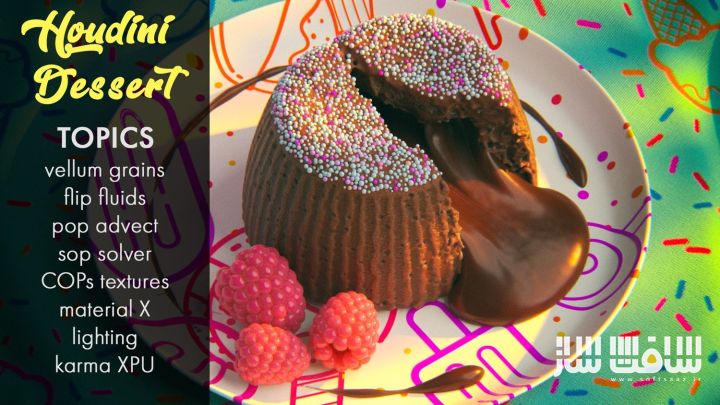
آموزش ساخت دسر در Houdini 20.5
آموزش ساخت دسر در Houdini 20.5 : در این دوره آموزشی، با روش ساخت یک دسر در Houdini آشنا میشوید. در این آموزش از Vellum و FLIP Fluids برای ایجاد یک Lava Cake استفاده میکنیم. پس از اتمام شبیهسازی، با کمک Volume VOPs جزئیات بیشتری به کیک اضافه میکنیم.
همچنین جزئیات اضافی مثل شکر روی کیک و حبابهای موجود در مایع شکلاتی نیز ایجاد میشود. بعد از پایان شبیهسازی و مدلسازی، با استفاده از COPS تکسچرها ساخته شده و نهایتاً نورپردازی و شیدینگ در Solaris انجام میشود و رندر با Karma XPU گرفته میشود. این دوره آموزشی توسط تیم ســافــت ســاز برای شما عزیزان تهیه شده است.
عناوین آموزش ساخت دسر در Houdini 20.5 :
- Cake Vellum Setup – استفاده از Vellum Grains، Glue و Attribute سفارشی برای شکستن کیک با قاشق
- Cake Mesh – ساخت Mesh کیک با Grains و Constraint Geometry و افزودن جزئیات با Volume VOP
- Chocolate Simulation – اضافه کردن شکلات داخل کیک با FLIP Fluids
- Chocolate Mesh & Bubbles – ساخت Mesh شکلات و ایجاد حبابها با Pop VOP و Velocity Volumes سفارشی
- Spoon Setup – چسباندن شکلات به قاشق با SOP Solver
- Berry – مدلسازی یک توت ساده با Vellum Cloth
- Sugar – افزودن شکر روی کیک با استفاده از Vellum Grains موجود
- Table Cloth – ساخت یک پارچه میز ساده با Vellum Brush
- Dessert Texture Shapes – ایجاد اشکال دسر در COPS برای تکسچر میز و بشقاب
- Dessert Textures Final – ساخت تکسچر نهایی میز و بشقاب در COPS
- Solaris Setup – وارد کردن صحنه به Solaris و تنظیم نورهای پایه
- Shader Setup – ساخت تمامی شیدرهای صحنه
- Final Touches – اضافه کردن نورهای تکمیلی و افکتهای دوربین
- Rendering Animation – رندر کردن انیمیشن و اصلاح مشکلات احتمالی
- Correction – انجام اصلاحات کوچک روی Mesh کیک برای جلوگیری از Flickering در رندر
عنوان دوره : Rohan Dalvi – Houdini Dessert (20.5)
سطح : متوسط
زمان کل دوره : 5 ساعت
تعداد فايل ها : 15
سال آموزش : 2025
فایل تمرینی : دارد
مربی دوره : Rohan Dalvi
نرم افزار : Houdini
زیرنویس انگلیسی : ندارد
فشردگی اختصاصی سافت ساز : ندارد
Rohan Dalvi – Houdini Dessert (20.5)
Hello everyone, and this is making a dessert in houdini. In this training we’ll use vellum and flip fluids to create a lava cake in houdini.
Once the simulation is done, we’ll use volume vops to add details to the cake. We’ll also add additional details to the cake other some sugar on top and done bubbles into the chocolate fluid. After the simulation and modeling is done, we’ll make some texture using the new COPS and finally add lights and shaders in Solaris and render using karma XPU.
Lessons
- Cake Vellum Setup – Using vellum grains, glue and custom break attribute to break the cake with a spoon
- Cake mesh – Building the cake mesh using the grains and the constraint geometry. Also adding details to the cake using Volume VOP
- Chocolate sim – Adding chocolate inside the cake using FLIP fluids
- Chocolate mesh and bubbles – Building the chocolate mesh and adding some bubbles using a pop vop and custom velocity volumes
- Spoon setup – Getting chocolate to stick to the spoon using a SOP solver
- Berry – Modeling a simple berry using vellum cloth
- Sugar – Adding sugar on top of the cake using the existing vellum grains
- Table Cloth – Making a simple table cloth using vellum brush
- Dessert Texture Shapes – Making some dessert shapes in COPs to make textures for the table cloth and plate
- Dessert Textures final – Building the final textures for the table cloth and plate in COPs
- Solaris setup – Importing the scene into Solaris and setting up basic lights
- Shader setup – Making all the shaders for the scene.
- Final touches – Adding more lights to finalize the scene and adding some camera effects
- Rendering animation – Rendering the animation and correcting any issues we might get in the rendered animation
Correction – Making a minor correction to the cake mesh to prevent flickering in the render.
حجم کل : 10 گیگابایت
برای نمایش این مطلب و دسترسی به هزاران مطلب آموزشی، نسبت به تهیهی اکانت ویژه از لینک زیر اقدام کنید.
وضعیت فعلی شما
- لینکهای دانلود این مطلب قفل است
- بقیهی مطالب ویژه هم بسته است
- بدون دسترسی به آموزش نصب
با اشتراک ویژه
- دسترسی به همهی مطالب سافتساز
- آپدیت روزانه مطالب سایت از بهترین سایتهای سیجی
- ورود نامحدود کاربران از هر دیوایسی
- دسترسی به آموزش نصب کامل پلاگینها و نرمافزارها
For international users: online support — email info@softsaz.ir or Telegram @SoftSaaz.




کاش پروژهای تمرینیش رو توی یه فایل جدا قرار بدید
سلام جدیداً تا حد ممکن جدا میکنیم ☺️