آموزش طراحی سلاح SciFi در Blender
Blender Bros – SciFi Weapon Design in Blender

آموزش طراحی سلاح SciFi در Blender
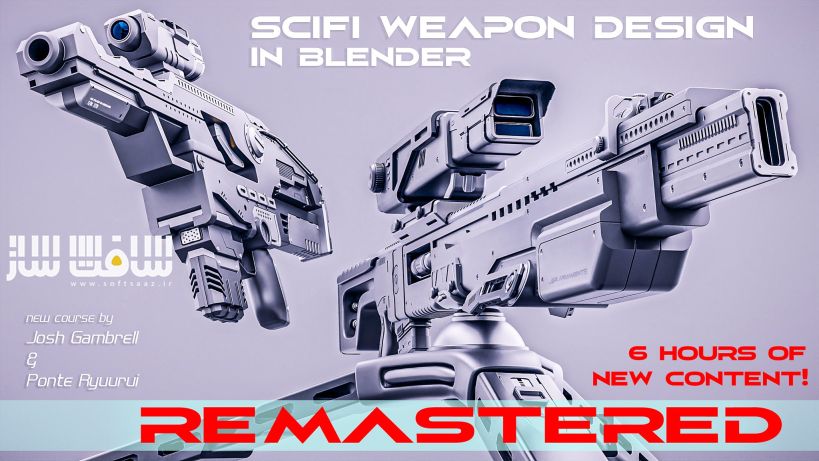
آموزش طراحی سلاح SciFi در Blender : این دوره یک آموزش جذاب و خلاقانه برای یادگیری مدلسازی هارد سرفیس (Hard Surface) در بلندر است که با طراحی دو اسلحه علمی-تخیلی (Sci-Fi) از صفر تا رندر نهایی پیش میرود. در این دوره شما یاد میگیرید چگونه مدلسازی را از مرحله بلاکآوت شروع کنید، جزئیات اضافه کنید، از تکنیکهای هارد سرفیس برای ترکیببندی تمیز استفاده کنید و در نهایت با متریال و نورپردازی یک رندر چشمگیر خلق کنید؛ تمام این فرآیند فقط در Blender انجام میشود.
این دوره چه برای مبتدیان و چه برای کاربران حرفهای، مجموعهای از تکنیکهای ضروری و عملی مدلسازی هارد سرفیس را پوشش میدهد. با گذراندن این آموزش، هم اعتمادبهنفس لازم برای مدلسازی سهبعدی را بهدست میآورید و هم آماده خواهید بود تا پروژههای شخصی خودتان را در زمینه طراحی هارد سرفیس شروع کنید.این دوره آموزشی توسط تیم ســافــت ســاز برای شما عزیزان تهیه شده است.
عناوین آموزش طراحی سلاح SciFi در Blender :
- مدلسازی هارد سرفیس در بلندر
- تکنیکهای Boolean و Bevel
- رفع خطاهای شیدینگ (Shading Errors)
- اصلاح مشکلات توپولوژی و اعوجاج مش
- ورکفلو کامل بدون نیاز به افزونه (Vanilla Blender Workflow)
- مدیریت Boolean Cleanup
- استفاده از Subdivision Surface همراه با Boolean
- تنظیم متریالها و نورپردازی حرفهای
- اصول ترکیببندی (Composition)
- رندرینگ سریع و بهینه
- بخش جانبی ویرایش رندر در Photoshop برای تقویت خروجی
عنوان دوره : Blender Bros – SciFi Weapon Design in Blender
سطح : متوسط
زمان کل دوره : – ساعت
تعداد فايل ها : –
سال آموزش : 2025
فایل تمرینی : دارد
مربی دوره : Blender Bros
نرم افزار : Blender
زیرنویس انگلیسی : ندارد
فشردگی اختصاصی سافت ساز : ندارد
Blender Bros – SciFi Weapon Design in Blender
This course will cover a fun and creative way to learn hard surface modeling in Blender by creating two beautiful SciFi weapons from scratch. You will learn how to block out the model, detail it, use hard-surface techniques for clean composition, and apply materials to give it a beautiful final render, all done completely within Blender.
Who is it for?
Quick answer: ANYONE interested in 3D modeling/art
This course is ideally for those who at least know the basic tool set within Blender (scaling, extruding, moving, menus, etc). Master or advanced knowledge of Blender is absolutely not required. However, if you are a complete beginner or are brand new to hard surface with no prior experience, I would suggest enrolling in our SciFi Crate Design in Blender.
What will the course cover?
• Hard Surface Modeling
• Boolean and Bevel techniques
• How to clean up shading errors
• How to fix artifacts and mesh distortions
• Vanilla (no addons) Blender workflow
• Boolean cleanup
• Topology Fixes
• Subdivision Surface workflow with booleans
• Materials
• Lighting
• Composition
• Rendering
Among other topics, these are the primary points of focus. Specifically, you will learn not only how to model, but also how to clean up common issues involving bad shading and mesh artifacts. The ability to model and then clean up these errors is essential, and this course will cover everything you need to know for hard surface modeling.
Overview
We’ll start by setting up the correct proportions using a reference photo. Although this is a SciFi model, it still needs to make sense, so we’re going to make sure we get the trigger, barrel, grip, and things like that in the correct locations. After that, it will all be smooth sailing into making our own unique design.
Next, we will discuss how to properly use booleans and modifiers to create our own visual aesthetic without the need for a lot of geometry. Along the way, we will encounter common modeling problems and shading errors, which we will fix on the spot. We will also move our focus onto how to practically use bevels in our workflow, to avoid shading errors and artifacts in the first place.
Lots of people are also intimidated by subdivision surface modifiers with booleans. Don’t be. The concept it actually quite easy once you wrap your head around the concept. We’ll have several examples of combinations of subsurf, booleans, and bevels all in one object, with absolutely flawless shading.
Our personal favorite part of this course is working with materials and rendering the model after it’s complete. Composition is something that needs to be considered, as it can be the difference between your model looking out of this world and beautiful or cheaply made. The course will cover how to use proper material settings, HDRI lighting, reflectors, and camera angles to achieve an aesthetically pleasing render. Best of all, no more waiting hours for your render! We’ll show you some tricks that we both use personally to render our images in mere minutes.
We will also have a bonus section covering additional editing in Photoshop. It is not required but will help your render ‘pop’ a bit more for your portfolio.
Conclusion
Whether you’re a seasoned hard-surface modeler, or a beginner in Blender or modeling in general, this course will present a series of important and practical modeling techniques to get you up to speed in 3D modeling quicker than most YouTube tutorials may be able to do. We believe that courses geared too much towards one skill level results in a disconnect of information and learning, so we’ve made this easy enough to understand for beginners, but technical enough for advanced users to pick up on. This course will make you confident in 3D modeling and hard surface and you’ll leave feeling ready to tackle your own modeling projects.
حجم کل : 18 گیگابایت
برای نمایش این مطلب و دسترسی به هزاران مطلب آموزشی، نسبت به تهیهی اکانت ویژه از لینک زیر اقدام کنید.
وضعیت فعلی شما
- لینکهای دانلود این مطلب قفل است
- بقیهی مطالب ویژه هم بسته است
- بدون دسترسی به آموزش نصب
با اشتراک ویژه
- دسترسی به همهی مطالب سافتساز
- آپدیت روزانه مطالب سایت از بهترین سایتهای سیجی
- ورود نامحدود کاربران از هر دیوایسی
- دسترسی به آموزش نصب کامل پلاگینها و نرمافزارها
For international users: online support — email info@softsaz.ir or Telegram @SoftSaaz.
امتیاز دهی به این مطلب :
لطفا به این مطلب امتیاز دهید