پلاگین Merge Master برای بلندر
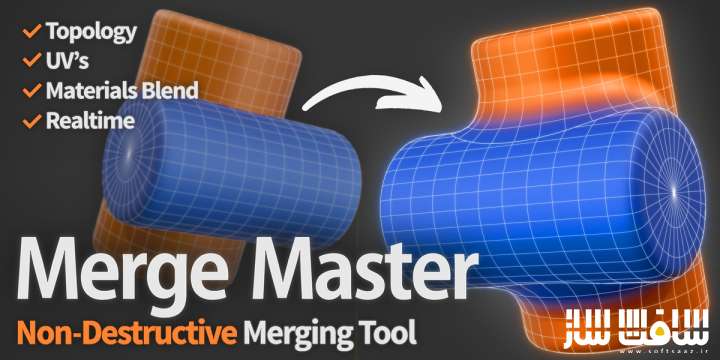
پلاگین Merge Master برای بلندر : این پلاگین اتصال و ادغام دو آبجکت مجزا در یک سطح پیوسته همواره نیازمند استفاده از عملیاتهای بولی، بازسازی شبکه، نگاشت پوسته یا پیکرتراشی دستی بوده است که تمامی این روشها مخرب و بازگشتناپذیر هستند ، این ابزار نخستین پلاگین است که فرآیند ترکیب و محوشدگی مرزها را به صورت زنده، تنها با چند کلیک و بدون کوچکترین تغییر در مدلهای پایه انجام میدهد ، کافی است دو مدل سهبعدی را انتخاب کرده و دکمه فعالسازی یا کلید میانبر کنترل به همراه شیفت و ام را فشار دهید تا یک مدل با اتصال بسیار تمیز روی سطح مدل دیگر پیوند داده شود ، با سافت ساز همراه باشید .
ویژگی های این پلاگین :
- ادغام زنده و لحظهای با قابلیت بهروزرسانی آنی تغییرات هنگام جابهجایی لغزندهها حتی روی شبکههای بسیار متراکم بدون نیاز به پیشپردازش
- حفظ کامل ساختار توپولوژی اصلی شامل تعداد راسها، لبهها و چندضلعیها بدون تغییر در مدل اولیه در طول فرآیند ترکیب
- حفظ دقیق نقشههای مختصات بافت حتی هنگام فعال بودن ترکیب زنده متریالها جهت استفاده در فرآیندهای رنگآمیزی و پخت
- ترکیب زنده متریالها همراه با ایجاد انتقال بافت بین دو مدل در ناحیه اتصال با قابلیت تنظیم مستقل شدت نفوذ هر متریال
- جریان کاری تکلغزندهای با ابزار ادغام سراسری جهت تغییر متناسب شدت، شعاع و بردارهای عمود بر سطح به صورت همزمان
- پشتیبانی اختیاری از عملیاتهای بولی جهت برش زنده مدل پایه و حذف هندسههای داخلی پنهان، بسیار کاربردی برای پرینت سهبعدی
- قابلیت پیوند چندگانه اشیاء بر روی یک سطح هدف واحد و امکان زنجیرهسازی زنده اتصالها بدون نیاز به پخت نهایی
- دارای منحنیهای افت شدت سفارشی و الگوهای آماده نرم، خطی، تیز و کروی به همراه ویرایشگر اختصاصی پروفایل
- کنترل تقسیمبندی ساختار در دو حالت ساده برای اجرا روی تمامی شبکهها و حالت پیشرفته برای محاسبات دقیق ریاضی
- ذخیرهسازی تنظیمات اختصاصی برای هر شیء به صورت مجزا جهت ترکیب چندین مدل با مشخصات متفاوت روی یک بدنه
- و..

Superhive Market – Merge Master
Merge Master Non-Destructive Mesh Adhesion for Blender 5.0+
Fusing two separate objects into one continuous surface has always meant booleans, remesh, shrinkwrap or manual sculpting, all destructive and all committed. Merge Master is the first tool that handles this blending live, with just a few clicks, and never alters your source meshes.
Pick two meshes, hit Activate (or press Ctrl+Shift+M), and one fuses onto the surface of the other with a clean adhesion between them. The whole process stays live and reversible.
Is Merge Master right for you?
Merge Master shines for:
Product visualization and design concepts
Hard-surface and organic concepting
Look development, renders, and stills
Anyone who wants smooth, controllable adhesions without committing to destructive edits
*If you are looking for game-ready assets, keep in mind that Merge Master needs a sufficiently subdivided mesh, and when you bake the result that subdivision gets applied, so the final mesh density will be high. Please watch the youtube tutorial first to understand if Merge Master fits your workflow.
Key features
-Real-time blending. Adjustments update as you move the sliders, even on dense meshes. You see exactly what you’re getting before committing to anything: no setup steps, no precomputation, no waiting between tweaks.
-Topology preservation. Your original topology stays untouched throughout. Vertex count, edges, faces and mesh structure are all preserved exactly as you built them. You can keep editing A while the merge is active, and the blend updates live without altering a single vertex of the source mesh.
-UVs preserved. UV maps stay exactly as you authored them, even while the blend is running and Blend Materials is active. The merge never rewrites, shifts or modifies UV data, so you can use the same UVs for texturing, baking or downstream work without disruption.
-Live material blending (optional). Creates a texture transition between A’s material and B’s material across the merge zone, with independent intensity per side so you control how far each one bleeds in. Refresh manually, or enable Auto Refresh to update on idle.
-Single-slider workflow. Global Merge does 90% of the work. It scales Strength, Radius and Normals together proportionally in one motion. The individual sliders are there when you need fine control, and they break free from Global Merge the moment you touch them.
-Boolean operations Optional. When enabled, Object A is cut against Object B so the finalized mesh carries no hidden interior geometry. It is very useful for 3d rpinting purposes.
-Multi-mesh adhesion Blend as many objects as you want onto the same target surface. Just create one adhesion per object, all sharing the same Object B, and a single Object B can receive as many objects as you like. Chaining also works live with no baking needed: you can merge a new object onto an object that is already merged onto something else, since that object can act as the target for the next adhesion. The only rule is that each adhesion has one target at a time, so each object you adhere points to a single Object B.
And much more
-Custom falloff curve. Four presets cover most cases (Smooth, Linear, Sharp, Sphere), and a custom curve editor lets you draw your own profile when none of them fit (remember to refresh the normals with it). The curve updates the blend live.
-Subdivision quality. Built-in subdivision control with two modes:
Simple: always works, on any mesh, with no extra configuration. The result isn’t mathematically 100% accurate, but it’s clean and visually flawless in the vast majority of cases. This is the default.
Advanced: produces a mathematically correct subdivided adhesion. To deliver that, it may require higher polygonal density on Object B.
-Per-object settings. Multiple objects can merge onto the same target B independently. Each stores its own configuration directly on the object, so several meshes can blend onto one body, each with different strength, radius and falloff.
-Bake to Mesh. Generates the final joined geometry and applies the adhesion permanently. An optional backup of the original setup can be saved into a dedicated collection in case you want to revisit it later.
-Bake for Cycles. Joins the two meshes and adds a Bevel node to the material that smooths the merge boundary at render time, compensating for how Cycles renders the blended normals at the contact zone (more on this below).
-Full reversibility. Remove Setup at any moment. Object A returns to its exact pre-merge state, same topology, same UVs.
-Keyboard shortcut. Select two objects with A active, press Ctrl+Shift+M, and the merge runs in a single shot, with no panel diving and no manual B picking. The default parameters land you at a clean adhesion immediately, ready to tweak from there.
این راهنمای نصب به صورت نوشته می باشد .
- فایل دانلود رو از حالت فشرده خارج کنید
- نرم افزار بلندر رو اجرا کنید و کلید ترکیبی Ctrl+Alt+U رو فشار دهید سپس Add-ons برای شما باز می شود Install from file رو انتخاب کنید
- از پوشه addons فایل Merge Master.zip رو انتخاب کنید تا در پلاگین ها فعال شود
- پلاگین نصب شد
حجم کل :