پلاگین Panel Cutter برای بلندر
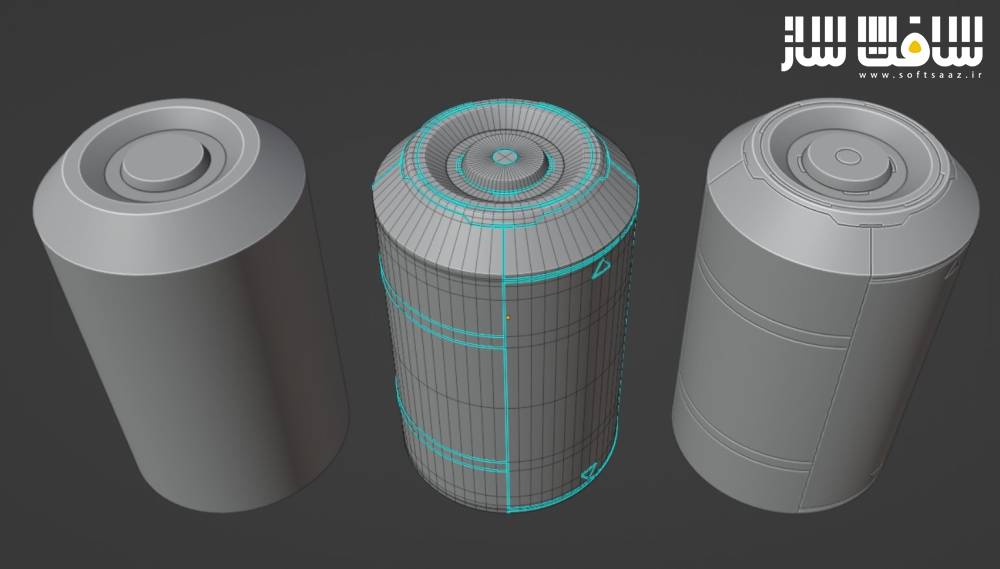
پلاگین Panel Cutter برای بلندر : این پلاگین بلندر به طور ویژه برای کاربرانی طراحی شده که به دنبال ابزارهای بیرونی کارآمد و کمحجم هستند ، کارکرد این پلاگین بسیار ساده است این ابزار جزئیات برآمدگی و شیارهای پانلی را مستقیماً از روی لبههای علامتگذاریشده به عنوان تیز درون حالت ویرایش بلندر ایجاد میکند ، این قابلیت تبدیل سادهترین مدلهای هندسی به یک مدل پیچیده و باجزئیات علمیتخیلی را فوقالعاده آسان میسازد ، با سافت ساز همراه باشید .
ویژگی های این پلاگین :
- ایجاد جزئیات و شیارهای پانلی از روی لبههای مشخصشده به عنوان لبههای تیز
- قابلیت ادغام هندسه حاصل با مدل اصلی یا حفظ حالت غیرتخریبی به صورت شیء مجزا
- قابلیت تصادفیسازی ارتفاع پانلهای ایجادشده جهت تنوع بصری
- ساخت خودکار گروه رأسها برای علامتگذاری هندسه پانل و انتخاب راحت آن در مراحل بعدی
- پشتیبانی از روشهای کاری متنوع و انعطافپذیر برای ایدهپردازیهای مختلف
- دسترسی سریع به منوی دستورات از طریق منوی ویژه دبلیو در هر دو حالت ویرایش و شیء
- منوی تنظیمات مجدد ساده و کارآمد شامل تمام پارامترهای لازم جهت ایجاد افکتها و جریانهای کاری مختلف
- عدم نیاز به قابلیت برش در اشیاء قرینهشده و قابلیت ارتقای ارتفاع جزئیات به صورت تصادفی
- قابلیت پخت جزئیات پانلها به صورت نقشههای برجستگی برای تمام یا بخش خاصی از مدل
- و..

Superhive Market – Panel Cutter
Panel Cutter is a part of a series of small independent add-ons designed for those who want their external plugins efficient and lightweight. What it does is very simple and that is to create “panel cut” details from edges that are marked sharp inside Blender’s edit mode. This makes it easier to turn even the simplest geometry into a detailed scifi model.
Features:
Make panel cut details from marked sharp edges
Merge resulting geometry to source mesh or keep it non-destructive
Randomize panel heights
Vertex group to mark panel geometry for easy selection
Multiple possible workflows for a simple add-on
The add-on works in both object andedit mode. By default, the resulting panel cut geometry is a separateobject but you have the option to “merge” it to the originalobject.
The operator button can be foundquite easily using the W specials menu in both object and edit mode.
The redo panel or operator menuitself is quite simple and only has the functions necessary for youto create different effects and workflows.
The add-on can be used to quickly detail simple models to complicated ones. These panel details canalso be easily baked as normal details for particular areas of themodel or its entirety.
The model above is a mixture ofmanually and randomly generated panel details. The same result can bedone using Random Flow with certain effects specific to Panel Cutterlike not needing the clipping feature for mirrored objects orelevating the panel cut islands to random heights.
این راهنمای نصب به صورت نوشته می باشد .
- فایل دانلود رو از حالت فشرده خارج کنید
- نرم افزار بلندر رو اجرا کنید و کلید ترکیبی Ctrl+Alt+U رو فشار دهید سپس Add-ons برای شما باز می شود Install from file رو انتخاب کنید
- از پوشه addons فایل Panel Cutter.zip رو انتخاب کنید تا در پلاگین ها فعال شود
- پلاگین نصب شد
حجم کل :