راهنمای جامع پلاگین Boxcutter و Hard Ops در Blender بخش دوم
Blender Bros – The Ultimate Guide to Hard Ops & Boxcutter 2.0

راهنمای جامع پلاگین Boxcutter و Hard Ops در Blender
راهنمای جامع پلاگین Boxcutter و Hard Ops در Blender : این آموزش ، یک دوره جامع و کاربردی برای کسانی است که میخواهند مدلسازی هاردسرفیس را در Blender با سرعت، دقت و اصول حرفهای یاد بگیرند. این دوره، همان «دفترچه راهنمای کامل» دو افزونه قدرتمند Hard Ops و Boxcutter محسوب میشود؛ ابزارهایی که طی ۶ سال تجربه حرفهای سازندگان، بهینهترین سیستم کاری برای مدلسازی سریع و کارآمد را شکل دادهاند.
این دوره فقط آموزش ابزار نیست؛ بلکه یک سیستم کامل کاری ارائه میدهد که با آن میتوانید هزاران ساعت در تولید مدلهای پیچیده صرفهجویی کنید. از نصب و پیکربندی اصولی گرفته تا یک پروژه عملی مدلسازی یک کامیون علمی–تخیلی، سپس رندر، تکسچرینگ، و حتی تکنیکهای پیشرفته و ویژگیهای پنهان افزونهها—all-in-one. این دوره آموزشی توسط تیم ســافــت ســاز برای شما عزیزان تهیه شده است.
عناوین راهنمای جامع پلاگین Boxcutter و Hard Ops در Blender :
- ۱. مقدمه و راهاندازی افزونهها
نصب، مدیریت و پیکربندی Hard Ops و Boxcutter
تفاوتها و نقش هر افزونه
رفع مشکلات رایج و تنظیمات بهینه برای شروع کار - ۲. ابزارهای ضروری و ورکفلو پایه
معرفی منوها و ابزارها در سناریوهای واقعی
نحوه کار با ابزارها در حالتهای مختلف (Object, Edit, Cutter)
ساخت یک رویکرد اصولی برای سرعتبخشیدن به مدلسازی - ۳. پروژه عملی مدلسازی سایفای
طراحی و بلاکاوت یک وسیله Sci-Fi
مدلسازی کامل با ترکیب Hard Ops و Boxcutter
ارتقای جزئیات و ساخت یک مدل حرفهای از صفر تا صد - ۴. رندرینگ، تکسچرینگ و پستپروداکشن
آمادهسازی مدل، تمیزسازی مش و جزئیاتدهی
استفاده از Decals، Trims و MaterialWorks
نورپردازی، صحنهسازی، رندر نهایی و ویرایش در Photoshop - ۵. تکنیکهای پیشرفته و امکانات پنهان
ویژگیهای کمترشناختهشده افزونهها
شخصیسازی ابزارها و ساخت ورکفلو اختصاصی
ترفندها و روشهای حرفهای برای افزایش سرعت و کیفیت کار
عنوان دوره : Blender Bros – The Ultimate Guide to Hard Ops & Boxcutter 2.0
سطح : تمامی سطوح
زمان کل دوره : – ساعت
تعداد فايل ها : 5 بخش
سال آموزش : 2025
فایل تمرینی : دارد
مربی دوره : Ryuu Ponte – Josh Gambrell
نرم افزار : Blender
زیرنویس انگلیسی : دارد
فشردگی اختصاصی سافت ساز : ندارد
Blender Bros – The Ultimate Guide to Hard Ops & Boxcutter 2.0
If you own Hard Ops & Boxcutter then this is the manual you need to get the full use of the products! These tools are equally amazing and the products are essential, in my opinion, to hard surface modeling. I can honestly say this is one of the best and more essential tutorials I have come across in a while.”
Learn the Exact System We’ve Used to Save Thousands of Hours Over 6+ Years of Professional Modeling – Specifically Designed for Quick Results
SECTION 1: INTRODUCTION & SETUP
In this section, we cover the essential foundation:
Installation & Management
How to install, uninstall, and properly manage these add-ons within Blender.
Troubleshooting & Support
Common issues users face and how to resolve them.
Hard Ops vs. Boxcutter
Understanding their differences, strengths, and why they work best together.
Optimal Setup
Recommended configurations to maximise efficiency in your workflow.
This section provides a strong introduction, ensuring you know why and how to use these add-ons together before diving deeper.
SECTION 2: ESSENTIALS
This section is a deep dive into the fundamental tools and menus of both Hard Ops and Boxcutter. Unlike in the previous version of this course, where tools were covered in isolation, this updated approach teaches them in the context of real-world scenarios. Topics include:
General Workflow Introduction
Learn how to incorporate Hard Ops & Boxcutter into your Blender projects.
Menus & Tools in Context
Understand how menus dynamically change based on selection types:
Object selection
Edit mode interactions
Multi-object selections
Cutter-specific selections, etc
By focusing on practical applications rather than isolated tools, you’ll develop a more intuitive understanding of how to use these add-ons in professional settings.
SECTION 3:
SCI-FI TRUCK MODELLING PROJECT
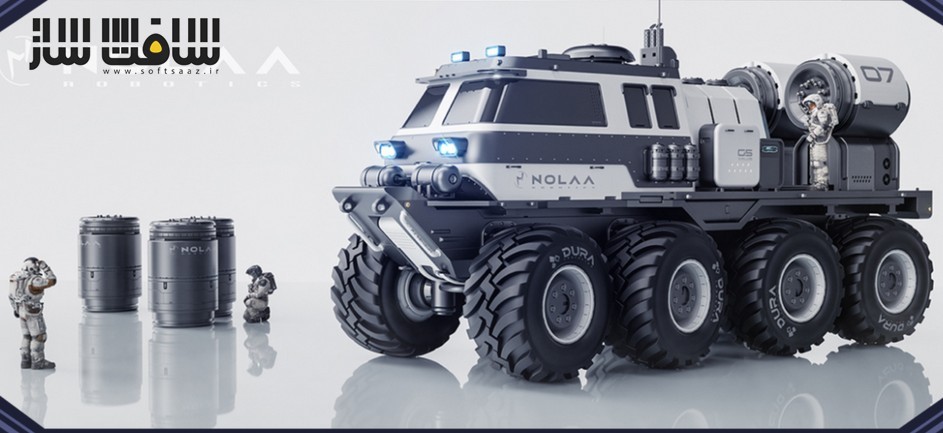
This hands-on project takes you through the entire modelling process of a sci-fi truck, from a basic cube to a fully detailed model. This section emphasizes:
Design Fundamentals
Learn the importance of blockouts and concept refinement.
Hard Ops & Boxcutter for Modelling
Use these add-ons to improve your modelling workflow while creating a professional-grade asset.
Full Project Workflow
Step-by-step guidance on building a complex model from scratch.
This section is not just about using tools but also understanding design principles that make your models stand out.
BONUS #1: RENDERING & POST-PROCESSING
A fully comprehensive 4-hour segment focused on rendering and finalizing your model:
Mesh Cleanup & Preparation
Optimizing your model for detailing with decals and trimsheets and texturing with MaterialWorks.
Detailing & Texturing
Using high-quality decals and trims from the Ultimate Decal Pack & materials via MaterialWorks.
Scene Setup & Rendering
Scene set-up, framing & composition, lighting and creating a polished final render.
Photoshop Post-Processing
Enhancing your renders with post-processing techniques.
This section ensures that your final model is not only well-designed but also beautifully presented.
BONUS #2: ADVANCED TECHNIQUES & HIDDEN FEATURES
This section introduces advanced tools and workflows not covered in typical tutorials:
Unexplored Features
Many powerful features in Hard Ops & Boxcutter remain undocumented or poorly explained online. This section fills that gap.
Customization & Optimized Workflows
Tailoring the add-ons to fit your specific needs.
Given the outdated official documentation and fragmented tutorials available online, this section is essential for users who want to unlock the full potential of these add-ons in order to develop their own personalized workflow.
حجم کل : 20 گیگابایت
برای نمایش این مطلب و دسترسی به هزاران مطلب آموزشی، نسبت به تهیهی اکانت ویژه از لینک زیر اقدام کنید.
وضعیت فعلی شما
- لینکهای دانلود این مطلب قفل است
- بقیهی مطالب ویژه هم بسته است
- بدون دسترسی به آموزش نصب
با اشتراک ویژه
- دسترسی به همهی مطالب سافتساز
- آپدیت روزانه مطالب سایت از بهترین سایتهای سیجی
- ورود نامحدود کاربران از هر دیوایسی
- دسترسی به آموزش نصب کامل پلاگینها و نرمافزارها
For international users: online support — email info@softsaz.ir or Telegram @SoftSaaz.
امتیاز دهی به این مطلب :
لطفا به این مطلب امتیاز دهید