آموزش جامع تدوین حرفهای ویدیو با داوینچی ریزالو ۲۰
Udemy - Master DaVinci Resolve 20 Pro Video Editing

آموزش جامع تدوین حرفهای ویدیو با داوینچی ریزالو ۲۰
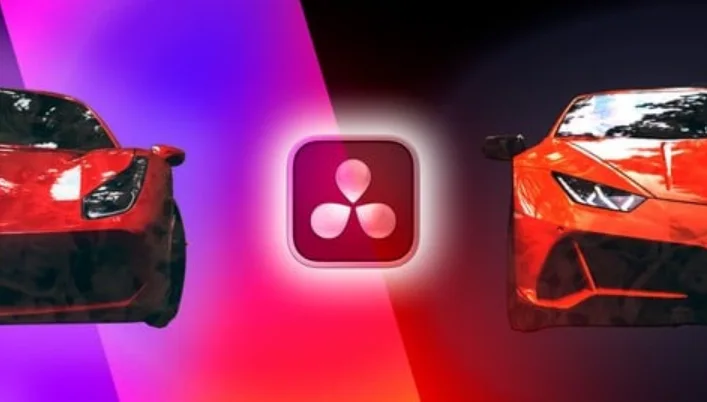
آموزش جامع تدوین حرفهای ویدیو با داوینچی ریزالو ۲۰ : در این دوره آموزشی، شما از سطح مقدماتی تا پیشرفته با یکی از قدرتمندترین نرمافزارهای تدوین سینمایی جهان یعنی داوینچی ریزالو آشنا خواهید شد. این دوره با تمرکز بر پروژههای عملی، به شما میآموزد که چگونه با استفاده از فیلترهای سینمایی، اسلوموشنهای حرفهای و تکنیکهای اصلاح رنگ، ویدیوهایی خیرهکننده خلق کنید. شما به فوتیجهای اختصاصی از خودروهای لوکس دسترسی خواهید داشت تا مهارتهای خود را به صورت عملی تمرین کنید. علاوه بر این، فرصت دریافت بازخورد مستقیم از مدرس و عضویت در انجمن فیلمسازان، مسیر پیشرفت شما را در دنیای ویرایش ویدیو هموار میسازد. این دوره آموزشی توسط تیم ســافــت ســاز برای شما عزیزان تهیه شده است.
عناوین آموزش جامع تدوین حرفهای ویدیو با داوینچی ریزالو ۲۰ :
- آشنایی کامل با محیط کاربری و ابزارهای تدوین داوینچی
- تکنیکهای حرفهای کات زدن و مدیریت سکانسها
- کار با فیلترها، افکتهای تصویری و انتقالها
- اصول پیشرفته اسلوموشن و تغییر سرعت ویدیو
- مدیریت فایلها و کار با فوتیجهای خام
- تدوین اختصاصی ویدیوی تبلیغاتی خودروهای لوکس
- آموزش کلیدهای میانبر برای افزایش سرعت تدوین
- بررسی پروژههای عملی و دریافت بازخورد گروهی
- نکات کلیدی برای روایتگری تصویری و جذب مخاطب
- خروجی گرفتن نهایی با کیفیت سینمایی
عنوان دوره : Udemy – Master DaVinci Resolve 20 Pro Video Editing
سطح : پیشرفته
زمان کل دوره : 000 ساعت
تعداد فايل ها : 37
سال آموزش : 2026
فایل تمرینی : DOCX:1, HTML:1, NFO:1, PDF:1
مربی دوره : Alex Assenmacher
نرم افزار : DaVinci Resolve
زیرنویس انگلیسی : ندارد
Udemy – Master DaVinci Resolve 20 Pro Video Editing
What you’ll learn
Become a Video Editor with One of the Most Powerful Tools Used in Blockbusters!
Learn Video Editing with Free Software: DaVinci Resolve!
Learn to Edit Sequences with Filters, Slow Motion, and Stunning Edits!
Receive Personal Feedback from a Pro Video Editor!
Final individual Project with group feedback
Requirements
No Experience Needed—This Course Will Teach You Everything You Need to Know!
Get Exclusive Supercar Footage for Free to Use in Your Edits!
Description
[Course updated: April 25] Edit an Amazing Supercar Video Using My FREE Footage!
Get personalized feedback and join a vibrant community of filmmaking enthusiasts!
[Trusted by more than 6,000 students]
What’s This About?
Are you tired of struggling to create those jaw-dropping videos with seamless speed ramps and transitions? It’s time to take your filmmaking skills to the next level! Learn how to edit like a pro and truly master your editing software.
Discover hidden secrets, essential keyboard shortcuts, and powerful tools that let you fully control your editing process. Most importantly, use these techniques to captivate your viewers and deliver unforgettable experiences.
Become a Pro Filmmaker
Why Take This Course?
This course teaches you how to create authentic, high-quality video productions. To unlock the full potential of your footage and software, you’ll start by understanding the core components of DaVinci Resolve. Mastering these tools will open up endless editing possibilities and take your skills to new heights.
Drawing from my extensive filmmaking experience—including both successes and challenges—and addressing the most common questions from my community, this course introduces you to a new cinematic language. You’ll face real-world editing scenarios and learn effective solutions for each.
Above all, this course is about crafting exceptional experiences. Are you tired of making mediocre videos because you lack editing expertise? It’s time to dive deep into pro software, understand its features, and learn how to apply them effectively to your footage.
Exclusive Perks for Students
Join a Private Telegram Group: Share your footage, get instant feedback from peers and the instructor, and grow alongside a supportive community of filmmakers.
حجم کل : 3.7 گیگابایت
برای نمایش این مطلب و دسترسی به هزاران مطلب آموزشی، نسبت به تهیهی اکانت ویژه از لینک زیر اقدام کنید.
وضعیت فعلی شما
- لینکهای دانلود این مطلب قفل است
- بقیهی مطالب ویژه هم بسته است
- بدون دسترسی به آموزش نصب
با اشتراک ویژه
- دسترسی به همهی مطالب سافتساز
- آپدیت روزانه مطالب سایت از بهترین سایتهای سیجی
- ورود نامحدود کاربران از هر دیوایسی
- دسترسی به آموزش نصب کامل پلاگینها و نرمافزارها
For international users: online support — email info@softsaz.ir or Telegram @SoftSaaz.
امتیاز دهی به این مطلب :
لطفا به این مطلب امتیاز دهید