طراحی جلوههای بصری با سیستم نیاگارا در آنریل انجین ۵
VFXapprentice - Unreal Engine 5 Niagara Block-in VFX

طراحی جلوههای بصری با سیستم نیاگارا در آنریل انجین ۵
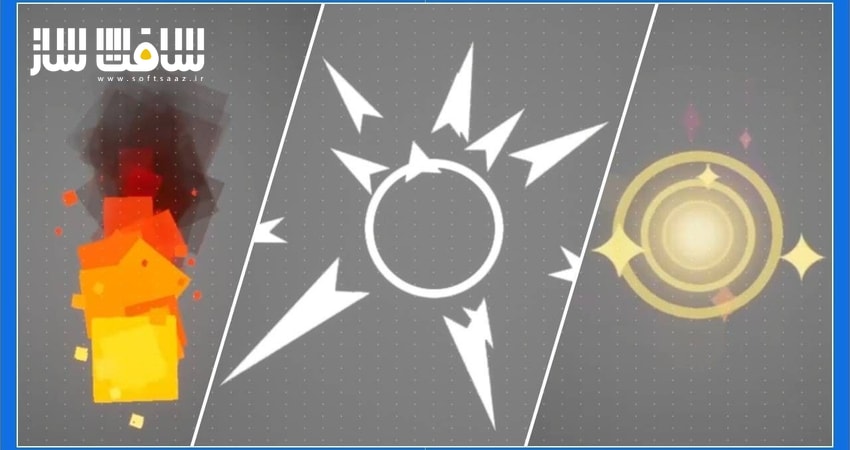
طراحی جلوههای بصری با سیستم نیاگارا در آنریل انجین ۵ : این دوره آموزشی برای تمامی هنرمندان، از مبتدی تا حرفهای، طراحی شده است تا با سیستم ذرات نیاگارا در آنریل انجین ۵ به تسلط کامل برسند. شما در این دوره با مفاهیم کلیدی مانند طراحی اولیه (Block-in)، زمانبندی و ایجاد جلوههایی همچون آتش، انفجار و برخورد آشنا خواهید شد. مدرس دوره، هادیجه چمبرلین، با آموزش اصول هنری و تکنیکهای فنی، شما را برای خلق جلوههای بصری سینمایی و بهینهسازی آنها برای محیطهای بازی آماده میکند. با اتمام این دوره، یاد میگیرید چگونه با استفاده از Mesh Particles و اصول متحرکسازی، جلوههایی واقعگرایانه و پویا بسازید که در پروژههای حرفهای بازیسازی کاربرد مستقیم دارند. این دوره آموزشی توسط تیم ســافــت ســاز برای شما عزیزان تهیه شده است.
عناوین طراحی جلوههای بصری با سیستم نیاگارا در آنریل انجین ۵ :
- مقدمهای بر سیستم ذرات نیاگارا و طراحی آتش
- آموزش ایجاد هاله و سلسلهمراتب بصری برای آیتمها
- بررسی ابزارهای فنی، ویژگیهای سیستم و منحنیها
- اهمیت فرآیند طراحی اولیه در ایجاد جلوههای بصری
- تکنیکهای زمانبندی و ضربآهنگ در افکتهای برخورد
- پیادهسازی قوسهای حرکتی و اصول ورود و خروج نرم
- طراحی افکتهای موشک و شبیهسازی حرکت ثانویه
- نحوه آمادهسازی و تفکیک اجزای ذرهای برای تولید بازی
- استفاده از ذرات مش برای طراحی انفجارهای منطقهای
- اصول پیشبینی و ضربه در طراحی انفجارهای پویا
عنوان دوره : VFXapprentice – Unreal Engine 5 Niagara Block-in VFX
سطح : تمامی سطوح
زمان کل دوره : 6 ساعت و 36 دقیقه
تعداد فايل ها : 9
سال آموزش : 2026
فایل تمرینی : دارد: TXT (1)، ZIP (1)
مربی دوره : Hadidjah Chamberlin
نرم افزار : Unreal Engine
زیرنویس انگلیسی : ندارد
VFXapprentice – Unreal Engine 5 Niagara Block-in VFX
Included with VFX-A All Access
This course is designed to help you start making Niagara effects in Unreal Engine 5, regardless of your experience level. Learn how to get started with a collection of block-in VFX like fire, hit impacts, and explosions.
6.5+ Hours
This course includes over six hours of real-time VFX training in UE5.
Skill Level
Beginner Level One course for new artists.
Software
Unreal Engine 5
Instant Access
This course is immediately available to All Access members.
Course Breakdown
The perfect place to start your journey into Unreal Engine 5 Niagara editor! Niagara is the newer, more powerful particle creation tool that is slowly replacing Cascade.
Intro to Niagara: Fire Block-in FX
If you’ve familiar with UE Cascade then you’ll be able to pick up Niagara very quickly.
If you are new to VFX, Hadidjah will run you through the workflow of creating an effect in Niagara starting with a simple torch.
Item Aura & Visual Hierarchy
Create a cool item pick-up aura effect using some custom textures and materials.
We’ll be discussing some basic art fundamentals in this lesson as well as looking at incorporating gameplay components into the effect.
Niagara Tech & Tools
Learn some technical aspects to improve your mastery of Niagara.
This lesson covers the System Properties, Curve index, and Parent emitters. Once you learn more about these concepts you’ll have a better understanding of how Niagara particle behavior works and be able to fine-tune your particle system for more complex effects.
Block-in VFX Overview
Blocking is one of the most important phases for creating new effects. It lets you test gameplay functionality, prototype your timing and animation, and allows you to experiment and explore new ideas.
We will look at the effects that you’ll be making such as healing effects, missile effects, and some explosions.
Damaging Impact – Timing & Punch
Learn about timing and punch with this hit-impact effect!
We’ll be creating a hit effect with some primary and secondary elements and show you some of the different components in Niagara that you can use to make your effects more impactful.
Heal Impacts – Arcs & Ease In/Out
Create a block in for a healing effect. You’ll learn about creating arcs and also introduce the principles of ease in and ease out.
Arcs create curved motion in your effects to create interesting and dynamic visuals. Arcs are commonly used in weapon trails or projectiles that are affected by gravity.
Missile Wind-up & Impact
Learn about follow-through and secondary action with this missile block-in effect. Applying these animation principles to your effect will create visual interest and improve the realism and believability of the motion.
You’ll be creating a missile effect block-in with a windup and impact. Learn some tips on creating more complex multi-stage effects in a 3D environment.
Projectile Setup for Games
A follow-up lesson to show you how to format particles to better suit game production.
Learn how to split particles into separate gameplay components. Split the projectile into the wind-up, the missile, and the impact. Having separate components allows non-VFX artists to test and change the gameplay without needing to use Niagara.
Explosion AOE – Anticipation, Impulse & Rhythm
Learn how to set up mesh particles in Niagara. Mesh particles use 3D models instead of 2D sprites.
Incorporate these by creating an Explosion AOE. You’ll also learn how to set up mesh particles for a bomb radius explosion.
حجم کل : 2.45 گیگابایت
برای نمایش این مطلب و دسترسی به هزاران مطلب آموزشی، نسبت به تهیهی اکانت ویژه از لینک زیر اقدام کنید.
وضعیت فعلی شما
- لینکهای دانلود این مطلب قفل است
- بقیهی مطالب ویژه هم بسته است
- بدون دسترسی به آموزش نصب
با اشتراک ویژه
- دسترسی به همهی مطالب سافتساز
- آپدیت روزانه مطالب سایت از بهترین سایتهای سیجی
- ورود نامحدود کاربران از هر دیوایسی
- دسترسی به آموزش نصب کامل پلاگینها و نرمافزارها
For international users: online support — email info@softsaz.ir or Telegram @SoftSaaz.
امتیاز دهی به این مطلب :
لطفا به این مطلب امتیاز دهید