انیمیشنسازی جلوههای ویژه دو بعدی سطح متوسط
VFXapprentice - Animating Medium 2D FX

انیمیشنسازی جلوههای ویژه دو بعدی سطح متوسط
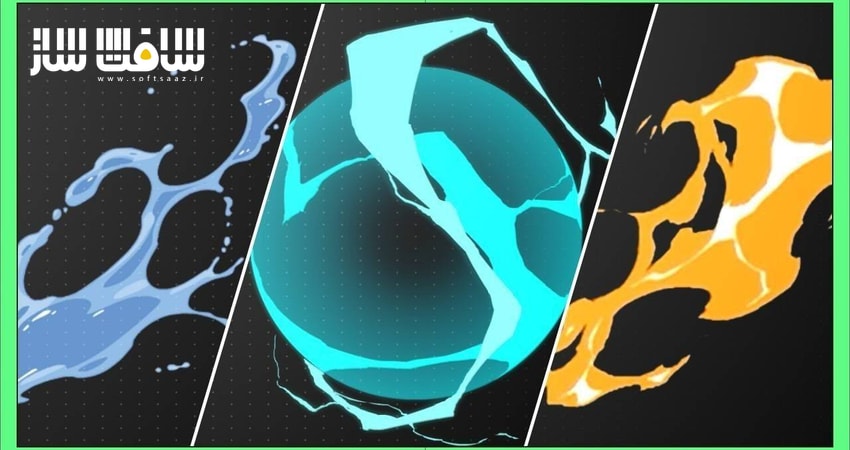
انیمیشنسازی جلوههای ویژه دو بعدی سطح متوسط : در این دوره آموزشی، به سراغ مطالعه جلوههای ویژه پیچیدهتر با استفاده از اشکال متنوع و درک رفتار سیالات با ویسکوزیته (گرانروی) متفاوت میرویم. شما یاد میگیرید چگونه با ترکیب چندین المان مختلف، افکتهای جذابی نظیر آتش جهتدار، ترکیدن حباب، پرتاب آب و دودهای مارپیچ خلق کنید. این دوره به شما کمک میکند تا با مدیریت لایههای ماسک و طراحی فرمهای حرکتی، مهارتهای خود را از سطح مقدماتی ارتقا داده و به سطح یک هنرمند حرفهای VFX نزدیک شوید. تمامی مباحث با تمرکز بر نرمافزارهای استاندارد صنعت انیمیشن تدریس شده است. این دوره آموزشی توسط تیم ســافــت ســاز برای شما عزیزان تهیه شده است.
عناوین انیمیشنسازی جلوههای ویژه دو بعدی سطح متوسط :
- تکنیکهای متحرکسازی پرتاب آب
- طراحی و رنگآمیزی اشکال پیچیده مایعات
- پیادهسازی گویهای لزج و ضد جاذبه
- اصول متحرکسازی آتش با جهتگیری خاص
- ایجاد افکتهای فانتزی ترکیدن حباب قلبی
- متحرکسازی دود با فرمهای مارپیچ
- مدیریت محدودیتهای فریم در تولید انیمیشن
- طراحی و سایهزنی الکتریسیته و رعد و برق
- تکنیکهای نورپردازی و درخشش در جلوههای ویژه
- ترکیببندی لایهها برای خروجی نهایی
عنوان دوره : VFXapprentice – Animating Medium 2D FX
سطح : تمامی سطوح
زمان کل دوره : 14 ساعت و 18 دقیقه
تعداد فايل ها : 18
سال آموزش : 2026
فایل تمرینی : دارد: ZIP (6)
مربی دوره : Matthieu Petit, Tom De Vis, Chris Graf, Guillaume Degroote
نرم افزار : Adobe Animate, Toon Boom Harmony
زیرنویس انگلیسی : ندارد
VFXapprentice – Animating Medium 2D FX
Animating Medium 2D FX
Elemental Studies
Instructors: Matthieu Petit, Tom De Vis, Chris Graf, Guillaume Degroote
Included with VFX-A All Access
Dive into these more complex animation studies, with different viscosities, multiple elements, and more complex shapes. Create directional fire, bubble bursts, water flings, and more!
14+ Hours
This course includes over four hours of FX animation training.
Skill Level
Beginner Level One course for new and aspiring VFX artists.
Software
Toon Boom Harmony,
Adobe Animate
Instant Access
This course is immediately available to All Access members.
Course Breakdown
Lesson overview.
Water Fling
4 Lessons
FX Animation – Chris Graf
Commentary – Jason Keyser
Because various types of airborne liquid are a mainstay in 2D FX, you’ll get a lot of value from referring back to this lesson often.
Learn how to use mask layers to give you the freedom to set up your inner shapes, without having to worry about clean outer edges.
Water Fling Style Target
Create a reusable water fling animation. Get a rundown of the style target, and explore the motion, shape design, and color of the effect.
Water Fling FX Animation
This effect can be quite complex to animate, so don’t be afraid to just try things out and get in some practice!
Coloring the Water Fling
Use the coloring phase to start really defining the negative shapes of this water fling effect.
Water Fling Effect Timelapse
Watch the entire water fling effect animation by Chris Graf unnarrated. Follow along and create your own water fling.
Goo Orb
4 Lessons
FX Animation – Matthieu Petit
Commentary – Jason Keyser
Let’s create a looping slimy anti-gravity goo orb animation.
Following the water fling effect, you will see how liquids behave similarly to each other with slight variations depending on the viscosity of the liquid.
Goo Orb FX Base Animation
Nail down the feeling of your liquid substance, then add asymmetry and shape variation to your effect. Having an interesting motion will help to break up the repetition for looping effects.
Animation Finish & Coloring
Add interest by offsetting and duplicating the effect. This mirror technique will help you create the other half of the goo orb.
Goo Orb Animation Timelapse
Watch the entire Goo Orb effect animation with Matthieu Petit. Follow along and create your own effect.
Goo Orb Coloring Timelapse
Watch the entire Goo Orb effect color process with Matthieu Petit. Follow along and color your own effect.
Directional Fire
2 Lessons
FX Animation – Matthieu Petit
Commentary – Tom de Vis
Learn how to bend fire to your will! Animate fire rushing outwards, catching air currents, and dissipating into interesting shapes.
Heart Bubble Burst
2 Lessons
FX Animation – Matthieu Petit
Commentary – Tom de Vis
You’re going to love this charming tutorial! Learn how this highly reusable asset uses snappy timing to delight the senses.
Directional Fire Animation & Color
Watch the pros at work! Learn from Tom de Vis about the shape language of fire, as he walks you through Matthieu’s animation.
Directional Fire Effect Timelapse
Watch the original recording of the creation process for this amazing directional Fire effect by Matthieu Petit as bonus content.
Heart Bubble Burst Animation
Watch along with Tom De Vis, as Matthieu Petit works through animating some heart bubbles.
Heart Bubble Burst Timelapse
Watch the original animation process of these lovely bubbles as bonus content.
Spiral Smoke Poof
3 Lessons
FX Animation – Matthieu Petit
Commentary – Tom de Vis
Create a spiral smoke puff animation, while learning about production constraints, like limited frame counts.
Spiral Smoke Animation & Shading
Watch Matthieu Petit animate this awesome spiral smoke puff as Tom De Vis breaks down his workflow.
Spiral Smoke Poof Animation Timelapse
Watch the original recording by Matthieu Petit as bonus content, if you are interested in his thought process while animating.
Inner Shape & Shadows Timelapse
If you want to see even more, you can watch the raw coloring and shading process as well!
Electric Burst
3 Lessons
FX Animation – Guillaume Degroote
This ball of lightning packs a punch! Learn how to manipulate timing, shapes and motion to your advantage.
Electric Burst Main Sphere Animation
Get started making an electric sphere with Guillaume Degroote by focusing on core composition first!
Electric Burst Windup & Dissolve
How do you create smooth transitions between animation frames? Learn more as Guillaume talks through his process building up the bolts around his effect.
Electric Burst Light Rays & Polish
In this video, Guillarme covers how to use rays and a full-screen flash to give the feeling of extra energy, without muddying your effect.
حجم کل : 3.02 گیگابایت
برای نمایش این مطلب و دسترسی به هزاران مطلب آموزشی، نسبت به تهیهی اکانت ویژه از لینک زیر اقدام کنید.
وضعیت فعلی شما
- لینکهای دانلود این مطلب قفل است
- بقیهی مطالب ویژه هم بسته است
- بدون دسترسی به آموزش نصب
با اشتراک ویژه
- دسترسی به همهی مطالب سافتساز
- آپدیت روزانه مطالب سایت از بهترین سایتهای سیجی
- ورود نامحدود کاربران از هر دیوایسی
- دسترسی به آموزش نصب کامل پلاگینها و نرمافزارها
For international users: online support — email info@softsaz.ir or Telegram @SoftSaaz.