آموزش تکنیکهای پیشرفته نرم افزار Vue
FxPhd – VUE301 – Advanced Vue Techniques

آموزش تکنیکهای پیشرفته نرم افزار Vue
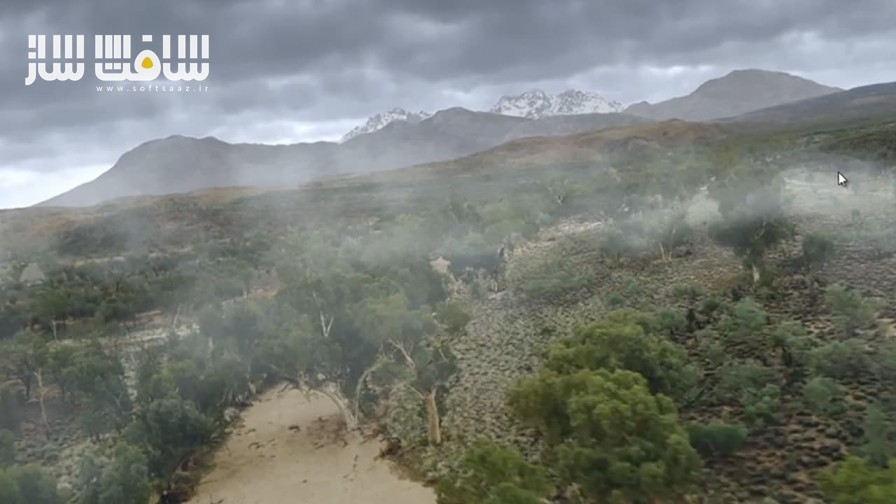
آموزش تکنیکهای پیشرفته نرم افزار Vue : این دوره پیشرفته، ادامهی مسیر دوره Vue201 است و فرصتی ارزشمند برای هنرمندان سطح متوسط تا پیشرفتهی Vue فراهم میکند تا دانش خود را در این نرمافزار تعمیق بخشند و تکنیکهای کاربردی جدیدی برای استفاده در پروژههای واقعی کسب کنند.
در نیمهی اول این دوره، تمرکز اصلی بر ابزارها و بخشهای خاصی از Vue است، در حالی که نیمهی دوم بهطور کامل به بررسی یک شات VFX اختصاص دارد که در آن از Vue استفاده شده؛ از مراحل اولیهی برنامهریزی گرفته تا کامپوزیت نهایی در نرمافزار Nuke. در طول این مسیر، با ویژگیهای جدید و قدرتمند Vue 9 نیز آشنا خواهیم شد و آنها را بهصورت عملی بهکار میگیریم. این دوره آموزشی توسط تیم ســافــت ســاز برای شما عزیزان تهیه شده است.
عناوین آموزش تکنیکهای پیشرفته نرم افزار Vue :
- کلاس 1: مدلسازی با Displacement — ساخت متریال سنگساز، ترکیب فراکتالها، مدلسازی صخره با MetaBlob و استفاده از قابلیت جدید “انتشار پارامتر” در Vue 9.
- کلاس 2: HyperBlob و پراکندگی زیرسطحی — معرفی HyperBlob و ساخت شیدرهای واقعگرایانه برای یخ و مرمر با کنترل دقیق پارامترهای SSS.
- کلاس 3: نورپردازی پیشرفته و Relighting — ایجاد سیستم نوردهی انتخابی و استفاده کامل از ویژگی Relighting در Vue 9 با رویکردی متفاوت نسبت به نورپردازی سنتی Vue.
- کلاس 4: مدلسازی زمین با Rocky Mountain Fractal — بررسی عمیق فراکتال جدید کوهستانی و تحلیل کاربرد Function Editor در ساخت زمینهای طبیعی.
- کلاس 5: Vue در تولید — بخش اول: تحلیل نقش Vue در تولید، برنامهریزی اولیه برای شات VFX و آمادهسازی برای ترکینگ دوربین سهبعدی.
- کلاس 6: Vue در تولید — بخش دوم: ساخت صحنه مستر در Maya و وارد کردن آن به Vue برای ایجاد هماهنگی در جریان کار Vue و Nuke.
- کلاس 7: Vue در تولید — بخش سوم: ساخت عناصر 2.5 بعدی در Vue، رندر فریم و پاسها، و راهاندازی پرسپکتیو در Nuke برای کامپوزیت.
- کلاس 8: Vue در تولید — بخش چهارم: تولید عناصر کاملاً سهبعدی، وارد کردن مدلهای درخت در Nuke، و بررسی نورپردازی، موشن بلور و کاهش Flicker در Vue.
- کلاس 9: Vue در تولید — بخش پنجم: ادامه کامپوزیت شات با افزودن جلوههای حجمی و جوی در Vue و Nuke برای افزایش واقعگرایی.
- کلاس 10: موضوعات متفرقه — بازسازی بافت درختان Vue، بررسی Shadow-Matte و قابلیتهای جدید Vue 9.5 مانند Reflection-Matte و Ambient Relighting Control.
عنوان دوره : FxPhd – VUE301 – Advanced Vue Techniques
سطح : متوسط تا پیشرفته
زمان کل دوره : 5.29 ساعت
تعداد فايل ها : 10
سال آموزش : 2011
فایل تمرینی : jpg – mat
مربی دوره : Eran Dinur
نرم افزار : Vue
زیرنویس انگلیسی : ندارد
فشردگی اختصاصی سافت ساز : ندارد
FxPhd – VUE301 – Advanced Vue Techniques
This course follows up on the Vue201 course, and offers intermediate and advanced Vue artists an opportunity to deepen their knowledge of the program and to acquire new practical techniques for production work. In the first half of the course we will concentrate on specific areas and tools in Vue, while the second half will essentially be a detailed work-through of a VFX shot involving Vue – from initial planning stages to final Nuke compositing. Throughout this course we will also get a chance to explore and use the great new features of Vue 9.
Eran Dinur is compositing supervisor at Brainstorm Digital. Previously he was a senior digital artist at ILM Singapore and Framestore NY. He has created visual effects for films such as “Clash of the Titans”, “Salt”, “Transformers: Revenge of the Fallen”, “Surrogates”, “Terminator Salvation”, “Star Trek”, “Iron Man” and “Indiana Jones and the Kingdom of the Crystal Skull”. Dinur is a true Vue veteran, and has been using the app extensively since version 2 in numerous projects. He has written Vue tutorials for various publications, including 3D World Magazine (for which he is a regular contributor), and has created many sample scenes for Vue xStream, Infinite and Esprit.
Class 1
Modeling with displacement – Displacement can be used as a powerful modeling tool in Vue. We will create a custom “rock generator” material, examine the potential of the world coordinates system, mix fractals, model high-detail cliffs with MetaBlobs and use the great new parameter publishing feature of Vue 9.
Class 2
HyperBlobs and sub-surface scattering – We will take a look at the new HyperBlob feature which combines displacement, volumetric shading and MetaBlobs. We will then move on to sub-surface scattering. By looking at how the different parameters affect the look of the material, we will create more natural-looking shaders for ice and marble.
Class 3
Relighting and advanced lighting techniques – The new relighting feature in Vue 9 is a fantastic tool, but requires a switch from the standard Vue lighting paradigm in order to fully exploit its potential. We will create a lighting rig with selective lighting and explore various lighting techniques.
Class 4
Terrain modeling with the Rocky Mountain fractal – Another great new feature in Vue, the rocky mountain fractal packs a lot of power, and we’ll spend the entire class not only uncovering its secrets but also looking deeper into the function editor and tgerrain modeling in general.
Class 5
Vue in production – part 1
We will discuss different aspects of using Vue in production – its strengths and weaknesses, its role as a matte painting tool, the use of Vue for 2D, 2.5D and 3D. We will then examine the shot and come up with an initial strategy, before heading off to 3D camera tracking.
Class 6
Vue in production – part2
We will use Maya to create a master layout scene that will enable us to streamline the workflow in both Vue and Nuke. Next we will look at the correct process of importing the scene and camera into Vue and setting up a basic scene.
Class 7
Vue in production – part3
We will start creating elements in Vue and bringing them into Nuke. We will concentrate on the 2.5D elements, rendering out single frames and passes from Vue and setting up projections in 3D space in Nuke, while I finessing and retouching the Vue elements in comp.
Class 8
Vue in production – part4
We will move on to creating fully 3D elements and renders. We’ll look at the different solutions, from importing Vue tree models directly into Nuke to rendering out animations in Vue. We will discuss subjects such as flicker reduction, correct lighting, motion blur and texturing.
Class 9
Vue in production – part5
We will continue working on the shot, adding more elements while finessing the comp. We will also take a look at creating volumetric and atmospheric effects, in Vue as well as in Nuke.
Class 10
Various subjects – We will take a closer look at Vue trees and see how we can re-generate and edit their textures to improve the way they look. We will also explore shadow-mate materials, as well as the new reflection-matte and ambient relighting control features of Vue 9.5.
حجم کل : 0.8 گیگابایت
برای نمایش این مطلب و دسترسی به هزاران مطلب آموزشی، نسبت به تهیهی اکانت ویژه از لینک زیر اقدام کنید.
وضعیت فعلی شما
- لینکهای دانلود این مطلب قفل است
- بقیهی مطالب ویژه هم بسته است
- بدون دسترسی به آموزش نصب
با اشتراک ویژه
- دسترسی به همهی مطالب سافتساز
- آپدیت روزانه مطالب سایت از بهترین سایتهای سیجی
- ورود نامحدود کاربران از هر دیوایسی
- دسترسی به آموزش نصب کامل پلاگینها و نرمافزارها
For international users: online support — email info@softsaz.ir or Telegram @SoftSaaz.
امتیاز دهی به این مطلب :
لطفا به این مطلب امتیاز دهید