
مسترکلاس ساخت دنیای یخی پروسیجرال در Blender و Gaea
Udemy - Blender and Gaea Masterclass – Procedural Ice World

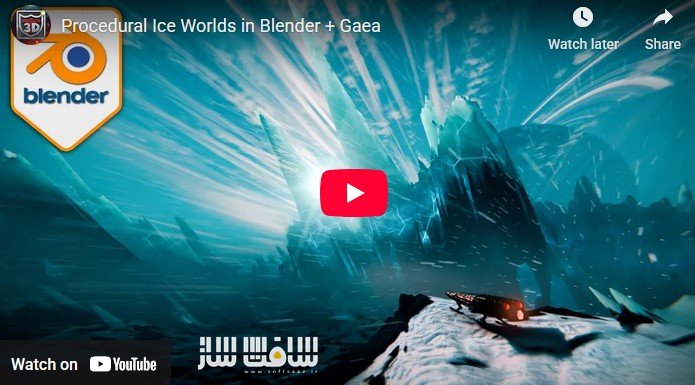
مسترکلاس ساخت دنیای یخی پروسیجرال در Blender و Gaea
مسترکلاس ساخت دنیای یخی پروسیجرال در Blender و Gaea : جاش با همکاری 3D Tudor ، یک مسیر کامل و کاملاً عملی برای ساخت یک محیط یخی سینمایی و حرفهای ارائه میدهد؛ مسیری که از تولید زمین پروسیجرال در Gaea شروع میشود و تا رندر نهایی، کامپوزیت، مه، نورپردازی و جزئیات سینمایی در Blender ادامه پیدا میکند، بهگونهای که خروجی نهایی کاملاً مناسب پورتفولیو باشد.
در این مسترکلاس، با یک پایپلاین واقعی مشابه پروژههای تولیدی آشنا میشوید؛ ابتدا یک دنیای یخی با جزئیات بالا در Gaea ساخته میشود، سپس مپها و ماسکهای استاندارد خروجی گرفته شده و در Blender بازسازی میگردد، و در نهایت با متریالهای یخی، دیسپلیسمنت صحیح، مه حجمی، نورپردازی سینمایی، یک سفینه فضایی قهرمان (Hero Asset)، افکت برف و کامپوزیت نهایی، صحنهای کامل و چشمنواز خلق میشود، به شکلی که هم در نمای نزدیک و هم در ابعاد کوچک (Thumbnail) کیفیت خود را حفظ کند. این دوره آموزشی توسط تیم ســافــت ســاز برای شما عزیزان تهیه شده است.
عناوین مسترکلاس ساخت دنیای یخی پروسیجرال در Blender و Gaea :
- آشنایی سریع و کاربردی با اصول Gaea شامل رابط کاربری، نودگراف و ابزارهای اصلی ساخت زمین
- تولید زمین یخی با فرمهای سنگی، فرسایش (Erosion)، آوار، پوشش برف و جزئیات ریز
- ماسکسازی حرفهای برای برف، قلههای یخی، آوار، آب و کنترل دقیق متریالها و افکتها در Blender
- پیادهسازی دیسپلیسمنت اصولی در Blender شامل استک تمیز، جزئیات چندمرحلهای و دیسپلیسمنت مورب برای پویایی بیشتر
- ساخت متریالهای سینمایی شامل سنگ، برف با Subsurface و یخ ترکخورده درخشان با Emission
- طراحی HDRI اختصاصی و ایجاد اتمسفر با مه حجمی شامل Distance Fog و Ground Fog
- مدلسازی و شیدینگ یک سفینه فضایی بهعنوان Hero Asset و ادغام طبیعی آن با محیط
- ساخت افکت ذرات برف همراه با Motion Blur
- بهینهسازی تنظیمات رندر در Cycles
- انجام کامپوزیت نهایی شامل Glare، Color Grading، Vignette و Lens Distortion
عنوان دوره : Udemy – Blender and Gaea Masterclass – Procedural Ice World
سطح : متوسط
زمان کل دوره : 7 ساعت
تعداد فايل ها : 31
سال آموزش : 2025
فایل تمرینی : دارد
مربی دوره : 3D Tudor – Josh/ DragonLaser
نرم افزار : Blender and Gaea
زیرنویس انگلیسی : ندارد
فشردگی اختصاصی سافت ساز : ندارد
Udemy – Blender and Gaea Masterclass – Procedural Ice World
Create a Procedural Ice World in Blender + Gaea: Terrain, Masks, Displacement, Ice Shaders, Volumetric Fog, Final Render
Blender and Gaea Masterclass – Procedural Ice World
Tired of terrains that look great in isolation… but fall apart the second you try to render a full scene? This masterclass fixes that by taking you from procedural terrain generation in Gaea to a finished, cinematic hero render in Blender—fog, lighting, spaceship, particles, compositing, the lot.
Hi, I am Josh, and together with 3D Tudor, we built a course specifically for Environment creation. Built around a real production-style pipeline: generate a detailed icy world in Gaea, export the correct maps and masks, rebuild it properly in Blender, then polish it into a portfolio-ready final image.
Master a full Gaea-to-Blender pipeline: procedural ice terrain, masks, displacement, shaders, volumetric fog, spaceship hero asset, and final compositing.
What You Will Learn
● Gaea fundamentals (fast): interface, node graph, navigation, and essential terrain tools so you can work confidently.
● Terrain generation for an ice world: rocky forms, erosion, debris, snow coverage, and micro detail that holds up close.
● Masking like a pro: snow, ice peaks, debris, water, and more—so Blender materials and FX land exactly where you want them.
● Blender displacement done properly: clean displacement stack, multi-pass detail, and a diagonal displacement pass for extra dynamism.
● Cinematic materials: rock, subsurface snow, and glowing cracked ice driven by your masks.
● Custom HDRI + atmosphere: build a planet-style HDRI and layer fog volumes for distance haze and ground fog.
● Hero asset workflow: model a spaceship, add detail, light it, shade it, and integrate it into the environment.
● Final polish: snow particle FX with motion blur, render optimisation, and a clean compositor pass (glare, grading, vignette, lens distortion).
Project-Based Learning
You will build this scene in stages—terrain and masks first, then Blender displacement and materials, then lighting and atmosphere, then the spaceship, then particles and compositing—so every section ends with something concrete you can check, improve, and reuse in your own worlds.
That’s your ‘Blender and Gaea Masterclass – Procedural Ice World’ course project in a few words. You will shape and mask your terrain in Gaea, export a dependable set of maps, rebuild the landscape in Blender with proper displacement, then craft icy materials, layered fog, a hero spaceship, snow FX, and a polished compositor pass.
The workflow stays practical and art-directable from start to finish, so you end with a final image that holds up in close-ups and still reads beautifully at thumbnail size.
What you’ll learn
● Generate a production-ready icy terrain in Gaea using erosion, debris, snow simulation, and detail layering.
● Build and export a clean map set (height maps, colour maps, and control masks) for a reliable Blender import workflow.
● Create a correct Blender displacement stack, including multi-pass detail and diagonal displacement for stronger composition.
● Build layered environment shaders (rock, subsurface snow, translucent cracked ice with emission/glow) driven by masks.
● Create a custom HDRI sky setup and use it to light your environment in a controlled, cinematic way.
● Build layered fog volumes (distance fog and ground fog) that add scale, depth, and atmosphere.
● Model and shade a hero spaceship, add detail, and integrate it naturally into the terrain and lighting.
● Create snow particle FX with motion blur and balance them against fog and lighting for readability.
● Optimise Cycles render settings and finish the shot with compositing (glare, grading, vignette, lens distortion).
حجم کل : 10.3 گیگابایت
برای نمایش این مطلب و دسترسی به هزاران مطلب آموزشی، نسبت به تهیهی اکانت ویژه از لینک زیر اقدام کنید.
وضعیت فعلی شما
- لینکهای دانلود این مطلب قفل است
- بقیهی مطالب ویژه هم بسته است
- بدون دسترسی به آموزش نصب
با اشتراک ویژه
- دسترسی به همهی مطالب سافتساز
- آپدیت روزانه مطالب سایت از بهترین سایتهای سیجی
- ورود نامحدود کاربران از هر دیوایسی
- دسترسی به آموزش نصب کامل پلاگینها و نرمافزارها
For international users: online support — email info@softsaz.ir or Telegram @SoftSaaz.
امتیاز دهی به این مطلب :
لطفا به این مطلب امتیاز دهید


عالی
چند وقتی بود که دنبال آموزش Gaea بودم