ساخت صحنه جاده متروکه با استفاده از Megascans
Udemy - Megascans Scene - Lost Road

ساخت صحنه جاده متروکه با استفاده از Megascans
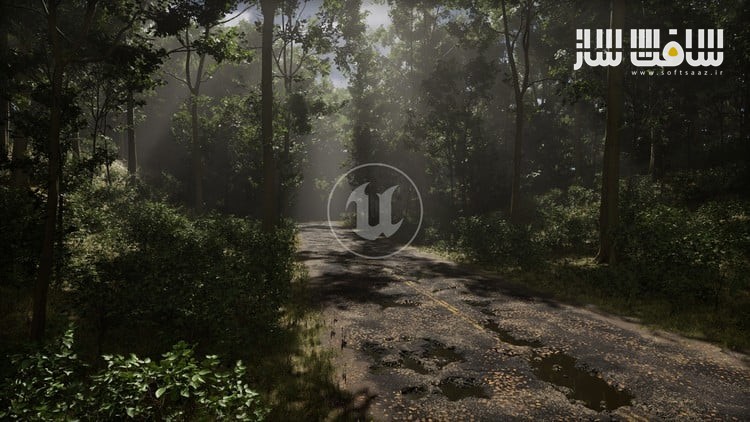
ساخت صحنه جاده متروکه با استفاده از Megascans : در این دورهی دوم از مجموعه آموزشهای Megascans، بهصورت گامبهگام یاد میگیرید که چگونه یک محیط جادهای ویرانشده را در Unreal Engine 5.4.1 خلق کنید. هدف این دوره، تمرکز مستقیم بر ترکیببندی و نورپردازی است، بدون نیاز به مدلسازی پیچیده؛ چرا که از داراییهای آماده Megascans، شیدرهای از پیش آمادهشده و بستههای درخت استفاده میشود. این دوره مناسب برای تمام افرادی که میخواهند مهارت خود را در ساخت محیطهای سهبعدی ارتقاء دهند یا اصلاح کنند .این دوره آموزشی توسط تیم ســافــت ســاز برای شما عزیزان تهیه شده است.
عناوین ساخت صحنه جاده متروکه با استفاده از Megascans :
- ساخت حرفهای زمین با استفاده از پلاگین Landmass
- استفاده از ابزارهای پیشرفته PCG برای افزودن درخت، دکالها و دکالهای اسپلاین (همگی در دوره موجود است)
- رسم جاده با استفاده از تکنولوژی Nanite Tessellation
- نقاشی Vertex روی داراییهای Nanite
- استفاده از داراییهای Megascans و Nanite
- افزودن جزئیاتی مانند برگهای مرده و زبالههای خیابانی با دکال
- اضافهکردن ابرهای حجمی (Volumetric Clouds)
- راهاندازی خودکار پوشش گیاهی با Landscape Grass Types
- ایجاد نورپردازی طبیعی و واقعگرایانه
- کار با افزونه Quixel Bridge که بهصورت بومی در UE5 قرار دارد
عنوان دوره : Udemy – Megascans Scene – Lost Road
سطح : متوسط
زمان کل دوره : 4.35 ساعت
تعداد فايل ها : 57
سال آموزش : 2025
فایل تمرینی : حاوی لینک دانلود گوگل درایو
مربی دوره : Michael Gerard
نرم افزار : Megascans – Unreal Engine
زیرنویس انگلیسی : ندارد
فشردگی اختصاصی سافت ساز : ندارد
Udemy – Megascans Scene – Lost Road
Learn step-by-step how to create a destroyed road environment.
Here is the second Megascans course! The goal is to get straight to the point and focus on composition and lighting only thanks to Megascans assets, provided shaders and tree packs.
What I will learn?
In Unreal Engine 5.4.1:
Advanced Terrain Creation with Landmass Plugin
Fully customizable PCG tools for Trees, Decals and Spline Decals (all included)
Drawing a road with Nanite Tessellation
Painting Vertex on Nanite Assets
Using Nanite/Megascans assets
Add details such as decals for dead leaves and debris.
Add Volumetric Clouds
Automatic Foliage Setup with Landscape Grass Types
Create a realistic and natural lighting
Working with Quixel Bridge plugin natively available in UE5
What I will get?
~4h30 of step-by-step video tutorial
~55 videos
1080/30fps resolution
Software Used:
Unreal Engine 5.4.1
Level:
Anyone who wants to learn, improve or fix their skills in environment creation.
Prerequisite:
Owning a computer with Windows 10 (64Bits) / Not tested on Windows 11
Winrar or 7zip to decompress files
The basics on Unreal Engine (Camera movements, working with material instances…)
Important note :
This course was created in version 5.4.1 and it is STRONGLY RECOMMENDED to use THE SAME version! If you choose to use another version, be aware that you may encounter possible errors not covered in this course.
What you’ll learn
Advanced Terrain Creation with Landmass Plugin
Fully customizable PCG tools for Trees, Decals and Spline Decals (all included)
Drawing a road with Nanite Tessellation
Painting Vertex on Nanite Assets
Using Nanite/Megascans assets
Add details such as decals for dead leaves and debris.
Add Volumetric Clouds
Automatic Foliage Setup with Landscape Grass Types
Create a realistic and natural lighting
حجم کل : 10.3 گیگابایت
برای نمایش این مطلب و دسترسی به هزاران مطلب آموزشی، نسبت به تهیهی اکانت ویژه از لینک زیر اقدام کنید.
وضعیت فعلی شما
- لینکهای دانلود این مطلب قفل است
- بقیهی مطالب ویژه هم بسته است
- بدون دسترسی به آموزش نصب
با اشتراک ویژه
- دسترسی به همهی مطالب سافتساز
- آپدیت روزانه مطالب سایت از بهترین سایتهای سیجی
- ورود نامحدود کاربران از هر دیوایسی
- دسترسی به آموزش نصب کامل پلاگینها و نرمافزارها
For international users: online support — email info@softsaz.ir or Telegram @SoftSaaz.