آموزش ساخت محیطهای مدولار در Unreal Engine 5
CGMA - Unreal 5 Modular Environments

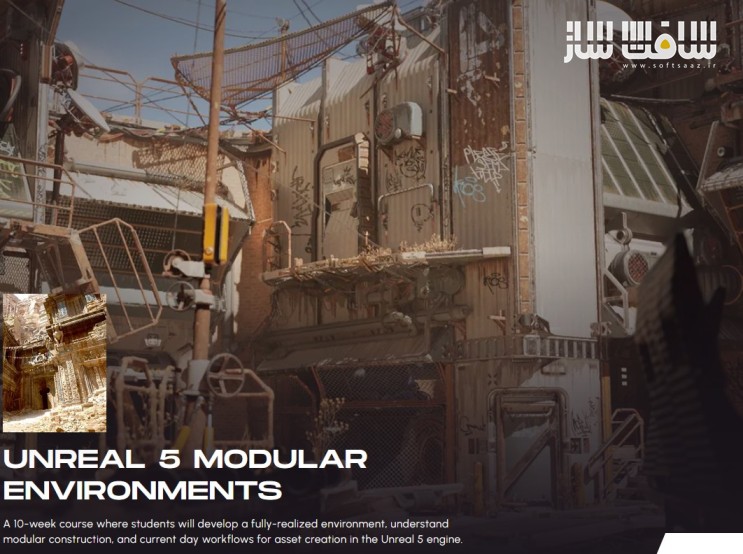
آموزش ساخت محیطهای مدولار در Unreal Engine 5
آموزش ساخت محیطهای مدولار در Unreal Engine 5 : این دورهی ۱۰ هفتهای، راهی است برای طراحی یک محیط کامل در موتور Unreal Engine 5 و یادگیری اصول ساخت مدولار و فرآیندهای بهروز ساخت داراییها (assets) در صنعت بازیسازی می باشد. دانشجویان در طول این دوره با نحوهی تحلیل منابع تصویری و تبدیل آنها به یک فهرست از داراییهای مدولار قابل استفاده مجدد آشنا میشوند. در این فرآیند از تکنیکهایی مانند trims، بافتهای تکرارپذیر (tileable)، و بافتهای منحصربهفرد استفاده خواهد شد. همچنین با استفاده از چندین روش کاری، بهترین رویکرد استاندارد صنعتی برای ساخت داراییها تعیین میگردد.
با در اختیار داشتن این لیست، هنرجویان با کمک نرمافزار Maya و موتور Unreal Engine 5، یک محیط کامل با کیفیت مناسب برای ارائه در نمونهکار (portfolio) خلق خواهند کرد. ابزارهای مورد استفاده در این دوره شامل Unreal Engine 5، Maya (یا نرمافزار معادل)، Substance Painter، Photoshop، Marmoset، و RizomUV خواهد بود.
در پایان دوره، هنرجویان درک درستی از ساخت مدولار، طراحی گردشکار (workflow) ساخت داراییها، آشنایی با موتور Unreal 5 و استانداردهای روز ساخت داراییها، ایجاد بافتهای PBR استاندارد، و همچنین تسلط کلی بر ساخت متریال برای Unreal خواهند داشت. همچنین توانایی ترکیببندی، نورپردازی و رندر کردن یک صحنه در Unreal Engine 5 را بهدست خواهند آورد. این دوره آموزشی توسط تیم ســافــت ســاز برای شما عزیزان تهیه شده است.
عناوین آموزش ساخت محیطهای مدولار در Unreal Engine 5 :
- هفته ۱: مشاهده و تحلیل رفرنسها
دانشجویان یاد میگیرند که چگونه رفرنسهای مختلف را بررسی و آنها را به بافتها و آبجکتهای تکرارشونده تقسیم کنند. سپس با استفاده از قطعات ماژولار، بلاکاوت اولیهای از صحنه بسازند و در این مسیر به دستهبندی بافتها (اصلی، فرعی و دکالها) توجه داشته باشند. - هفته ۲: وارد کردن بلاکاوت به Unreal Engine 5
بلاکاوت اولیه به UE5 وارد میشود. کار با ابزارهای پایهی آنریل، اسنپ شبکهای، و ساخت صحنه با مشهای ماژولار آموزش داده میشود. همچنین روایت بصری صحنه آغاز میشود. - هفته ۳: آشنایی با بافتها و ساخت مشهای High Poly
مدلها و بافتها به دو دسته قابل تکرار و منحصربهفرد تقسیم میشوند. مسائل مربوط به بهینهسازی، تراکم بافت و توزیع پیکسلها بررسی شده و ساخت داراییهای Nanite نیز معرفی میشود. - هفته ۴: بیک کردن بافتها در Marmoset / آمادهسازی مشها
ساخت بافتهای تکرارشونده در Maya و Photoshop با تمرکز بر جلوگیری از تکرار آشکار روی سطوح وسیع. تنظیم نقشههای Normal، Metalness و AO برای بافتهای نهایی. - هفته ۵: ساخت بافت در Substance Painter
ایجاد بافتهای tiling و unique با افزودن جزئیات داستانی مثل فرسایش، خش و گردوغبار. همچنین مدیریت مقادیر PBR و رعایت استانداردهای آن آموزش داده میشود. - هفته ۶: پیادهسازی ماژولار
کاربرد عملی مدلسازی ماژولار و استفاده مجدد از آبجکتها. اختصاص بافتهای تکرارشونده به مدلها از طریق UV Mapping و ساخت شیدرهای ساده در Unreal 5. - هفته ۷: متریالهای پیشرفته
ایجاد شیدرهای پیشرفته برای تنوع رنگی و پارامترهای قابل تنظیم. ساخت متریال مستر برای کنترل کلی صحنه و کاهش تکرار بصری آبجکتهای ماژولار. - هفته ۸: روایت بصری و متریال مسترها
افزودن جزئیات ثانویه مانند کابل، تابلو، و آبجکتهای کوچک جهت تقویت روایت صحنه. ساخت مدلهای ماژولار اضافه برای ایجاد تنوع و نامتقارنی در ترکیببندی. - هفته ۹: نورپردازی
افزودن نور به صحنه در Unreal و استفاده از آن برای کاهش یکنواختی و افزایش عمق بصری. شروع بررسی ترکیببندی برای رندرهای نهایی. - هفته ۱۰: نهاییسازی صحنه
تکمیل صحنه با افزودن جزئیات، دکالها، نورپردازی و پستپروسس. تهیه رندرهای باکیفیت از صحنه نهایی (۵ تا ۱۰ تصویر) بههمراه داراییهای قابل استفاده برای پروژههای آینده.
دوستان در نظر داشته باشند این دوره ها رمزنگاری شده و در هر خرید محصولات سوپرویژه چون به صورت سخت افزار کد ایجاد میشه فقط یک بار میتوانند بروی یک سیستم بصورت دائم از دوره ها استفاده کنند . برای دریافت کد مجدد ، نیاز به خرید مجدد می باشد
مهم : تفاوت بین مطالب اشتراکی با سوپرویژه : لطفاً مطالعه فرماید
عنوان دوره : CGMA – Unreal 5 Modular Environments
سطح : پیشرفته
زمان کل دوره : 10 هفته
تعداد فايل ها : –
سال آموزش : 2023
فایل تمرینی : دارد
مربی دوره : Clinton Crumpler
نرم افزار : Knowledge of Maya (or equivalent), ZBrush, Unreal Engine, Substance | Recommended courses: Intro to Unreal Engine 5, Fundamentals and/or Advanced Substance for Environment Art, Shading and Material Creation in Unreal Engine
زیرنویس انگلیسی : ندارد
فشردگی اختصاصی سافت ساز : ندارد
سکه مورد نیاز برای خرید : 10000 سکه
CGMA – Unreal 5 Modular Environments
A 10-week course where students will develop a fully-realized environment, understand modular construction, and current day workflows for asset creation in the Unreal 5 engine.
In this course, students will be taught how to break down references and develop a list of reusable modular assets, utilizing trims, tileable and unique texture sets and working with multiple workflows to determine the best industry standard method. With this list, students will then use both Maya and the Unreal Engine 5 to create a fully realized environment with portfolio screenshots. The class will cover: Unreal Engine 5, Maya (or equivalent), Substance Painter, Photoshop, Marmoset, and more. By the end of the course, students will have an understanding of modular construction and workflow creation of assets, knowledge of the Unreal 5 engine and current day workflows for asset creation, create proper PBR textures, and generally master material creation for Unreal. Students will also be able to compose, light, and render a scene in Unreal Engine 5. The class will cover: – Unreal Engine 5, Maya (or equivalent), Substance Painter, Photoshop, Marmoset, RizomUV
PREREQUISITES
Knowledge of Maya (or equivalent), ZBrush, Unreal Engine, Substance | Recommended courses: Intro to Unreal Engine 5, Fundamentals and/or Advanced Substance for Environment Art, Shading and Material Creation in Unreal Engine
MATERIALS
Unreal Engine 5, Maya (or equivalent), Substance Painter, Photoshop, Marmoset, RizomUV
Week #1
Observing Our Reference
Students will learn how to observe multiple references and break it up into repeated textures and assets. They will then begin with a basic block out of their scene creating and using modular pieces to fill it up. Throughout this process it will be important to think about breaking up the textures into main textures, secondary, and decals. We will also look at the tools that make for the best use of modular workflows Students will learn how to observe multiple references and break it up into repeated textures and assets. They will then begin with a basic block out of their scene creating and using modular pieces to fill it up. Throughout this process it will be important to think about breaking up the textures into main textures, secondary, and decals. We will also look at the tools that make for the best use of modular workflows.
Week #2
Importing Blockout Into Unreal Engine 5
Students will begin importing their initial blockout meshes into Unreal Engine 5. We will cover basic Unreal tools, grid snapping, and using our modular meshes inside of Unreal to build our scene. Students will also begin to flesh out their visual narrative aspects of the scene.
Week #3
Learning About Textures and Creating High Poly Meshes
Students will take the plans they made in weeks 1 and 2 to start to break up their models and their respective textures into two lists: ones that they would like to tackle as tileables and the others as uniques. Students will learn optimization and performance issues and concerns when it comes to constructing scenes in Unreal Engine. Students will also learn about texture density and proper pixel distribution. We will also begin to discuss nanite asset creation.
Week #4
Baking Textures in Marmoset \ Mesh Creation and Prep
Students will learn how to create repeatable textures using Maya and Photoshop. With emphasis on ensuring repeatability without making it obvious across large surfaces. We will first establish our normal, metalness, and ambient occlusion we will be using for the final textures.
Week #5
Building Textures in Substance Painter
Students will learn how to create textures using Substance Painter for both tiling and unique texture sets. We will add interesting “story” elements to textures (such as wear, decay, scratches, dust, etc. that tell the story of the texture): albedo, roughness, specular, metallic, normal maps. Students will also learn about managing PBR texture values and ensuring materials follow the proper PBR rule sets.
Week #6
Modular Application
Students will apply their new modular skills and learn the importance of modular modeling and re-use within assets and architecture. This process will also cover applying our tiling textures to the models(UV mapping) while we are finalizing our models and creating simple shaders for our models in the Unreal 5 engine.
Week #7
Advanced Materials
How to create more advanced shaders that can be used for color variation, and exposing parameters in material instances. We will also look at creating a master material to control the majority of the assets within the scene. These features will help us to make our modular pieces look more unique and less “tiling” inside of the engine. We will also cover additional material workflows that can further expand production efficiency.
Week #8
Visual Narrative and Material Masters
How to add secondary details to your scene, such as wires/cables, signs, small props, and storytelling: Students will also spend time focusing on development of the visual story elements within the scene. Lastly, we will be creating some additional modular models that can be used as secondary details “on top” of our large modular pieces for variation and asymmetry within our scene.
Week #9
Lighting
Students will begin adding lights to their Unreal scene. We will see how to break up the repetitiveness of the scene with different lighting environments and how shadows can work to our advantage. At this point we can also begin looking at composition for our final renders within the scene.
Week #10
Finalize the Scene
In week 10 we will use everything we have learned to add any additional details, decals, props, and lighting to “finalize the scene.” We will also learn how to take the highest quality screenshots within the Unreal Engine 5 and see how “post process” volumes can add a great deal of interest to our scenes. Students will have between 5-10 final images of the scene they have created at this point, as well as a handful of textures/reusable assets for future scenes.
حجم کل : 19 گیگابایت
برای دسترسی به لینکها ابتدا وارد حساب خود شوید.
- دسترسی دائمی
- محتوای اختصاصی سافتساز
- جدا از اشتراک ویژه
امتیاز دهی به این مطلب :
لطفا به این مطلب امتیاز دهید



سطح آموزش مبتدی بود و اصلا پروژه محور نبود
فقط هفته هشتم خوب بود
اگه به environment علاقه دارید آموزش های fasttrack رو پیشنهاد میکنم
ممنون
سلام سافت ساز عزیز.لینک خرابه.لطفا چک کنید و اینکه همین یه پارت موجوده فقط؟
سلام معمولا کمی بعد انتشار آپلود خواهد شد
امید عزیز آپلود شده میتونید دانلود بفرمایید